Want your web app to stay fast when users grow from hundreds to thousands?
Looking for a simple way to ship changes without breaking things in production?
This guide walks you through both, using the MERN stack and a clean CI/CD flow.
Modern web products never stand still. New features, new users, and new devices arrive all the time. If your app cannot grow with this change, it soon feels slow, buggy, and hard to trust. That is why planning for scale from day one is so important, even for small teams. A scalable MERN app does not just handle more users; it stays easy to update, test, and release.
In this guide, we will break down how to build a stable MERN project with a simple but strong CI/CD pipeline. We will keep the language clear and avoid heavy tech talk, so that even non‑developers can follow the ideas. Step by step, you will see how to think about scale, how to shape your app for growth, and how to ship updates in a safe and repeatable way.
Why MERN Is a Strong Base for Growth
MERN stands for MongoDB, Express, React, and Node. In simple terms:
- MongoDB stores your data
- Express and Node handle the back end (the “engine” on the server)
- React runs the front end (what users see in the browser)
All four parts use JavaScript, which means your team can move faster with one main language. This alone makes it easier to grow the app and the team. When more people join, they can work on either the front end or the back end without starting from zero.
MERN also fits well with cloud tools. You can start small on a single server, then move to more copies of your app as traffic grows. Since the parts are separate, it is easier to replace or upgrade one layer at a time.
Put simply, MERN lets you start quick and still gives you room to grow in a steady way.
What “Scale” Really Means for Your App
When we talk about scale, we do not mean only “lots of users.”
A truly scalable app should:
- Stay fast as user numbers increase
- Stay stable when new features are added
- Be easy to roll back if something goes wrong
- Be simple to monitor and fix
A scalable MERN app is built with these goals in mind from the start. You do not have to buy huge servers on day one. Instead, you design the app so it can grow in small, safe steps when the time comes.
CI/CD in Simple Words
CI/CD stands for Continuous Integration and Continuous Delivery (or Deployment). But we can explain it in plain terms.
- Continuous Integration:
Every time someone on the team makes a change, the system checks the change as soon as it is shared. It runs tests, checks style rules, and makes sure the app still builds. This helps catch problems early. - Continuous Delivery / Deployment:
When changes pass these checks, they can be sent to a test area or to live users in an automatic way. No more long, risky “big bang” releases. Instead, small changes go out often.
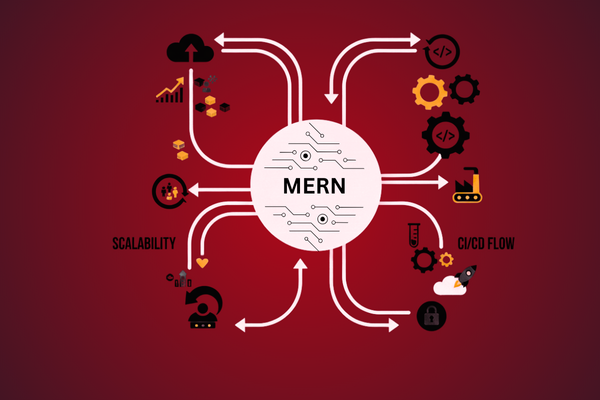
So CI/CD is like a careful, automatic assembly line for your app. It makes sure each change is tested, packed, and shipped in the same safe way every time. This is a key part of running and growing a scalable MERN app.
Core Building Blocks of a Scalable MERN App
1. Clear Project Layout and Simple Rules
A messy project is hard to scale. Your MERN app should have:
- A clean folder structure for front end and back end
- Shared rules for naming files and functions
- Clear steps to run the app on a new laptop or server
Write these rules down in a short guide inside the project. This sounds basic, yet it saves huge time when new team members join or when you return to the project after a break.
2. A Stable Contract Between Front End and Back End
React (front end) and Node/Express (back end) “talk” through APIs. Treat these APIs like a contract:
- Keep clear names for each path and action
- Always return responses in a steady format
- Add versioning when you need to change behavior
For example, when the back end changes how it sends data, keep old versions of the API for some time. This gives the front end team room to update without breaking the live app.
3. Safe Data Layer and Backups
MongoDB gives you a flexible way to store data, which is great for fast changes. Yet you should also:
- Define clear shapes for your data (what fields exist and what types they are)
- Add checks before saving data to the database
- Set up daily backups and a way to restore them
Think of your database as the memory of your app. A growing product cannot afford to lose that memory. Simple backup routines and basic data checks go a long way.
4. Logs, Alerts, and Basic Health Checks
You cannot fix what you cannot see. As your MERN app grows, make sure you have:
- Logs for errors and slow parts of the system
- Alerts when your app is down or very slow
- A basic “health” page that returns OK when the app is running
There are many tools that do this, but even a simple setup is better than none. It helps you act fast when users start facing problems.
A Simple CI/CD Flow for MERN
You do not need a huge toolset to start with CI/CD. A basic flow could look like this:
- Code is stored in a shared system
All team members push their work to a shared code store (like Git). They use small, focused branches for each change. - Automatic checks on each change
When someone opens a request to merge their work, an automatic job runs. It installs the MERN app, runs tests, and builds the front end. If something fails, the merge is blocked. - Automatic deploy to a test area
When a change is approved and merged, another job sends the new build to a test site. The team or the client can try new features there. - One‑click or automatic release to live users
After tests on the test site, you can push the same build to production with one click or an automatic rule. This reduces human error and keeps each release small. - Rollbacks if something goes wrong
Keep the last stable version ready. If a new release causes issues, you can go back to the old version fast. This lowers the risk of each update.
Over time, you can add more steps, such as deeper tests or security scans. But even this simple CI/CD setup will make your releases steadier and less stressful.
Real Project Snapshot: Growing a Health App
To see how these ideas work in real life, think of a health and nutrition platform that offers meal plans and wellness tools. The product team needed to ship new content, update plans, and improve the user flow often, without taking the app offline.
Our team built a MERN‑based solution and a matching CI/CD pipeline. The back end exposed clear APIs for meals, plans, and user data. The front end used these APIs to show daily menus, track progress, and share tips. When the business team wanted a new feature, the developers worked in small pieces. Each piece went through automatic checks and then to a test area.
Because of this setup, the team could push updates several times a week with low risk. You can explore the result in more detail, as we did this project, which shows how a strong base and repeatable release process support steady growth and user trust.
 Conclusion
 Conclusion
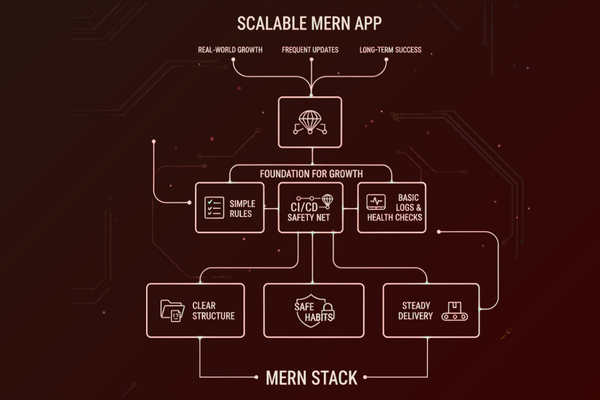
Scaling a modern web app is not only about big servers or complex tools. It is about clear structure, safe habits, and steady delivery. When you bring these ideas together in the MERN stack, you get a strong base that can handle change over time.
Start with simple but firm rules: a clean project layout, a steady API “contract” between front and back end, and a safe data layer with regular backups. Then add basic logs and health checks, so you can see what happens inside your app as users grow. These steps alone will make your life easier when traffic increases or the product team asks for quick changes.
Next, bring in CI/CD as your safety net. Automatic tests and builds catch many issues before they reach users. A clear release path, from test area to live app, lowers stress for your team. With rollbacks ready, you can move fast without fear. None of this needs to be complex; in fact, simple and reliable is better than fancy and fragile.
Over time, as your product and team grow, you can refine each part. You may add more checks, better monitoring, or more advanced scaling options in the cloud. But the core idea stays the same: plan for growth from the start, and use automation to protect your app and your users.
By following the steps in this guide, you can turn a basic MERN project into a true scalable MERN app that is ready for real‑world growth, frequent updates, and long‑term success.
FAQs
Q1: Do I need a big team to set up CI/CD?
No. Even a solo developer can start with a simple CI/CD flow.
Q2: Can I add CI/CD to an existing MERN app?
Yes. Start small with tests on each change, then add deploy steps.
Q3: Is MERN only for startups?
No. MERN works well for both small and large products.
Q4: How often should I deploy?
Aim for small, regular releases instead of rare, large ones.