
People expect answers fast. They want help inside the app, not in a long email thread. That is why AI chatbots are now a key feature in many apps. They can guide users, solve simple problems, and reduce support load. They can also help teams learn what users ask for most, so product updates become easier to plan.
If you run a business app, a shopping app, or a service app, a chatbot can improve user trust. It can also lower support costs over time. But building a chatbot is not only about adding a chat screen. You need clear goals, safe data rules, a solid backend, and a plan to test and improve.
In this guide, we explain how to build AI chatbots for apps in a clear, step-by-step way. You will learn what to build first, what tools you may need, and how to keep user data safe. We will also cover common mistakes and how to avoid them. Finally, you will see how generative AI is changing software work and what that means for chatbot projects. For a deeper look at this shift, read this guide: How generative AI is reshaping software development.
1) Start with the right chatbot goal
Before you write code, decide what “success” means. This keeps the build simple and helps you measure results.
Common app chatbot goals include:
- Support help: reset password, track order, update profile
- Product guide: explain features, show tips, share steps
- Lead capture: collect name, email, and needs (with consent)
- In-app search: help users find content faster
- Simple actions: book a slot, create a ticket, check status
Also, define what the bot must not do. For example: no medical advice, no legal advice, and no access to private data without checks.
2) Choose the chatbot type (rule-based vs AI)
There are two main paths. Many strong bots use both.
Rule-based chat
This uses fixed steps and set replies.
- Pros: easy to control, safer, works offline in some cases
- Cons: feels limited, breaks when users type new phrases
AI-based chat (LLM-driven)
This uses a large language model to understand and write replies.
- Pros: flexible, natural replies, handles many question types
- Cons: needs strong safety checks and good testing
For most modern apps, an AI chatbot with a few rule-based “guard rails” works best.
In many projects, teams aim to build AI chatbot features first for top user questions, then expand over time.
3) Plan your data and safety rules early
A chatbot is only as good as the data and rules behind it. So, plan these items upfront:
What data can the bot use?
- Public help pages and FAQ
- Product docs
- User account data (only when needed and allowed)
- Past tickets (only if cleaned and approved)
What safety rules should you set?
- Do not show private data unless the user is signed in
- Mask sensitive fields (like card details)
- Block harmful requests
- Add a clear “I may be wrong” style message for risky topics
Also, log chats in a safe way. Store only what you need. Keep a short data retention time when possible.
4) Pick a model and hosting setup
You can use:
- A hosted AI model (fast to start)
- A self-hosted model (more control, more work)
- A hybrid setup (mix of both)
Key factors:
- Cost: per message or per token
- Speed: how fast replies appear
- Privacy: where data is processed
- Quality: how correct and helpful replies are
If your agency is planning to build AI chatbot systems for many clients, it helps to build a common “core” service that can swap models based on need.
5) Design the chatbot flow for real people
A good bot feels clear and calm. It does not try to sound “too human.” It helps users finish tasks.
Best practices:
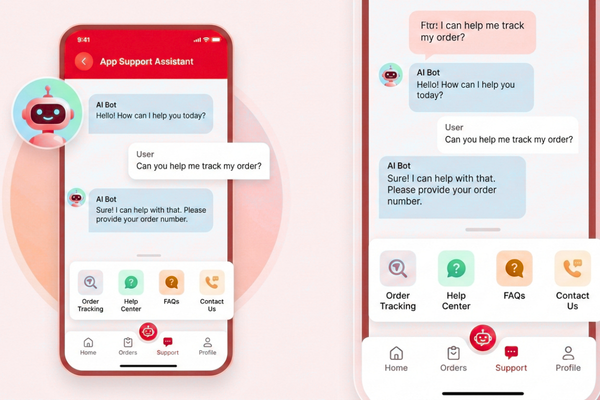
- Start with a welcome line plus 2–4 quick options
- Show typing status and clear error messages
- Provide a “Talk to a person” button
- Keep replies short, with steps and bullets
- Confirm actions before changing account data
Also, plan for “I don’t know.” A safe fallback can be:
- Ask a follow-up question
- Offer a help link
- Create a support ticket
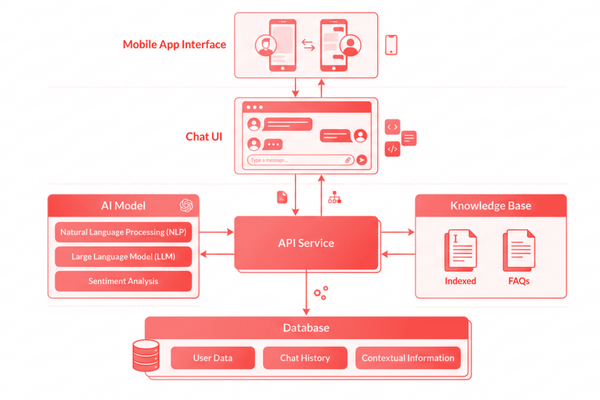
6) Build the backend: architecture that scales
A clean chatbot setup often includes:
Client (mobile/web app)
- Chat UI
- Login state and session handling
- File upload (optional)
Chat service (your API)
- Message routing
- User identity check
- Rate limits (to stop abuse)
- Logging and analytics
AI layer
- Prompt template (the instruction set)
- Tools/function calls (for actions like “track order”)
- Retrieval step (fetch facts from your docs)
Data sources
- Knowledge base (docs)
- User profile store (only when allowed)
- Ticket system (optional)
This structure helps you add features without breaking the whole bot.
7) Add “knowledge” the right way (so the bot stays accurate)
A common problem with AI chat is wrong answers. To reduce that risk, connect the bot to trusted content.
A simple and strong method:
- Store your docs in a searchable store
- For each user question, fetch the best matching text
- Give that text to the model to form the answer
This helps the bot stay grounded in real info. It also lets you update answers by updating docs, not code.
When teams build AI chatbot tools for apps, this “use your own docs” step is often the biggest jump in quality.
8) Use tools (function calls) for real in-app actions
Chatbots should do more than talk. They can also complete safe tasks.
Examples:
- Check order status
- Cancel a booking
- Create a ticket
- Update an address (with confirmation)
How to keep it safe:
- Only allow a short list of actions
- Validate inputs (date, email, order ID)
- Confirm before final changes
- Log every tool action with a trace ID
This makes the bot useful while keeping control in your hands.
9) Test like a product, not like a demo
Testing is where many chatbot projects fail. So, treat it like any key feature.
Test areas:
- Correctness: Is the answer right?
- Safety: Does it avoid private data leaks?
- Tone: Is it polite and clear?
- Speed: Are replies fast enough?
- Edge cases: slang, typos, short prompts, long prompts
Useful test methods:
- A set of 50–200 real user questions
- Red-team tests (try to break safety rules)
- A/B tests (compare prompt versions)
Also, track “handoff rate” (how often users ask for a person). If it is too high, the bot may be unclear or missing knowledge.
10) Ship, measure, and improve over time
After launch, keep improving based on data.
Track:
- Top questions
- Drop-off points
- Time to resolve
- User rating after chat
- Cost per chat
Then, update:
- Help content
- Prompt rules
- Tool actions
- UI quick buttons
Over time, your chatbot can become a true “in-app assistant,” not just a support widget.

Conclusion
Building an AI chatbot for an app is now a practical step, not a risky experiment. Yet, the best results come from planning and simple choices. First, define the bot’s job in plain terms. Then, decide what type of bot fits your users. In many cases, a mix works best: AI for flexible questions, and rule steps for key tasks. After that, focus on safety. A chatbot must respect user privacy, follow clear rules, and avoid giving risky advice. These steps protect both users and your brand.
Next, build the right structure. A clean setup includes a chat screen, an API service, and a clear AI layer that can fetch trusted facts. This matters because users do not want guesses. They want correct answers. By connecting the bot to your real docs and help pages, you reduce wrong replies and build trust. Also, when you add tool actions, the chatbot can do real work, like tracking orders or creating tickets. However, every action needs checks, limits, and user confirmation.
Testing is just as important as building. You should test real questions, tricky inputs, and safety bypass attempts. Then, launch in a controlled way, measure results, and improve based on what users ask. Over time, the chatbot becomes smarter because your content and rules get better.
For agencies, chatbot work is also a chance to create a repeatable build process. When you build AI Chatbot projects with a shared core service, you can move faster and keep quality high across clients. In the end, a good chatbot is not “magic.” It is clear goals, safe data, trusted knowledge, and steady updates. That is how you deliver an in-app assistant that people will actually use.
FAQs
1) How long does it take to build an AI chatbot for an app?
Often, 3–8 weeks for a solid first version, depending on features.
2) Can a chatbot work with my existing help articles?
Yes, and it is one of the best ways to keep answers correct.
3) Is user data safe with an AI chatbot?
It can be, if you use strong access checks, masking, and safe logs.
4) Do I need a human support team after launch?
Yes. The bot should reduce load, not remove human help.