

Every digital product competes for attention, but only a few earn long-term user loyalty. Most users leave an app not because the idea is bad, but because the experience feels confusing, slow, or hard to follow. This is why a strong Usability Test Guide has become an essential part of modern software development. It shows how real users move through your product, where they struggle, and what stops them from completing important tasks.
Usability testing helps you look beyond assumptions and understand how real people think. For example, what seems clear to a developer may be confusing for a new user. A button may look obvious on a large screen but may hide on a mobile layout. The goal of usability testing is simple: find friction early and improve the experience before it becomes a problem.
Modern users expect apps to be fast, smooth, and easy to use. If any step feels unclear, they switch to alternatives instantly. This guide explains how to run tests that help you understand user behavior, improve design, and increase engagement. You will also see how usability connects with other experience elements such as speed, UI trends, and micro interactions—all of which shape how people feel while using your product.
1. What Is Usability Testing and Why It Matters
Usability testing is the process of observing real users as they complete tasks in your app. You study how they interact with screens, how quickly they make decisions, and where they face difficulty. This approach helps you detect weak areas, remove confusion, and make the app easier to use.
A structured Usability Test Guide ensures your product meets real user expectations rather than internal assumptions. Clear usability builds trust, encourages engagement, and improves overall satisfaction.
If your app relies heavily on loading speed and performance, you may also find this helpful:
How to Design High-Speed Digital Products Users Love
2. When Should You Run Usability Tests?
Usability testing works best when done in different stages:
Early Stage
Test wireframes and low-fidelity designs to fix layout issues before development.
Mid Stage
Test clickable prototypes to see if users understand flows and find key actions easily.
Pre-Launch
Test near-final designs to catch small usability problems like unclear labels or missing feedback.
Post-Launch
Test after adding new features or updates to ensure the experience stays smooth.
Testing throughout the product lifecycle helps keep the product user-friendly as it grows.
3. Steps to Run a Good Usability Test
Step 1: Set Clear Goals
Examples include:
- Can users complete the signup process smoothly?
- Can users find the main feature within 10 seconds?
- Do users understand the meaning of each button?
Step 2: Choose the Right Users
Pick people who match your target audience. Their feedback will represent real-world behavior.
Step 3: Write Realistic Tasks
Tasks should reflect how users normally use the app:
- Create an account
- Search for a product
- Make a booking
- Change profile settings
Keep instructions simple and natural.
Step 4: Observe Without Helping
Let users explore on their own. Observe confusion, hesitation, and mistakes to get honest insights.
Step 5: Record Insights Clearly
Collect notes, behavior patterns, user comments, and time taken for tasks.
Step 6: Fix and Retest
After improvements, test again to confirm that issues are solved.
4. Common Usability Testing Mistakes
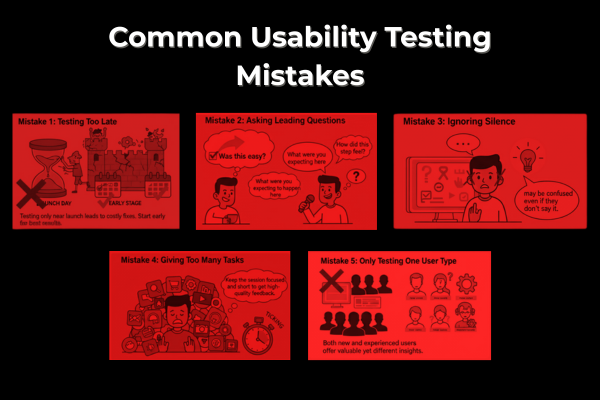
Mistake 1: Testing Too Late
Testing only near launch leads to costly fixes. Start early for best results.
Mistake 2: Asking Leading Questions
Avoid questions like “Was this easy?”
Instead ask, “How did this step feel?” or “What were you expecting to happen here?”
Mistake 3: Ignoring Silence
If users pause often, they may be confused even if they don’t say it.
Mistake 4: Giving Too Many Tasks
Keep the session focused and short to get high-quality feedback.
Mistake 5: Only Testing One User Type
Both new and experienced users offer valuable yet different insights.
5. What a Good UI/UX Design Supports Strong Usability
Good usability is supported by thoughtful UI and UX design. Clean layouts, simple navigation, and consistent patterns help users feel in control.
For teams exploring modern visual styles and design choices, you may find this helpful:
Revolutionary UI/UX Design Trends in 2025
Another important part of good usability is micro interactions—small animations and feedback that guide users subtly. These create a sense of flow and clarity.
You can read more here:
Mastering Micro interactions: The Secret Sauce of Modern UX
6. Tools That Help You Run Usability Tests
You can use simple and affordable tools to run effective sessions:
- Figma / Adobe XD – prototype testing
- Maze / Useberry – remote user testing
- Lookback / User Testing – recorded sessions
- Hotjar / FullStory – heatmaps and click tracking
- Google Analytics – post-launch behavior tracking
Even small teams can gather meaningful feedback without expensive setups.
Conclusion
Usability testing is not just a step in development—it is a mindset that helps create products people truly enjoy using. When you follow a structured Usability Test Guide, you understand real user behavior rather than guessing what works. This ensures that your app feels natural, simple, and clear.
By testing early and often, you reduce risks, lower development costs, and catch problems before they grow. You also gain honest insights into how users think and what matters to them. When users’ complete tasks smoothly, they feel confident and satisfied, which increases engagement and long-term loyalty.
Good usability also connects deeply with design quality. Fast loading screens, clean layouts, modern UI styles, and thoughtful micro interactions all play a role in shaping the overall experience. When these elements work together, users feel comfortable and in control. This increases the chances that they will stay, explore more features, and return again.
The beauty of usability testing is that it does not require complex tools. Simple prototypes, clear tasks, and honest user feedback can help you build a stronger product. As you continue improving based on real interactions, your product becomes more polished, intuitive, and user focused.
No matter what stage your product is in today, usability testing will help you make smarter decisions. It brings clarity to design, helps teams focus on user needs, and turns ideas into experiences people genuinely love.
FAQs
Q: What is usability testing?
A method to see how users interact with your product and find issues early.
Q: How many users do I need?
5–7 users can reveal major problems.
Q: When should I run tests?
During early design, before launch, and after updates.
Q: Do I need expensive tools?
No. Even basic prototypes and screen recordings work well.


