Today, many products live in two places at once. Users open a website on a laptop at work, then use a mobile app on the way home. Often, both are built with React. The web app runs in the browser. The mobile app runs with React Native. In most cases, these two apps do almost the same job.
Yet many teams still keep two very different code bases. One bug appears on the web, and you fix it. The same bug appears in the mobile app, and you fix it again. One new feature is planned, and you build it twice. Over time, this slows the team and raises costs for the business.
The good news is that React and React Native use the same language and many of the same ideas. You do not need a big rebuild to bring them closer. You can start slow and safe.
In this guide, we will look at simple, real steps that help you share React web and native code. You will see how to begin with shared logic, then move to shared design parts, and finally think about tools that can connect both worlds.
What Does It Mean to Share Code Between Web and Native?
Before you begin, it helps to be clear about what “sharing code” really means. It does not always mean one single project that runs everywhere. Instead, it often means that key parts of your app live in one shared place, and both the web and native apps use those parts.
Shared code can include:
- Logic that checks rules, such as price rules or form checks.
- Data helpers that clean, sort, or format values.
- Calls to your backend or cloud services.
- Small design parts that should look and feel almost the same.
When you share React web and native code, you reduce the number of things you must build and test. A rule that decides a discount should not be written twice. A signup flow should not have two separate versions of the same steps.
This approach also helps with a steady user experience. Users see the same words, the same rules, and the same basic layout, no matter which device they use. As a result, they trust your product more and feel less confused when they move between web and mobile.

Simple Way 1: Start with Shared Logic
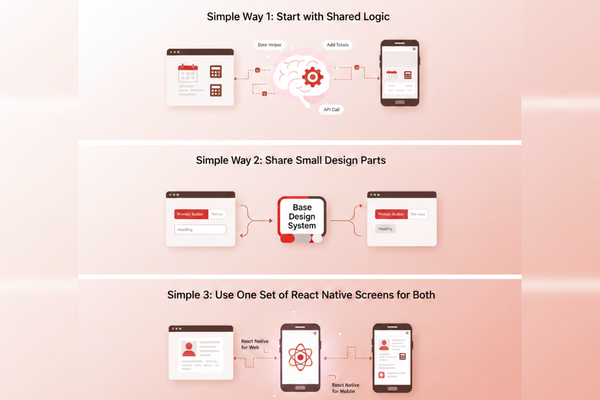
The easiest and safest place to start is pure logic. This is code that does not care about screens at all. It takes input, performs a small task, and returns output.
Think about:
- Helpers for working with dates and times.
- Functions that add up totals, taxes, and discounts.
- Code that checks whether a user is authorized to perform an action.
- Shared ways to call your backend and handle the response.
These parts should act the same on the web and mobile. Therefore, they are great candidates to move into one shared folder or package. Both the web app and the native app can then call them.
To begin, you can:
- Pick one simple helper that both apps use or could use.
- Move it into a shared folder that both projects can read.
- Update both apps so they call this shared helper.
- Run tests and fix any small issues.
Once this works, you repeat the steps for other helpers and for backend calls. Over time, more and more logic lives in one place. You already started to share React web and native code at the heart of your product, but the visual parts of each app can stay as they are for now.
Simple Way 2: Share Small Design Parts with Light Wrappers
After you share logic, the next step is to share small design pieces. Full screens are often too different, at least at the start. But some building blocks are very similar on both the web and native.
These include:
- Primary buttons.
- Text inputs for forms.
- Labels and headings.
- Simple list items with a title and a short line of text.
You can design a “base” version of each part that defines things like size, colors, spacing, and disabled states. Then, you can create a thin web version and a thin native version that both depend on the same base. The base holds the rules and style choices; the thin versions only handle platform details like how a click or tap is handled.
For example, your teams may agree that the main button is blue, has rounded corners, and turns grey when disabled. Those facts live in shared code. The web app and the mobile app each have their own button that uses those shared rules.
This pattern keeps your brand steady while still letting each platform feel natural. Over time, you can grow this into a small shared design system. In this way, you continue to share React web and native code without forcing both apps into one strict layout.
Simple Way 3: Use One Set of React Native Screens for Both (When It Makes Sense)
In some cases, teams choose to build most screens in React Native and then run them on both mobile and web. There are tools that can map React Native elements to real browser elements. This lets many screens work on both platforms from the same code.
This is a stronger form of sharing. Instead of just sharing logic and small design parts, you now share almost whole screens. For a new product, this can save a lot of time. One team builds a feature, and users can see it in the mobile app and the browser with only small changes.
However, this path is not always the best first move. It works best when:
- You are starting from scratch.
- Your main focus is mobile, and the web app can follow mobile design.
- You are ready to accept some limits in how deeply you use special browser features.
If you already have a large React web app with many custom web-only parts, moving everything into React Native style code may be heavy and risky. In that case, it is often smarter to stay with the first two methods. You can still get most of the benefits of shared work without a full rebuild. Later, if your team sees clear value, you can bring more screens into the shared layer at a slow and safe pace.
Process Tips to Keep Shared Code Healthy
As you share React web and native code, you are not only changing files. You are also changing how your team works. A few simple habits can keep things safe and clear.
First, draw a simple map of your project. Show which folders hold shared logic, which hold shared design parts, and which hold web-only or native-only code. Keep this map in your project notes so new team members can learn it quickly.
Next, agree on rules for when code should become shared. For example, you might say that if a rule or helper is used in two places, it should move into shared code. This reduces debates and keeps the shared layer clean.
Also, add tests for your shared logic. Since it now affects both web and mobile, a small mistake can have a wide impact. Even a few basic tests can catch problems early.
Finally, when someone changes shared code, make sure both web and mobile owners review the change. This small step helps avoid surprises and keeps trust high between teams.
Conclusion
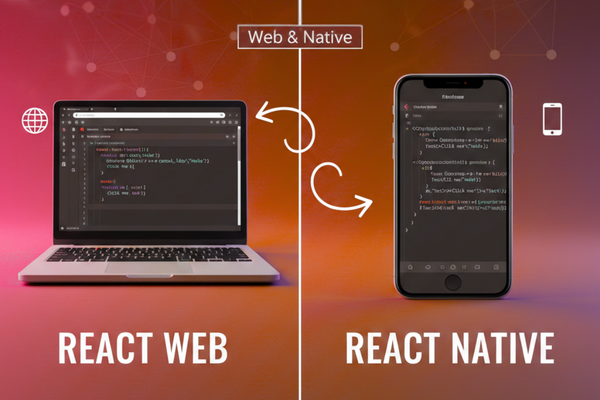
Building both a web app and a mobile app no longer needs to mean double work. React on the web and React Native on mobile share the same roots, the same language, and many of the same ideas. When you use this fact with care, you can lower costs, shorten delivery time, and still keep a high standard for users.
You do not need to jump into a large, risky merger of your projects. Instead, you can start with the simple and safe path of shared logic. When all your key rules and backend calls live in one place, you fix each bug once, and both apps become better at the same time. This already makes your system easier to trust and easier to grow.
Then, by moving on to shared design parts, you give users a steadier feel. Buttons, inputs, and lists behave in the same way across web and mobile. Your brand feels clearer. Your team works from one shared design language rather than two.
Tools that let React Native screens run on both web and mobile can take sharing even further. Yet they should support your plan, not control it. For many teams, the best result comes from a mix: shared logic at the core, shared design parts where it is safe, and platform-specific screens where each device truly needs its own path.
For a software development agency, this way of thinking can become a strong selling point. You can promise faster delivery across platforms, fewer bugs, and more steady user journeys. You can also offer long-term value, as every change in shared code helps both the web app and the native app at once. Paired with a focused UI/UX strategy that reduces long‑term development costs, shared React code can give your clients real value over the full life of their product.
In the end, the choice to share React web and native code is about respect for your team’s time and your users’ trust. When you plan your shared layer with care, review changes as a group, and grow it step by step, you gain speed without losing control. That balance is what turns a set of apps into a single, united product story.
FAQs
Q1. Can I use one React project for both web and mobile?
You can share large parts, but you may still keep some web-only and mobile-only code.
Q2. Do I need to rebuild my app to start sharing code?
No. You can begin by moving small helpers and backend calls into a shared folder.
Q3. Will shared code make debugging harder?
It can make it easier because you have one place to fix multiple related issues.
Q4. When should I avoid sharing UI code?
Avoid it when web and mobile need clearly different layouts or behaviors.