Every business needs a strong online presence today. But building a website from scratch can feel slow, costly, and overly complex. That is where Webflow Website Development changes the game for modern companies of all sizes. It lets you create stunning, fast, and fully responsive websites without writing complex code from the ground up. Whether you run a small startup or a growing enterprise, this platform gives you full control over design, layout, and overall performance. You no longer need to rely on lengthy development cycles or expensive coding teams for every small change. In this guide, we will walk you through every step of building a professional website on this powerful platform. You will learn about planning your structure, designing with visual tools, launching with confidence, and scaling your site over time. By the end, you will understand why thousands of companies trust this approach to stand out online. Let us dive in and explore how you can build a website that truly drives measurable results for your business.
What Is Webflow and Why Does It Matter?
Webflow is a visual web design and development tool. It lets you build, design, and launch websites all in one place. Think of it as a bridge between creative design and clean code. You see exactly what you are building in real time on the canvas.
Most website builders limit your creativity with rigid templates. Webflow does not. It gives you the power of clean, production-ready code with the ease of a visual drag-and-drop editor. This unique combination makes Webflow Website Development a top choice for brands that demand full creative freedom.
Definition: Webflow is a no-code and low-code platform that generates production-ready HTML, CSS, and JavaScript while you design visually in the browser.
Businesses love it because it dramatically speeds up launch times. You can go from a rough idea to a fully live site in days, not months. That speed gives you a real competitive edge in fast-moving markets.
Webflow Website Development vs Traditional Coding
Many companies still rely on fully hand-coded websites. While custom code offers deep flexibility, it comes with high costs and long timelines. Let us compare both approaches side by side.
| Feature | Webflow | Traditional Coding |
| Build Time | Days to weeks | Weeks to months |
| Cost | Lower overall | Much higher |
| Design Control | Full visual control | Requires a developer |
| Maintenance | Easy self-editing | Needs a dev team |
| Hosting | Built-in and fast | Separate setup needed |
| SEO Tools | Native and simple | Manual configuration |
As you can see, the visual approach saves both time and money. For most businesses, Webflow Website Development delivers the same high quality as hand-coded sites at a fraction of the total cost.
If you want to see what a professionally built site looks like in action, check out this modern e-commerce platform we designed for a growing consumer brand.
Key Steps to Build a Website on Webflow
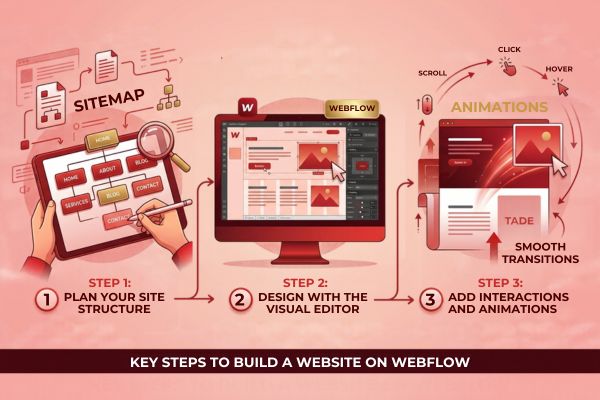
Building a professional site is easier than you might think. Follow these clear steps to get started on the right foot.
Step 1: Plan Your Site Structure
Before you even open the editor, plan your pages carefully. List every page your site needs to function well. Common pages include Home, About, Services, Blog, Portfolio, and Contact.
Create a simple sitemap on paper or in a tool like Figma. This keeps your entire project organized from day one. A clear structure also helps with SEO and user navigation later on.
Step 2: Design with the Visual Editor
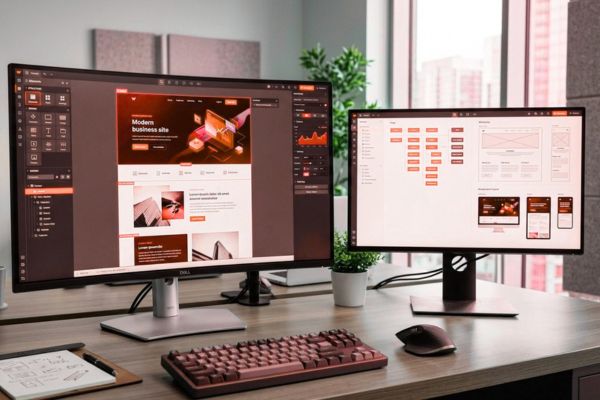
The Webflow Designer is the most powerful tool in the platform. You can drag elements onto the canvas and style them in real time. Use the box model to control spacing, sizing, padding, and layout with precision.
Start with a blank canvas for full freedom or pick a template to save time. Templates are great for quick launches, but custom designs help your brand stand out more. For a unique identity, always go custom.
Step 3: Add Interactions and Animations
Static websites feel outdated to modern users. Webflow lets you add smooth, professional animations without writing a single line of code. You can trigger visual effects on scroll, hover, click, or page load.
Keep your animations subtle and purposeful. Too many effects slow down your site and distract users from your message. A few clean transitions make your brand look polished, modern, and trustworthy.
Core Features That Make the Platform Powerful
Several built-in features set this platform apart from every competitor. Here are the ones that matter most for Webflow Website Development projects:
- CMS: Manage blogs, portfolios, and dynamic content with a simple editor.
- Responsive Design: Your site adapts perfectly to every screen size automatically.
- Ecommerce: Sell physical and digital products directly from your website.
- Hosting: Fast, secure, and scalable hosting built on Amazon Web Services.
- SEO Controls: Edit meta titles, descriptions, and alt tags in seconds.
- Forms: Collect leads and inquiries without any third-party plugins.
- Integrations: Connect with tools powered by OpenAI for smart content generation and automation.
These features work together to give you a complete web solution. You do not need to stitch together five different tools. Everything lives under one clean roof.
How Much Does It Cost to Build a Webflow Site?
Budget is always a key concern for any business leader. Costs vary based on complexity, design needs, and required functionality. Here is a general breakdown to help you plan your investment.
| Project Type | Estimated Cost | Timeline |
| Simple Landing Page | $2,000 – $5,000 | 1–2 weeks |
| Small Business Site | $5,000 – $15,000 | 3–6 weeks |
| E-commerce Store | $10,000 – $30,000 | 6–10 weeks |
| Enterprise Platform | $30,000+ | 10+ weeks |
These numbers include design, development, and basic SEO setup. For a more accurate quote tailored to your specific needs, you can get a detailed project estimate from our team in just a few minutes.
Benefits for Growing Businesses
Why are so many companies switching to this platform? The business value is clear and measurable. Here are the top benefits of choosing Webflow Website Development for your next digital project:
- Faster time to market: Launch your site in weeks, not months.
- Lower long-term costs: No need for a full-time developer for small edits.
- Better brand consistency: Full design control means your site matches your brand perfectly.
- Improved site speed: Clean code output leads to much faster load times.
- Easy content updates: Marketing teams can edit content without touching any code.
- Scalable architecture: Grow your site effortlessly as your business grows.
When your marketing team can update the site on their own, you save thousands in developer hours each year. That efficiency alone makes the investment pay for itself quickly.
SEO and Performance Best Practices
A beautiful site means nothing if no one can find it online. Good SEO starts with clean structure and fast loading speeds across all devices.
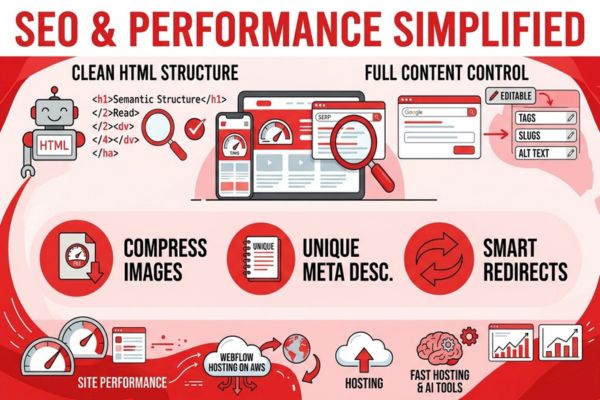
Webflow generates semantic HTML by default. This helps search engines read and understand your content clearly. You also get full control over meta tags, URL slugs, and image alt text right inside the editor.
Here are the key SEO steps you should follow:
- Use clear H1, H2, and H3 heading tags on every single page.
- Compress all images before uploading them to the CMS.
- Write unique meta descriptions for each page on your site.
- Set up 301 redirects for any old or changed URLs.
- Submit your sitemap to Google Search Console for faster indexing.
Performance matters just as much as keywords. Google’s Core Web Vitals directly affect your search rankings and user experience scores. Webflow’s built-in hosting on Amazon Web Services ensures fast global content delivery. Aim for a load time under two seconds for the best possible results. Tools powered by Google AI can also help you analyze and improve your site performance over time.
Common Mistakes to Avoid
Even with a great tool, simple mistakes can hurt your results. Avoid these common pitfalls during Webflow Website Development to keep your project on track:
- Skipping mobile design: Over 60% of all web traffic comes from phones. Always design for mobile first.
- Overusing animations: Too many visual effects kill your page speed and frustrate users.
- Ignoring SEO basics: A pretty site with no SEO strategy will not rank on Google.
- Using too many fonts: Stick to two or three fonts maximum for a clean, professional look.
- Forgetting accessibility: Use proper contrast ratios and alt text for every image on your site.
A great example of clean, accessible design done right is this window and door company website we built with a strong focus on speed, clarity, and user experience.
When to Hire a Professional Team
You can build a basic site on your own with some practice. But for complex projects, a professional team makes a massive difference in quality and speed. Consider hiring experts if you need:
- Custom animations and advanced interactions
- Ecommerce stores with hundreds of products
- CMS-driven content at a large scale
- Integration with third-party tools like CRMs, ERPs, or AI platforms
- Advanced SEO and conversion rate optimization
A skilled team ensures your site is fast, secure, and built to convert visitors into customers. They also handle the technical details you might miss on your own. This is especially important if your project involves both web design and custom software solutions that need to work together seamlessly across your business.
Real Results From Webflow Projects
The best way to understand the true value is to look at real outcomes. Companies that invest in Webflow Website Development often see measurable improvements within the first few months of launch.
Common results our clients report include:
- 40–60% faster page load speeds compared to old sites
- 25–50% increase in organic search traffic
- Higher conversion rates from improved user experience
- Reduced maintenance costs by up to 70%
For instance, our team recently delivered a streaming platform redesign that boosted user engagement and cut bounce rates significantly. The visual approach allowed rapid iteration and a much faster launch than traditional coding methods would have allowed.
Feature and Benefit Breakdown
To make your decision easier, here is a quick look at the top features and the direct business benefits they deliver to your team.
| Feature | Business Benefit |
| Visual Editor | No coding skills needed for your marketing team |
| Built-in CMS | Content updates happen independently and quickly |
| Global CDN Hosting | Fast load times for users anywhere in the world |
| Native SEO Tools | Higher search rankings without extra plugins |
| Ecommerce Engine | Sell products without relying on third-party platforms |
| Client Billing | Hand off completed sites to clients with ease |
Each feature solves a real, everyday business problem. That is exactly why Webflow Website Development continues to grow in popularity across every major industry.
Start Your Webflow Project Today
If your company is exploring a new website or redesigning an existing one, our team at Canadian Software Agency can help you design and build a high-performance site that converts visitors into loyal customers. We combine clean design, smart SEO, and scalable architecture to deliver results you can measure. Reach out to us today and let us turn your vision into a live, fast, and beautiful website that drives real growth.

Conclusion
Building a website should not be a stressful, slow, or overly expensive process. With the right tools and a clear strategy, you can launch a professional site that drives real, measurable business results. Webflow Website Development offers the perfect balance of design freedom, technical power, and everyday ease of use. It removes the barriers that slow down traditional web projects and puts you in full control of your online presence from day one.
From planning your site structure to designing with the visual editor, every step is streamlined for speed and quality. The built-in CMS, native SEO tools, and reliable hosting mean you do not need to juggle multiple platforms or hire extra specialists. Your marketing team can update content freely, your design team can iterate quickly, and your leadership can see tangible results faster than ever before.
The numbers speak for themselves. Companies that adopt this modern approach enjoy faster load times, better search rankings, and significantly lower maintenance costs. Whether you need a simple landing page or a full-featured ecommerce store, this platform scales smoothly with your ambitions and growth plans.
If you are ready to build a website that truly works for your business, now is the time to take action. The digital landscape moves fast, and your competitors are not waiting for you to catch up. A strong, well-designed website remains one of the best investments you can make for sustainable, long-term growth. Choose a platform that grows with you, and partner with a team that truly understands your business goals.
FAQs
1. How long does it take to build a website on Webflow?
A simple site takes one to three weeks to complete. Larger projects with ecommerce or custom features may take six to twelve weeks. The exact timeline depends on design complexity and how ready your content is.
2. Is Webflow good for SEO?
Yes, it is excellent for SEO. It generates clean, semantic code and gives you full control over meta tags, headings, and URLs. When paired with a strong content strategy, sites built on this platform rank very well on Google.
3. Can I migrate my existing site to Webflow?
Absolutely. You can move content from WordPress, Shopify, or any other platform. A professional team can handle the full migration smoothly without losing your hard-earned search rankings.
4. Do I need separate hosting?
No. Webflow offers built-in hosting powered by Amazon Web Services. It includes SSL certificates, a global CDN, and automatic backups. You can also export the code and host it elsewhere if your project requires it.
5. Is Webflow suitable for large enterprise websites?
Yes. Many enterprise brands use this platform for complex, high-traffic websites. With proper planning and a skilled development team, it scales very well for large organizations with demanding needs.