Building a multilingual website in WordPress can significantly expand your global reach, improve accessibility, and enhance user experience for visitors around the world. However, adding more languages often increases the technical load: more translated pages, additional media files, extra plugin operations, and expanded database entries. Without a performance strategy, these elements can slow down your website. This guide breaks down practical, easy-to-apply methods to create multilingual WordPress websites that stay fast, stable, and search-optimized—without referencing any agency directly.
This guide covers topic-specific best practices such as selecting the right translation method, optimizing media and code, configuring caching and CDN setups, managing database growth, and testing page performance across languages and regions. It also includes internal links to resources across canadian.agency, such as:
1. Planning and Strategy
A high-performing multilingual site begins with careful planning. Start by defining which languages you need and why. Analyze traffic data, target regions, user demographics, and business expansion goals. Once languages are chosen, plan how users will switch between them—simple dropdowns, a country flag selector, or automated language detection.
Choosing the Right URL Structure
Your URL structure affects SEO, caching, and user navigation. Three common structures include:
- Subfolders
- Subdomains
- Country-specific domains
For most WordPress websites, subfolders are ideal because they are easy to manage, more SEO-friendly, and simplify caching.
Next, map out all the content that requires translation—blog articles, landing pages, service descriptions, product information, site navigation, form labels, and images containing text. Assign translation responsibilities early and ensure consistency in tone and terminology. Concise content loads faster and simplifies long-term maintenance.
2. Choosing the Right Translation Approach
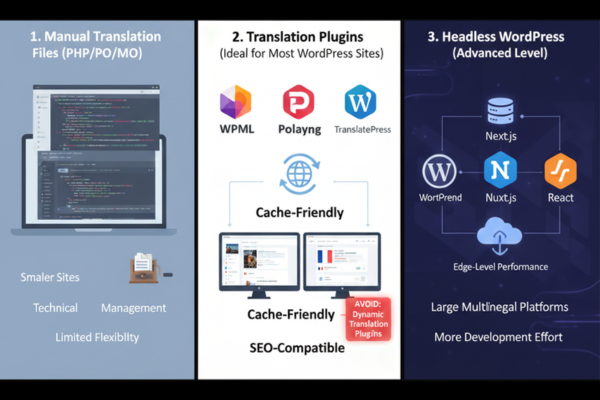
The translation method directly impacts both website performance and workflow. The three most common approaches include:
1. Manual Translation Files (PHP/PO/MO)
This is best for smaller sites with few languages. However, it requires technical management and offers limited flexibility.
2. Translation Plugins (Ideal for Most WordPress Sites)
Plugins such as WPML, Polylang, and TranslatePress create separate static pages for each language—making them cache-friendly and SEO-compatible.
Avoid plugins that perform translations dynamically on every page load, as this dramatically slows down TTFB and increases server usage.
3. Headless WordPress (Advanced Level)
Ideal for large multilingual platforms. WordPress acts as a backend for content while the front-end (Next.js, Nuxt.js, or React) handles rendering, caching, and page delivery. It requires more development effort but provides edge-level performance at scale.
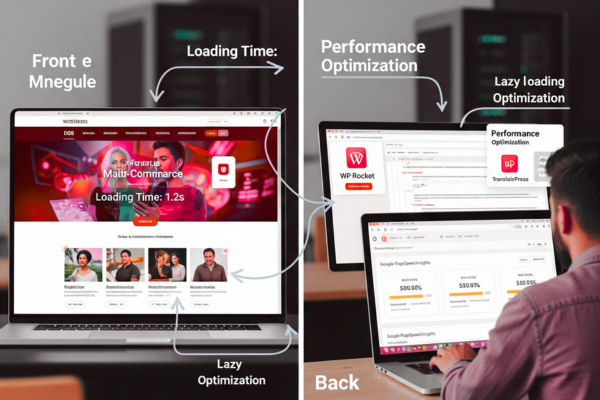
3. Keep the Site Lightweight: Media & Code Optimization
Multilingual sites naturally require more media—localized banners, infographics, UI elements, and language-specific images. Optimizing media per language helps control page weight.
Best Practices:
- Convert all images to WebP or AVIF for reduced size.
- Resize images according to the actual display size.
- Apply lazy loading to images below the fold.
- Remove unused CSS and JavaScript.
- Minify CSS and JS while ensuring translation markup remains intact.
- Avoid heavy language-specific scripts unless absolutely necessary.
Optimizing media ensures each translated page loads as quickly as your primary language version.
4. Caching & CDN for Multilingual Speed
Caching is essential for delivering high-speed multilingual websites because each language version generates unique URLs and content.
Caching Layers You Should Enable
- Page Cache: Stores full HTML versions for each language separately.
- Object Cache: Caches database queries using Redis or Memcached.
- Browser Cache: Reduces repeated downloads of scripts, fonts, and images.
- Opcode Cache: Improves server-side PHP performance.
Pairing caching with a global CDN (e.g., Cloudflare or BunnyCDN) reduces latency, especially for users in regions far from your primary server.
5. Plugin and Theme Optimization
Themes and plugins play a crucial role in website speed.
Theme Guidelines
- Use lightweight, performance-oriented themes.
- Avoid heavy multipurpose themes unless required.
- Ensure the theme is compatible with translation plugins.
Plugin Guidelines
- Install only essential plugins.
- Disable unnecessary plugin modules.
- Ensure plugins support multilingual caching.
- Test plugins with each language version.
Fewer plugins mean fewer database queries and faster loading across all languages.
6. Optimize Database & Queries
Multilingual sites store additional entries for each translated content piece. Over time, this increases database size and query time.
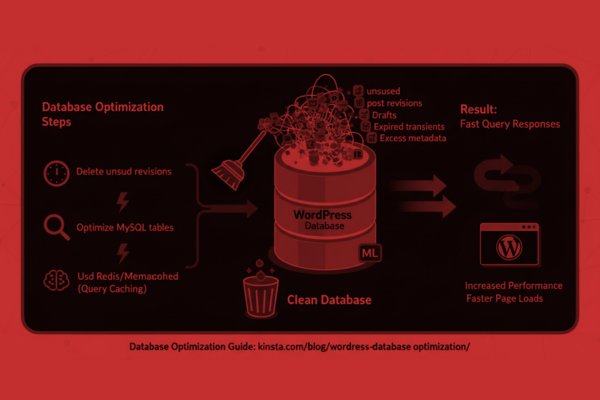
Database Optimization Steps
- Delete unused post revisions, drafts, and auto-saves.
- Clean expired transients.
- Optimize MySQL tables.
- Add database indexes when necessary.
- Use Redis or Memcached for query caching.
Keeping the database clean ensures fast query responses, especially when multiple languages produce additional metadata.
7. Test Performance for Each Language
A common mistake is testing only the primary language. Each language version may use different media, text lengths, and design layouts.
Use performance testing tools:
Key Metrics to Track
- TTFB
- LCP
- CLS
- FCP
- Fully Loaded Time
Test under real conditions:
- Slow mobile networks
- Older devices
- International server locations
This ensures all language pages deliver consistent performance worldwide.
8. SEO, Hreflang Tags & Metadata
Proper SEO setup helps search engines display the correct language version.
Implement:
- hreflang tags
- canonical URLs
- translated meta titles and descriptions
- consistent permalink structures
- language-specific sitemaps
Without correct hreflang configuration, search engines may treat translated pages as duplicates.
9. Deployment & Ongoing Maintenance
Maintaining a fast multilingual site is an ongoing process.
Create a routine for:
- Retesting performance after updates
- Optimizing new media
- Checking translation plugin configurations
- Updating caching and CDN rules
- Monitoring database growth
Document all settings to ensure your team follows a consistent system.
10. Translation Memory, Accessibility & User Experience
Translation memory tools ensure content stays consistent and reduces page size repetition. Reuse translated versions of:
- Headers
- Footers
- UI labels
- Product descriptions
- FAQ blocks
Accessibility Tips
- Use correct language attributes (lang=”fr” etc.).
- Provide a visible, simple language switcher.
- Ensure screen readers detect language changes.
Privacy & Compliance
- Review how translation plugins handle data.
- Ensure GDPR compliance when serving European users.
11. Advanced Option: Headless WordPress
For large-scale multilingual platforms, a headless setup provides:
- Faster global rendering
- Edge caching
- Reduced PHP load
- Greater control over content delivery
This approach is ideal for enterprise-level applications that require maximum performance under high traffic.
Conclusion
Building a fast multilingual WordPress website requires a blend of strategic planning, technical optimization, and continuous monitoring. Start by choosing the right languages, URL structure, and translation method. Opt for translation tools that generate static, cacheable pages to ensure fast performance. Keep the website lightweight by optimizing images, using modern formats, and applying lazy loading to reduce initial page weight. Minifying and optimizing CSS and JavaScript ensures all language versions load quickly and efficiently.
Caching plays an essential role in multilingual performance. Configure page caching, object caching, and browser caching carefully so that each language version is stored and served independently. Combining caching with a global CDN enhances delivery speed for international users. Keep plugins minimal and ensure themes remain lightweight and compatible with your multilingual setup.
The database grows as more languages are added, making regular cleanup, optimization, and query caching vital. Test performance for each language separately using industry tools like PageSpeed Insights and GTmetrix. Different languages may use different media, text lengths, and layouts, so analyzing them individually ensures consistent user experience.
SEO is another key part of multilingual success. Implement hreflang tags, proper canonicals, and translated metadata to avoid duplicate content issues. Maintain accessibility by using correct language attributes and offering intuitive language switching options.
For high-traffic multilingual environments, consider a headless architecture to deliver exceptional performance across regions. However, for most WordPress setups, the optimization techniques in this guide are more than enough.
By applying these best practices, your multilingual WordPress website can remain fast, reliable, secure, and globally accessible—no matter how many languages you support.
FAQs
Q: Will adding multiple languages slow down my website?
A: Not if caching, CDN, and media optimization are properly applied.
Q: What is the best URL structure for multilingual WordPress sites?
A: Subfolders—they are SEO-friendly and easy for caching.
Q: Do translation plugins affect performance?
A: Yes, but only if they translate content dynamically. Use plugins that create static pages.
Q: Should I test each language separately?
A: Yes, every language version may load differently due to media and layout changes.
Q: When is headless WordPress needed?
A: For large multilingual projects with high traffic and complex architecture demands.