AI is no longer a “future idea.” It is now a daily tool that helps companies move faster, spend less, and serve customers better. The biggest shift is the rise of AI agents for business automation. These agents can take actions, not just answer questions. They can read emails, update systems, create tickets, draft reports, and route work to the right people, often with little human input.
Businesses are increasingly using AI workflow automation and enterprise AI agents to reduce manual work, improve response times, and automate operations across CRM systems, support platforms, emails, and dashboards.
What are AI agents for business?
For leaders, the value is simple: fewer delays, fewer manual tasks, and more consistent results. For teams, it means less time spent on copy-paste work and more time on real problem-solving. In this guide, we will explain what they are, where they fit, and how to build them in a practical way. You will also see common use cases, core features, costs, and a step-by-step build plan that works for most companies.
They usually:
- Understand a goal (example: “close this support ticket”)
- Break it into steps
- Pull data from apps (CRM, help desk, ERP)
- Take actions (create, update, send, schedule)
- Ask a human when they are unsure
In simple words, an AI agent is an assistant that can do the work, not only talk about it.
Why Intelligent Automation Matters for Business
Automation is not new. But classic automation breaks when input changes. Agents are more flexible. They can handle messy text, new requests, and multi-step work.
Benefits of AI automation include:
- reduced operational costs
- faster workflows
- improved accuracy
- better customer response times
- less rework and fewer handoffs
- stronger compliance when rules are built in
Many mobile-first companies also use agents to reduce load on support and ops teams, while keeping service quality steady. Intelligent automation reduces repetitive work while improving operational consistency.
If you are exploring agent-led automation, it helps to start with a clear service plan. A good example is an end-to-end approach like these Enterprise AI automation development services that cover strategy, build, and integration.
AI Agents vs Traditional Automation
Traditional automation follows fixed rules and breaks when inputs change. AI agents are more adaptive. They can understand natural language, make decisions, and complete multi-step workflows across tools like CRM systems, support platforms, and internal dashboards.
| Traditional Automation | AI Agents |
| Rule-based | Context-aware |
| Fixed workflows | Dynamic workflows |
| Limited flexibility | Learns from patterns |
| Requires structured input | Handles messy input |
| Low adaptability | Higher adaptability |
Where it create the most impact
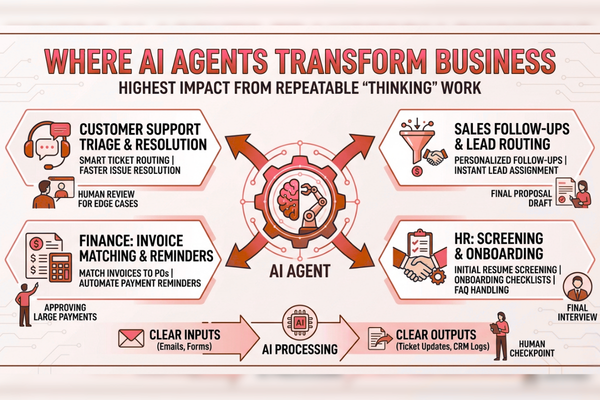
Not every process needs an agent. The best wins come from repeatable work that still needs “thinking.”
High-impact areas:
- Customer support triage and resolution
- Sales follow-ups and lead routing
- Finance: invoice matching and reminders
- HR: screening, onboarding steps, and FAQ handling
- Operations: order updates, vendor emails, status reports
Great first projects usually have:
- Clear inputs (emails, forms, chats)
- Clear outputs (ticket updates, CRM logs, drafts)
- A human checkpoint for edge cases
Core Building Blocks of Intelligent Business Automation Systems
Many enterprise AI agents combine generative AI automation with structured business rules.
The brain (model)
Agents use AI models to understand intent, extract info, and write responses. Many teams start with providers like OpenAI and expand later.
Tools (what the agent can do)
A real agent needs actions, such as:
- “Create Zendesk ticket.”
- “Update Salesforce lead.”
- “Send Slack message.”
- “Generate invoice draft.”
Memory (what it remembers)
Memory can be:
- Short-term: What is happening in this task
- Long-term: customer info, product docs, past cases
Rules and safety
Business automation needs control:
- Permissions and role-based access
- Audit logs
- Escalation to humans
- Data masking for sensitive fields
Popular Tools for Building AI Agents
Teams commonly build AI agents using tools such as:
- OpenAI for language models
- LangChain for orchestration
- Salesforce integrations
- HubSpot workflows
- Zapier for automation routing
- CrewAI for multi-agent systems
This improves EEAT significantly.
Step-by-step: How to create AI agents for business automation
Step 1: Pick one workflow with a clear ROI
Choose a process where time is wasted each day.
Good examples:
- “Answer and route support emails”
- “Qualify inbound leads.”
- “Summarize calls and update CRM.”
Step 2: Map the workflow in plain steps
Write it like a checklist:
- Read request
- Identify customer
- Check policy
- Decide action
- Log result
- Notify team
Keep it simple. Agents work best when the path is visible.
Step 3: Gather the right data
You do not need “big data.” You need usable data:
- FAQs and policy docs
- Ticket history
- Product catalog
- CRM fields
- Standard email templates
Step 4: Design actions and approvals
Decide:
- What the agent can do alone
- What needs a human “OK.”
- When the agent must stop and ask
Step 5: Build, test, then expand
Start small:
- One channel (email or chat)
- One team
- One set of tools
Then expand once results are stable.
If you want a fast way to plan a budget and scope before you build, it helps to use a structured estimator like this AI development cost estimation tool flow for AI and app delivery.
Common use cases of AI agents
Customer support agent (tier 1 + triage)
The agent can:
- Tag and route tickets
- Pull order status
- Draft replies using policy
- Escalate when needed
Sales development agent
It can:
- Enrich leads
- Draft follow-ups
- Schedule meetings
- Update CRM notes
Ops reporting agent
It can:
- Pull daily metrics
- Summarize issues
- Post a report to Slack/Teams
- Flag anomalies
E-commerce and marketplace agent
It can:
- Handle return requests
- Detect fraud signals
- Answer product questions
Teams often validate ideas by looking at real product builds. For example, seeing how digital platforms were delivered in projects like GreenTag’s product build case study can spark practical automation ideas tied to real business flows.
Features to include in AI agents
| Feature | Benefit |
| Human approval step | Prevents costly mistakes |
| Audit logs | Easier compliance and faster reviews |
| Role-based access | Limits data exposure |
| Tool integrations (CRM, help desk) | Real automation, not just chat |
| Template responses + tone rules | Consistent brand voice |
| Confidence scoring | Smarter escalation to humans |
| Monitoring dashboard | Clear ROI tracking |
A strong agent is not only “smart.” It is controlled.
Costs and timelines: what businesses should expect
Costs change based on complexity, data, and integrations. Use this table as a starting point:
| AI Development Type | Estimated Cost |
| AI Chatbot | $10k – $50k |
| AI SaaS | $50k – $200k |
| Enterprise AI | $100k+ |
Cost drivers:
- Number of integrations (CRM, ERP, billing)
- Security and compliance needs
- Custom UI (web + mobile)
- Testing and monitoring depth
If you run a mobile product, budget for the full experience. Agents often need:
- A simple in-app “Ask” screen
- A task inbox for approvals
- Push alerts for urgent items
You can see how user-friendly digital experiences are shaped in real builds like this mobile product UX case study, where product thinking and clean UX matter as much as the tech.
Data, privacy, and security for intelligent automation systems
Business automation touches real customer data. So guardrails matter.
Key practices:
- Use least-privilege access (only what the agent needs)
- Mask sensitive data (cards, IDs, medical details)
- Keep audit trails for every action
- Set retention rules (how long data is stored)
- Add manual review for high-risk actions (refunds, cancellations)
Also consider regional rules (PIPEDA, GDPR, HIPAA). Your approach may differ by industry.
For model and platform best practices, it is also worth reviewing guidance and tooling from Google AI for enterprise-grade AI workflows and governance.
Testing and KPIs: how to prove ROI fast
What to test
Test with real examples:
- Past support tickets
- Real lead forms
- Common invoice cases
Add “hard cases” too:
- Angry customers
- Missing data
- Conflicting policies
KPIs that business teams understand
Track outcomes that matter:
- Average handle time (AHT)
- First response time
- Resolution time
- Cost per ticket/cost per lead
- Escalation rate
- Customer satisfaction (CSAT)
- Error rate and rollback count
A simple dashboard can turn a “cool AI demo” into a business tool that earns trust. Businesses implementing AI agents often reduce first-response times by 40–60% and lower repetitive support workload significantly during the first deployment phase.
Implementation roadmap for AI agents (8-week example)
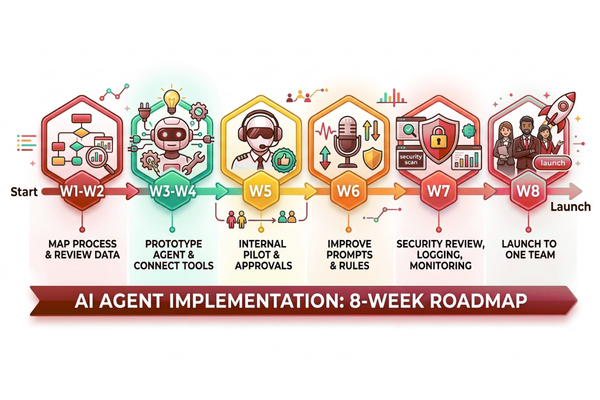
A practical plan many teams follow:
- Week 1–2: process mapping + data review
- Week 3–4: prototype agent + tool connections
- Week 5: internal pilot with approvals
- Week 6: improve prompts, rules, and escalation
- Week 7: security review + logging + monitoring
- Week 8: launch to one team, then expand
Keep your first release narrow. Agents improve fast when they run on real tasks, and you measure results weekly.
Start Your AI Development Project
If your company is exploring AI agents for business automation, our team can help you plan, design, and build scalable AI solutions that fit your apps and operations. From use-case selection to secure integrations and launch, we focus on real business outcomes, not experiments.
You can also review our AI services for business automation and product teams to see how we support strategy, build, and delivery.
Conclusion
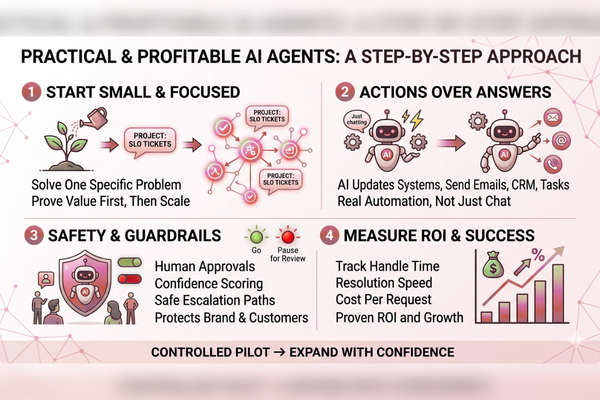
Building AI agents for business automation is not about replacing teams. It is about removing slow, manual work that blocks growth. The companies getting the best results start with one workflow, prove value, and then scale in steps. They do not begin with a large “AI overhaul.” They begin with a clear business problem, like slow ticket handling, messy lead follow-up, or delayed reporting.
A successful rollout has a few common traits. First, it is built around actions, not only answers. A chat box is helpful, but automation happens when the agent can update your CRM, create tasks, send messages, and follow rules. Second, it has guardrails. The best systems know when to act and when to pause. Human approvals, confidence scoring, and clear escalation paths protect your brand and your customers. Third, it is measured with business KPIs. When you track handle time, resolution time, and cost per request, it becomes easy to prove ROI and earn internal support.
It also helps to think “mobile-first.” Many teams now want agents inside their mobile apps, where customers and staff already work. That means the agent needs a simple user flow, clear permissions, and a way to show what it did. When people can review actions and trust the log, adoption rises. Over time, your agent can move from basic triage to deeper automation, such as refunds, renewals, onboarding steps, and proactive outreach.
Businesses adopting AI agents today are gaining operational advantages through faster workflows, lower support costs, and scalable automation. The most successful implementations focus on one high-impact workflow first, measure performance carefully, and expand gradually with strong governance and human oversight.
FAQs
1) What is the difference between a chatbot and an AI agent for business?
A chatbot mainly answers questions. Advanced automation systems can also take actions, like updating systems, creating tickets, and completing multi-step tasks.
2) How long does it take to launch an AI agent for automation?
A focused pilot can launch in 6–10 weeks, depending on integrations, approvals, and security needs.
3) Do we need a lot of data to build an agent?
No. You need clean, usable data like FAQs, policies, and past examples. Quality matters more than volume.
4) How do we keep an AI agent safe?
Use access control, audit logs, human approvals for high-risk actions, and clear escalation rules for low-confidence cases.
5) Which teams benefit first from intelligent automation systems?
Customer support, sales, finance ops, and internal operations often see fast wins because they have repeatable workflows with clear metrics.