Starting full-stack development can feel like a big jump. You may know basic web pages, yet a real app needs data, saving, editing, and deleting. That is exactly where a CRUD app helps. CRUD stands for create, read, update, and delete. These four actions are the base of many tools people use daily, like task lists, order systems, and simple admin panels.
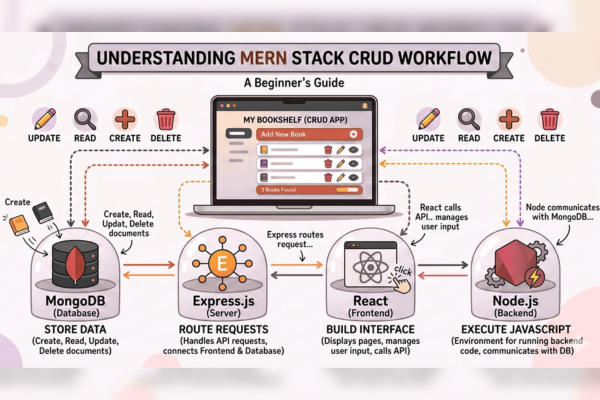
In this blog, we will walk through a MERN-based CRUD app in a clear and easy way. MERN means MongoDB, Express, React, and Node.js. Each part has one job. React shows the user screen. Node and Express handle requests behind the scenes. MongoDB stores the data, so it stays even after you refresh.
Also, this guide is made for new developers. So, it avoids heavy terms and keeps the steps simple. You will not see code here. Instead, you will learn the full process, so you can follow it even if you are still getting used to project folders and basic setup steps.
By the end, you will understand the flow of a working CRUD app and how the MERN parts fit together. This MERN Stack CRUD App Tutorial will help you build confidence and move toward real client-ready apps.
To see how modern web work looks in real projects, review this case study: GreenTag case study.
What CRUD Means
CRUD is a simple set of actions:
- Create: add a new item
- Read: view saved items
- Update: change an item
- Delete: remove an item
For example, in a basic “Task Manager”:
- Create: add a task like “Buy milk.”
- Read: see all tasks in a list
- Update: mark a task as done or rename it
- Delete: remove a task you no longer need
Because of that, CRUD is one of the most useful skills for new developers.
What MERN Means and Why People Use It
MERN is a set of tools that work well together and are easy to learn step by step.
MongoDB (Stores Your Data)
MongoDB holds your saved items. In a task app, it stores tasks. In a contact app, it stores contacts. It is built to handle data in a flexible way.
Express (Helps Build Server Routes)
Express helps your server respond when the app asks for data. It makes it simple to create routes, such as “get all tasks” or “delete one task.”
React (Builds the Screen)
React builds what the user sees. It helps you show lists, update the screen after changes, and keep the page fast and smooth.
Node.js (Runs the Server)
Node runs JavaScript on the server. This helps because you can use the same main language across the full project.
So, MERN is popular because it is practical, clear, and widely used.
What We Are Building in This Tutorial
To keep things easy, we will use a “Task Manager” example. The app will let a user:
- Add a new task
- View all tasks
- Edit a task (rename it or change its status)
- Delete a task
This is enough to cover CRUD and learn the full data flow. After that, you can reuse the same steps for many other ideas.
This is the heart of a MERN Stack CRUD App Tutorial.
How Data Moves Through a MERN CRUD App
Understanding data flow makes everything easier.
- The user enters a task and clicks “Add.”
- React sends the task info to the server.
- The server checks the request and prepares the action.
- MongoDB stores the task.
- The server sends back a success message or the saved task details.
- React updates the list so the new task appears.
The same flow happens for update and delete. Therefore, once you learn the pattern, you can repeat it in many projects.
Plan the Data Before You Build
Before you start building, plan what you will save for each task. Keep it simple:
- Title: The task text
- Done status: yes or no
- Created time: optional, but helpful
Then, plan the actions:
- Add a task
- List tasks
- Change a task
- Remove a task
Because of this planning, your app stays clean and easy to test.
Backend Setup (Server Side) in Easy Steps
The backend is where your CRUD actions actually happen. In simple terms, you will:
1) Create routes for CRUD
You will make four main routes:
- One to add a task
- One to return all tasks
- One-to-one task
- One to delete one task
Each route has one job. That keeps things easy.
2) Connect to MongoDB
The server must connect to your database so data can be saved and loaded. Many beginners use a cloud database because the setup is quick. However, local setup also works.
3) Add basic safety checks
Even a simple app should block empty task names. Also, it should handle cases like “task not found” in a calm way.
4) Test routes before building the UI
This step saves time. If your server routes work well, your React work becomes much smoother.
Frontend Setup (React Side) Without Overload
React is the part that the user touches. Your main UI pieces are:
- A text box to type a task
- An “Add” button
- A list of tasks
- An edit option (even a simple “mark done” change is fine)
- A delete option
Then, React calls your backend routes:
- When the page opens, it loads the task list
- When you add, it sends task data to the server
- When you update, it sends the changed values
- When you delete, it sends the task id
After each action, React reloads the newest list. As a result, the screen stays in sync with the database.
This step-by-step approach is what makes a MERN Stack CRUD App Tutorial so useful for new developers.
Simple Testing Checklist (So You Know It Works)
Testing does not need to be complex. Use this checklist:
Create
- Add a normal task
- Try adding an empty task and confirm it is blocked
Read
- Refresh the page and confirm tasks still show
- Confirm you can see more than one task
Update
- Mark a task as done and check it stays done after refresh
- Rename a task and check that the new name shows
Delete
- Delete a task and confirm it disappears
- Refresh the page and confirm it is still gone
If these work, your CRUD loop is solid.
Common Issues New Developers Face (And How to Fix Them)
The screen cannot reach the server
Often, the address is wrong, or the server is not running. Check the server link and confirm both parts are on.
Data does not save
This is usually a database link issue or a connection issue. Double-check the database setup.
The list does not update after changes
React may not be reloading the latest list after add, update, or delete. Make sure you refresh the shown data after each action.
These are normal bumps, and they happen in almost every MERN Stack CRUD App Tutorial.
Why Agencies Often Build CRUD Apps with MERN
Many agency projects need simple data tools first, then grow later. MERN is often used because:
- It helps teams build fast and test early
- It supports clean separation between the screen and the server
- It is flexible when the client needs to change
- It can grow from small tools into larger systems
Even if an app seems advanced, many parts of it still come down to CRUD actions.
Conclusion
A CRUD app is one of the best ways to learn full-stack development because it teaches you the core loop that powers most real apps. In this blog, you learned how a MERN-based CRUD app works without getting buried in hard terms or heavy details. You saw what each part does in a clear way: React handles the user screen, Node and Express handle requests, and MongoDB stores the data so it stays saved.
The most important takeaway is the flow. A user takes an action, the screen sends a request, the server handles it, the database stores or changes data, and then the screen updates to match. Once you understand this, you can build many useful tools with the same pattern. For example, you can create a simple system for customer lists, product lists, service requests, or small team tasks. The names change, yet the steps stay almost the same.
Next, you can improve your app in small and safe ways. You can add better input checks, so bad data does not get saved. You can add search and sort, so lists are easier to use. You can also add a simple message after each action, such as “Task added” or “Task deleted.” After that, when you feel ready, you can add login and user roles. These are common needs in real business apps. However, it is best to add them only after CRUD feels easy.
Finally, if you want real learning, rebuild the app once from memory. That single step helps you see what you truly understand. This MERN Stack CRUD App Tutorial is a strong base, and with steady practice, you will be ready for larger projects and real client work.
FAQs
1) What does CRUD mean?
Add, view, change, and remove data.
2) Is MERN a good choice for beginners?
Yes, because you can use one main language across the app.
3) Do I need a cloud database?
No, but it can be easier to start.
4) How long does a basic CRUD app take?
Often a weekend for beginners, if kept simple.