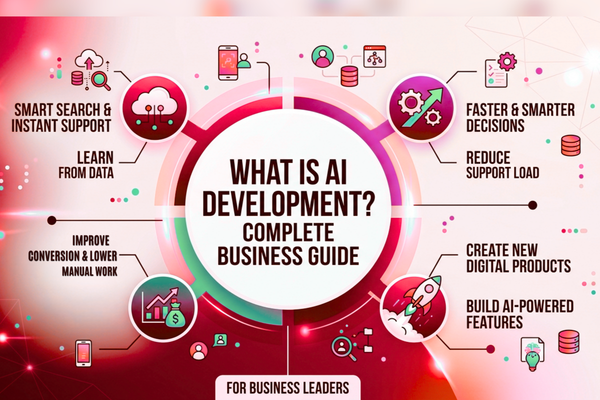
Mobile apps are no longer just “features on a screen.” Users expect smart search, instant support, personalized feeds, and faster decisions. That is where AI Development becomes a clear business advantage. In simple terms, it is the work of planning, building, and improving AI-powered features that learn from data and help your app or business act faster and smarter.
AI solutions are helping businesses integrate machine learning, automation, and generative AI into mobile apps to improve user experience and operational efficiency.
For business leaders, adopting AI is not about hype. It is about outcomes: reducing support load, improving conversion, lowering manual work, and creating new digital products. In this guide, you will learn what building AI-powered solutions involves, how AI models work, what it costs, and how to choose the right approach for your company.
1) What is AI Development?
It is the process of building software that uses data to make predictions, automate tasks, and generate outputs like text, recommendations, or insights for business applications.
What it includes
It usually covers:
- Picking the right AI use case (based on business value)
- Choosing an AI model (or training one)
- Connecting the AI to your app and workflows
- Testing quality, safety, and accuracy
- Monitoring performance after launch
How it differs from “normal” software
Traditional software follows fixed rules. AI-powered software can learn patterns from data. That means it can improve over time, but it also needs more testing, monitoring, and guardrails.
2) Why AI Development matters for mobile-first businesses
Mobile is where customers ask questions, buy, and make decisions. Adding AI can make your app feel faster, more helpful, and more personal without increasing headcount at the same pace.
Key Benefits for Businesses
Benefits of AI automation include:
- Reduced operational costs through AI automation for business
- faster workflows
- improved accuracy
- quicker response times for customers
- Better personalization using AI in mobile apps
- Better decisions with real-time insights
Where the ROI often shows up first
- Customer support (lower cost per ticket)
- Sales enablement (higher conversion rates)
- Operations (less manual work)
- Content workflows (faster creation and review)
If you are exploring options, a focused AI strategy workshop is often the fastest way to confirm what will pay off and what will not.
3) How AI Models Work
Most business teams hear “AI model” and think it is a black box. It is not. An AI model is a system trained using machine learning or deep learning to map inputs to outputs.
An AI model is a trained program that finds patterns in data and uses those patterns to predict, classify, summarize, generate, or recommend.
Common model types
Here are the main types you will see:
- Machine learning models
Great for predictions like churn risk, demand forecasting, fraud signals, or lead scoring. - Deep learning models
Often used for images, speech, and complex pattern recognition. - Generative AI models
Used to create or transform content (text, images, summaries, code help, and more).
Pre-trained vs custom models
- Pre-trained models: ready to use, faster to launch, lower upfront cost
- Custom models: trained for your data and tasks, higher accuracy for niche needs, more effort
Many companies start with a pre-trained model and move to custom later when the value is proven.
4) AI Use Cases in Mobile Apps and Business Applications
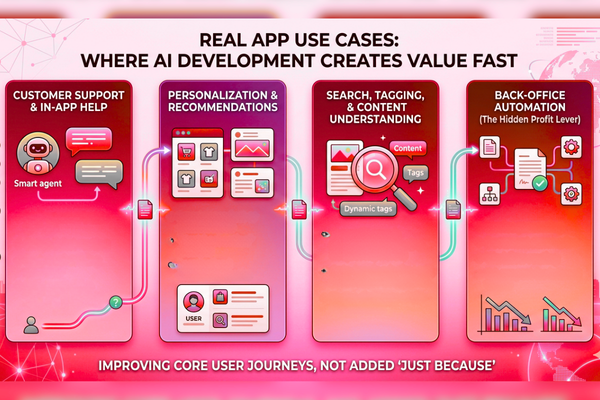
For a mobile app development company, AI app development is most effective when it improves a core user journey, not when it is added “just because.”
Customer support and in-app help (AI chatbot + beyond)
Common wins include:
- 24/7 answers inside the app
- smart ticket routing
- faster onboarding guidance
- fewer repetitive questions reaching your team
If you are comparing options, AI agents vs chatbots for business helps clarify what to use and when.
Personalization and recommendations
- smarter product or content feeds
- “next best action” prompts
- personalized onboarding paths
Search, tagging, and content understanding
- semantic search (understands meaning, not just keywords)
- auto-tagging for images, products, or documents
- faster discovery of the right content
Back-office automation (the hidden profit lever)
- invoice processing
- document summaries
- workflow routing
- QA support for internal teams
This is where AI automation often pays back quickly.
5) Approaches: Build vs Buy vs Hybrid
Most teams choose between three paths. Your best option depends on time, budget, data, and risk tolerance.
Option A: Buy (platform tools)
Best when you need speed and standard features.
- faster launch
- predictable costs
- Less control over customization
Option B: Build (custom)
Best when AI is a core differentiator.
- higher control
- better fit for unique workflows
- stronger competitive edge
Option C: Hybrid (common for real businesses)
Use a platform model, then add custom layers:
- your own data and rules
- custom UX and integrations
- better governance and reporting
If you want a cost-focused comparison, this guide on custom AI vs platforms and what saves more money lays out the tradeoffs clearly.
6) Process: Step-by-Step Roadmap
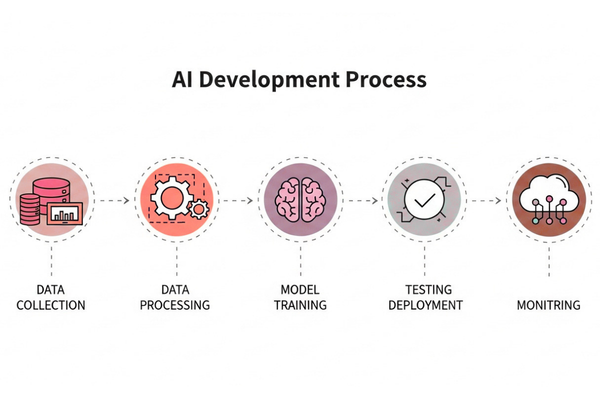
This is the practical process we recommend for building business-grade AI solutions.
1) Discovery: define the business goal
Start with questions like:
- What cost are we reducing (support, ops, sales time)?
- What metric are we improving (conversion, retention, speed)?
- What user action should become easier?
2) Data readiness and the data pipeline
AI quality in AI product development depends on data quality. A clean data pipeline helps you:
- collect the right inputs
- remove duplicates and noise
- protect privacy
- keep data updated
3) Model selection and model training (when needed)
Some projects need model training. Others do not.
- If you use pre-trained models, training may be minimal.
- If you need custom accuracy, you may fine-tune a model on your data.
4) Build the app experience (mobile UX matters)
AI results must be delivered in a way users trust:
- show “why” when possible
- allow feedback (“thumbs up/down”)
- Give users an easy way to correct the AI
5) Testing and guardrails
Before launch, test for:
- accuracy on real examples
- unsafe or biased outputs
- edge cases (short queries, messy inputs)
- latency (speed) on mobile networks
6) Launch, monitoring, and MLOps
After release, AI needs ongoing support:
- monitoring quality and drift
- updating prompts/models
- controlling cost per request
- logging and auditing
This operating layer is often called MLOps.
7) Cost, Timeline, and Team Structure
Costs vary based on scope, data complexity, and whether you need custom models. Here is a simple starting view.
Estimated cost table (business ranges)
| AI Project Types | Estimated Cost |
| AI Chatbot | $10k – $50k |
| AI SaaS | $50k – $200k |
| Enterprise AI | $100k+ |
The cost of its services depends on complexity, integrations, and data requirements.
What costs the most
- number of integrations (CRM, ERP, ticketing, analytics)
- privacy and compliance requirements
- data cleanup effort
- real-time needs vs batch processing
- QA and evaluation depth
Typical timelines (high-level)
- Proof of concept: 2–6 weeks
- Pilot in production: 6–12 weeks
- Full rollout: 3–6 months
Team roles you may need
Depending on your business needs, an AI project may include:
- Product manager (value + scope)
- Mobile engineers (iOS/Android)
- Backend/API engineers
- Data engineer (pipelines)
- ML engineer (if custom training)
- QA + security review
- AI consulting support for strategy and governance
8) Best AI Tools and Platforms
Many companies do not want to “bet the business” on one provider. A smart AI strategy keeps flexibility where it matters.
Where popular model providers fit
- For strong language and reasoning capabilities, many teams evaluate models from OpenAI.
- For cloud AI services, data tooling, and enterprise infrastructure, teams often review Google AI.
Practical selection checklist
Use this simple checklist:
- Does it meet your accuracy needs on real examples?
- Can you control privacy and data retention?
- What is the cost per request at your expected usage?
- Can you log outputs for QA and audits?
- Can you swap models later if needed?
In many cases, a hybrid approach (two providers, or one provider + fallback logic) reduces risk.
9) Security, privacy, and compliance
Strong security and compliance are the foundation of enterprise AI initiatives. Business AI must be safe and predictable. The goal is not just “it works.” The goal is “it works reliably, and we can prove it.”
Key guardrails to consider
- Minimize sensitive data sent to external services
- Mask personal data where possible
- Add role-based access controls
- Log prompts, outputs, and user feedback
- Set clear retention and deletion rules
Common enterprise requirements
- SOC 2 alignment
- GDPR / PIPEDA considerations (depending on region)
- Internal approvals for model use
- Human review for high-risk outputs
A reliable AI implementation partner treats governance as an integral part of every project, not an afterthought.
10) High-ROI AI Features for Business Applications
To keep AI practical, connect each feature to a measurable business benefit.
High-value features (common winners)
- Smart in-app assistant for support and onboarding
- Document or ticket summarization
- Recommendation feed improvements
- Workflow automation for internal ops
- Fraud and abuse detection signals
Feature vs Benefit table (quick business mapping)
| Feature | Benefit |
| AI chatbot inside the app | Lower support volume and faster customer answers |
| Personalized recommendations | Higher conversion and better retention |
| Auto-summaries for tickets and notes | Faster agent workflows and fewer mistakes |
| Smart search (semantic) | Users find content faster, with fewer drop-offs |
| Automated classification/tagging | Cleaner data and better reporting |
KPIs to track
- cost per resolved support request
- time saved per workflow
- conversion rate uplift
- retention improvement
- customer satisfaction (CSAT)
- error rate/escalation rate
These metrics keep AI projects focused on measurable business results.
11) How a mobile app development partner helps (beyond code)
Many teams can “build a demo.” Fewer can ship a reliable AI feature inside a production mobile app, with monitoring, cost control, and a clean UX.
A strong partner can help you:
- Choose the right use case (and say no to weak ideas)
- Design a realistic AI strategy
- Integrate AI into your app flows without confusion
- Set up evaluation and monitoring from day one
If you want to see how the product works and is delivered in real projects, explore the Player Dex mobile product case study for a concrete example of shipping user-ready experiences.
For companies ready to operationalize AI, our team also supports end-to-end delivery through AI services for product teams from discovery to launch to ongoing improvement.
12) Get Your AI Project Cost Estimate
If your company is exploring AI solutions, our team at Canadian Software Agency can help you design and build scalable AI platforms, improve workflows, and launch AI features that users will actually adopt. We focus on practical releases, measurable ROI, and clean mobile UX.
To scope your timeline and budget, you can request a fast plan using our project estimate process for AI initiatives.
Conclusion:
AI Development is not a single tool or a one-time release. It is a business capability that combines smart planning, the right model choice, strong data practices, and ongoing improvement. When done well, it reduces costs, speeds up work, and creates better app experiences that keep users coming back. Start with one high-value use case, measure impact, then expand. That is how it becomes a long-term advantage, not an experiment.
FAQs
1) What is AI Development in simple words?
It is building software that can understand data (text, images, numbers) and produce helpful results like answers, predictions, summaries, or automated actions.
2) Do we need custom model training for every AI project?
No. Many projects start with pre-trained models and a simple configuration. Custom model training is most useful when you need high accuracy for a specific, repeated task using your own data.
3) What is the difference between machine learning and generative AI?
Machine learning often predicts or classifies (like “will this user churn?”). Generative AI creates or transforms content (like summaries, chat replies, or drafts).
4) How do we control risk and privacy with AI?
Use data minimization, masking, logging, access controls, and clear retention rules. Also, test outputs for safety and accuracy before full rollout.
5) How do we know if AI is “working” after launch?
Track KPIs tied to business outcomes: time saved, cost per task, conversion uplift, retention, and escalation rates. Add user feedback loops to continuously improve.