A site redesign is not only about looks. It can lift or break your search traffic. This guide is written for business teams looking to improve rankings, generate more leads, and create a better user experience through a WordPress website redesign. When you redesign without an SEO plan, you risk losing pages, links, speed, and trust signals that took years to build. When you redesign with structure, you can improve search visibility, user experience, and conversions at the same time.
In this WordPress Redesign Guide, you will learn a practical path you can follow step by step. We will cover planning, SEO checks, content updates, site speed, mobile readiness, and post-launch tracking. You will also see simple tables, checklists, and FAQs so your team can act fast. Whether your company is a mobile app development firm adding a stronger web funnel, or a product business improving inbound leads, this guide keeps the focus on measurable business value.
What is a WordPress redesign for SEO?
A WordPress redesign for SEO is the process of updating a WordPress website’s design, structure, content, and technical setup while protecting and improving search rankings. It includes mapping URLs, improving site speed, strengthening internal links, updating on-page SEO, and using redirects to prevent traffic loss.
1) Why a redesign affects SEO and revenue
A redesign changes how Google reads your site. It also changes how people act on your pages. Both affect revenue.
Key SEO risks during redesign include:
- Lost pages due to removed URLs
- Broken internal links and missing redirects
- Slower load speed due to heavy themes or plugins
- Changed headings and content to remove keywords
- Tracking issues that hide real performance
Key business wins when done right:
- More qualified traffic from improved keyword coverage
- Higher conversion rate from clearer pages and better UX
- A faster site that reduces bounce and improves leads
- Stronger brand trust, which supports sales cycles
Research consistently shows that faster websites improve user engagement, reduce bounce rates, and increase conversion rates compared to slower websites. If you want a clean way to connect SEO with lead generation, treat the redesign as a growth project, not a design project.
2) How to Plan a WordPress Redesign Without Losing SEO
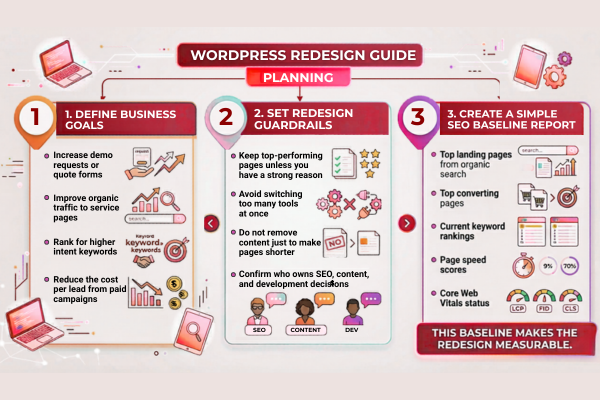
Before starting a WordPress website redesign, decide what success means. This part of your SEO-friendly WordPress redesign process is where you protect your traffic, rankings, and budget.
Define business goals first
Pick 2 to 4 clear outcomes:
- Increase demo requests or quote forms
- Improve organic traffic to service pages
- Rank for higher intent keywords
- Reduce the cost per lead from paid campaigns
Set redesign guardrails
Keep the scope realistic:
- Keep top-performing pages unless you have a strong reason
- Avoid switching too many tools at once
- Do not remove content just to make pages shorter
- Confirm who owns SEO, content, and development decisions
Create a simple SEO baseline report
Track these before work begins:
- Top landing pages from organic search
- Top converting pages
- Current keyword rankings
- Page speed scores
- Core Web Vitals status
This baseline makes the redesign measurable.
3) Content and information architecture that search engines understand
Your structure is your map. Google needs a clear map. Users do too.
Build a clean site structure
Keep navigation simple and predictable:
- Home
- Services
- Industries or Solutions
- Case Studies
- Blog
- About
- Contact
Improve internal linking
Internal links help Google discover pages and understand importance.
Use internal links with descriptive anchor text:
- Link blogs to the related service page
- Link service pages to proof, such as results and case studies
- Link case studies back to services
Create topic clusters around your primary services. For example, a WordPress development service page can connect to related blogs about redesigns, SEO, performance optimization, and website maintenance. This structure helps search engines understand topical authority.
A good example of proof-led structure is a portfolio page that shows real outcomes, like this Ecotech Windows and Doors project story: EcoTech Windows & Doors. It supports trust and can reduce sales friction.
Keep pages focused
One page should target one main intent. Avoid mixing too many topics on one page.
4) SEO friendly URL strategy and redirect mapping
URLs are assets. Changing them without a plan is one of the fastest ways to lose rankings.
Follow these URL rules
- Keep URLs short and readable
- Use real words, not random strings
- Avoid date-based URLs unless needed
- Keep the slug stable once it ranks
Redirect mapping checklist
Before launch, create a redirect sheet:
- Old URL
- New URL
- Redirect type, usually 301
- Notes for the content owner
Common redirect mistakes:
- Redirecting everything to the home page
- Creating redirect chains
- Forgetting image URLs that rank in Google Images
Avoid changing URLs that already rank well unless there is a strong business reason. Every URL change creates risk and should be supported by a 301 redirect. If your site has many pages, redirect mapping is not optional. It is core to any WordPress Redesign Guide meant for SEO results.
5) On-page SEO: headings, metadata, and intent match
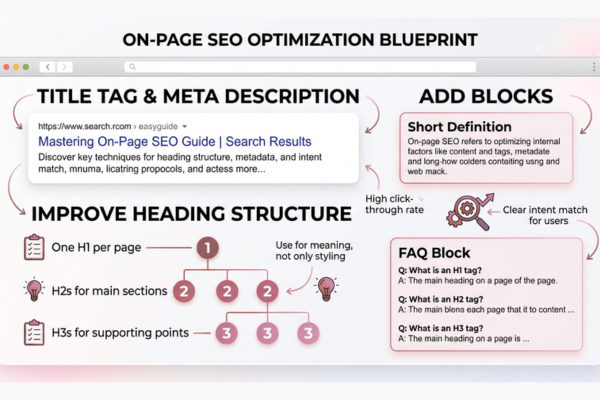
On-page SEO is where small details create big wins.
Improve heading structure
Use a clear hierarchy:
- One H1 per page
- Use H2s for main sections
- Use H3s for supporting points
Avoid using headings only for styling. Use them for meaning.
Write better titles and meta descriptions
Use short, clear titles. Add the primary phrase where it fits naturally.
Good metadata supports:
- Higher click-through rate
- Better relevance signals
- Clear intent match for users
Add FAQ blocks and definition blocks
Google often pulls short definitions and Q and A content into search features.
Use:
- A short definition near the top
- 3 to 5 FAQs near the bottom
- Clear answers that fit in 2 to 4 lines
Optimize Images for SEO
Every image should include descriptive alt text that explains the content of the image. Use compressed images and modern formats such as WebP to improve loading speed and accessibility.
6) Site speed and Core Web Vitals: the redesign advantage
A redesign is the best time to fix speed issues because you are already changing layouts and assets.
Speed improvements that matter
Focus on actions with high impact:
- Use a lightweight theme
- Compress and resize images
- Reduce plugin bloat
- Use caching and a CDN
- Load fonts and scripts efficiently
Core Web Vitals basics
You do not need to be technical to manage this well. You need clear targets:
- Faster page load
- Faster time to interact
- Less layout shift when content loads
Speed supports SEO. It also supports revenue. Faster pages usually mean more completed forms and fewer drop-offs.
Key Core Web Vitals metrics include:
- Largest Contentful Paint (LCP)
- Interaction to Next Paint (INP)
- Cumulative Layout Shift (CLS)
These metrics directly affect user experience and can influence organic performance.
7) Mobile-first redesign for lead generation
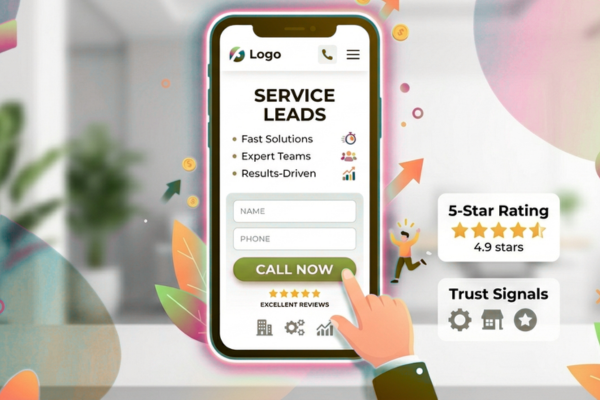
Most buyers will meet your brand on a phone first. Your redesign should treat mobile as the main experience.
Mobile UX checks
- Buttons must be easy to tap
- Forms must be short and simple
- Text must be readable without zoom
- Sticky headers should not block the page
- Popups should be limited
Conversion-focused mobile pages
If you sell services, mobile pages should help users take action:
- Call buttons
- Clear service summaries
- Trust signals like logos and reviews
- Fast contact options
Use click-to-call buttons, sticky contact actions, and simplified forms to increase conversions from mobile visitors.
If you build mobile products, your site should also show product clarity. A strong example of a modern product story and clear positioning can be seen in this BundlBox project case study: BundlBox. It shows how clear visuals and structure can support understanding.
8) Technical SEO essentials for WordPress redesigns
Technical SEO sounds complex, but the essentials are straightforward.
Must have technical checks
- XML sitemap is enabled and accurate
- Robots.txt does not block important pages
- Canonical tags are correct
- HTTPS is enforced
- 404 pages are handled well
- Structured data is added where relevant
Plugin discipline
More plugins often mean more risk:
- Security gaps
- Slow performance
- Conflicts after updates
Keep only what you need. Choose trusted tools with strong support.
Authority references you can trust
For modern SEO, follow guidance from credible sources such as Google Search Central and research from OpenAI on how users interact with AI-powered search and content. These sources help you stay aligned with what search platforms value.
Verify that structured data remains valid after launch. Use Organization, Article, FAQ, and Breadcrumb schema where appropriate.
9) AI tools to support content, testing, and SEO workflow
AI can speed up parts of a redesign. It should not replace human review, brand tone, or strategic decisions.
Practical AI uses during redesign
- Drafting content outlines for service pages
- Creating FAQ ideas based on customer questions
- Checking readability and simplifying text
- Spotting thin content and duplicate sections
- Supporting QA by scanning for missing metadata
Business Value Section
Benefits of AI automation include:
- reduced operational costs
- faster workflows
- improved accuracy
- quicker content refresh cycles
- smoother QA for large sites
AI development cost table
If you plan to add AI features to the site, this high-level view helps with planning.
| AI Development Type | Estimated Cost |
| AI Chatbot | $10k – $50k |
| AI SaaS | $50k – $200k |
| Enterprise AI | $100k+ |
If you are exploring AI features alongside your redesign, it can help to review a team that offers AI services for customer support and automation in a way that fits business needs: AI Development Services
10) Feature and benefit alignment for SEO and conversions
SEO brings visitors. Your page must then convert them. Align features with business outcomes.
Feature and benefit table
Use this format on service pages to improve clarity and reduce friction.
| Feature | Benefit |
| Faster page speed | More visitors stay and complete forms |
| Clear service pages | Better rankings and higher intent leads |
| Strong internal links | Search engines find pages faster |
| Updated case studies | More trust and higher close rates |
| Mobile first forms | More inquiries from mobile traffic |
This is also where a mobile app development company can stand out. Pair technical skill with business clarity. Show outcomes, not only features.
11) Common WordPress Redesign Mistakes
- Deleting pages that already rank
- Changing URLs without redirects
- Ignoring mobile performance
- Using heavy themes and plugins
- Launching without SEO testing
- Removing content that drives traffic
- Forgetting to verify analytics tracking
12) Launch checklist and post-launch tracking
Launch day is not the finish line. It is the handoff to tracking and improvement.
Pre-launch checklist
- Back up the full site and database
- Test redirects on a staging site
- Validate forms and key conversion flows
- Confirm analytics and tag manager events
- Check the sitemap and robots settings
- Test pages on mobile and desktop
Post-launch tracking for 30 days
Track daily for the first week:
- Organic traffic trends
- Crawl errors and 404s
- Indexing status in Google Search Console
- Keyword movements for key pages
- Form completions and call volume
Budget and timeline clarity
If you need a fast way to plan cost and scope, you can use a project estimate tool for your redesign and SEO work as part of early planning: Project Estimate. This supports better alignment between marketing goals and building effort.
Start Your AI Development Project
If your company is upgrading its website and also wants smarter automation, now is the right time to connect both. Start Your AI Development Project with Canadian Software Agency. Our team can help you plan a redesign that supports SEO, improves conversions, and adds practical AI features that reduce support load and improve lead handling. Explore our AI services for business growth and automation here: AI Development Services
Conclusion
A redesign should protect what already works and improve what holds you back. This WordPress Redesign Guide shows how to do that without guessing. Start with goals and a baseline, so you know what success looks like. Then lock down your structure, your key pages, and your URL plan. Redirect mapping is not a nice-to-have. It is the safety net that keeps rankings stable when page paths change.
Next, focus on what search engines and buyers both reward. Clear site structure, focused pages, and strong internal linking help Google understand your content and help users find answers faster. Improve on-page SEO with clean headings, simple wording, and metadata that matches intent. Add definition blocks and FAQs because they support search features and reduce confusion for readers. Keep content simple and direct. That also lifts readability, time on site, and conversion rates.
Performance and mobile experience are where redesigns often win or lose. A faster site with fewer plugins, lighter pages, and optimized images improves Core Web Vitals and reduces drop-offs. Mobile-first design is essential because most visitors will judge your brand on a phone. Make forms easy. Keep buttons clear. Reduce friction at every step.
Finally, treat launch as the start of measurement. Track traffic, rankings, indexing, and conversions for at least 30 days. Fix crawl issues fast. Update content based on real user behavior. If you also want to add AI, do it with purpose, such as better support, faster lead response, or smarter content workflows. When you follow this SEO-friendly WordPress redesign process with discipline, you get more than a fresh look. You get stronger SEO, more qualified leads, and a website that supports growth.
FAQs
1) How long does an SEO safe WordPress redesign take?
Most projects take 4 to 12 weeks. It depends on page count, redirect needs, and content updates. Planning and QA usually take more time than design.
2) Can a redesign hurt rankings even if the content stays the same?
Yes. Speed changes, broken links, missing metadata, and URL changes can hurt rankings. Redirects and technical checks prevent most problems.
3) Should we change our WordPress theme during a redesign?
Often yes, but choose a lightweight theme and test speed. Avoid themes that require many add-ons. Keep plugins minimal.
4) What is the most important SEO task during redesign?
Redirect mapping for changed URLs is a top priority. Next is preserving top pages and improving speed and mobile usability.
5) Should we use AI tools to write content during a redesign?
AI can help with outlines and drafts, but final copy should be reviewed by a human for accuracy, tone, and brand fit.