
Every business needs a strong online presence today. But building a great website often takes too long and costs too much money. That is where the Benefits of Webflow come into play for modern companies.
Webflow is a powerful no-code website builder. It lets you create stunning, responsive websites without writing a single line of code. For startups, agencies, and growing brands, this means faster launches and much lower costs.
As a mobile app development company, we see many clients struggle with slow website projects. Traditional coding can take months to complete. Webflow changes that timeline completely.
In this guide, we will walk you through the top reasons why businesses choose Webflow. From design freedom to built-in SEO tools, you will see why this platform is changing the web industry. Whether you are a small startup or a large enterprise, understanding these advantages will help you make smarter decisions for your next web project.
Let us dive into the details.
What Is Webflow and Why Does It Matter?
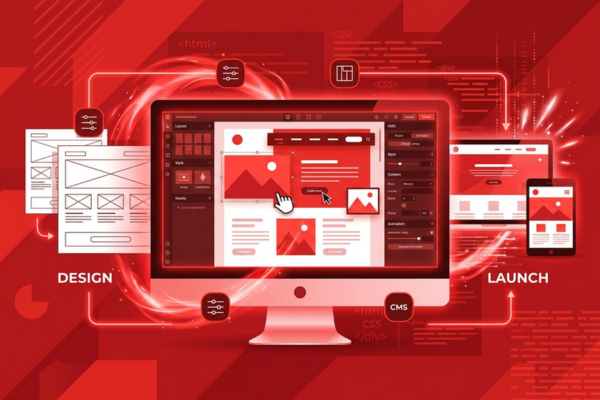
Webflow is a visual web development platform that allows users to design, build, and launch responsive websites without writing code. It combines a drag-and-drop designer with a powerful CMS and hosting solution.
Webflow launched in 2013 and has grown rapidly since then. Today, over 3.5 million designers and teams use it worldwide. It bridges the gap between design tools and coded websites.
Unlike basic website builders, Webflow gives you full control. You can adjust every pixel, animation, and layout detail with ease. Yet you never need to touch HTML or CSS directly.
This makes it ideal for businesses that want custom results without long development cycles. You get the quality of a hand-coded site with the speed of a visual tool.
Key Benefits of Webflow for Modern Businesses
This platform offers a complete toolkit for modern web projects. You get design, development, hosting, and CMS all in one place. That alone saves time and reduces the need for multiple tools.
Here are the main advantages most businesses notice first:
- Faster time to launch your website
- Lower overall development costs
- Full design control without writing code
- Built-in responsive design for all devices
- Clean, production-ready code output
These features make Webflow a smart choice for any company. It removes the usual bottlenecks that slow down web projects. Teams can move from concept to live site in days, not months.
Faster Development Without Writing Code
Speed is one of the biggest Benefits of Webflow for any business. Traditional web development requires front-end and back-end coders. You need designers, developers, and QA testers on board. Each handoff adds days or weeks to the project timeline.
Webflow removes most of those steps entirely. Your designer builds the site visually on a canvas. The platform generates clean HTML, CSS, and JavaScript automatically. There is no need to wait for a developer to convert mockups into code.
This means your team can launch a professional site in a fraction of the usual time. Many projects that once took three months now finish in just three weeks.
For example, when we built the StreamStyle platform, fast iteration was critical to success. Rapid prototyping let us test layouts quickly and refine the user experience without long code review cycles.
Stunning Visual Design Made Simple
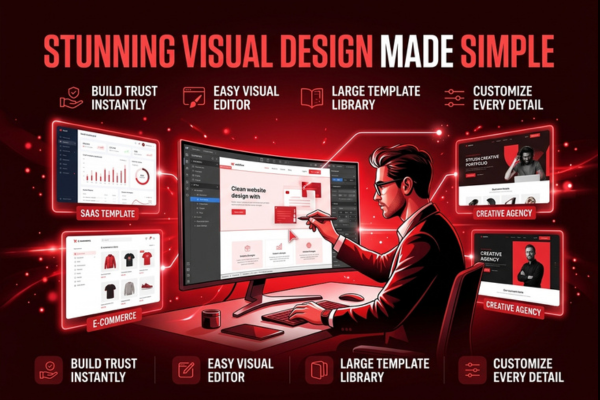
Great design builds trust with your audience. Visitors judge your brand within seconds of landing on your site. Webflow makes it easy to create visuals that truly impress.
The visual editor works much like popular design tools such as Figma. You drag elements onto a canvas and style them in real time. Every change appears instantly on your screen.
You also get access to a large library of Webflow templates. These give you a strong starting point for any industry. From SaaS dashboards to e-commerce stores, there is a template to match your exact needs.
But templates are just the beginning. You can customize every detail to match your brand identity. Colors, fonts, spacing, and animations are all fully under your control.
Responsive Design Built In
Every Webflow site is responsive by default. The platform lets you set breakpoints for desktop, tablet, and mobile screens. Your site looks great on every device without extra effort.
This is a huge advantage for responsive web design projects. You do not need separate mobile versions or complex media queries. Webflow handles all of it visually.
Built-In SEO Tools for Better Rankings
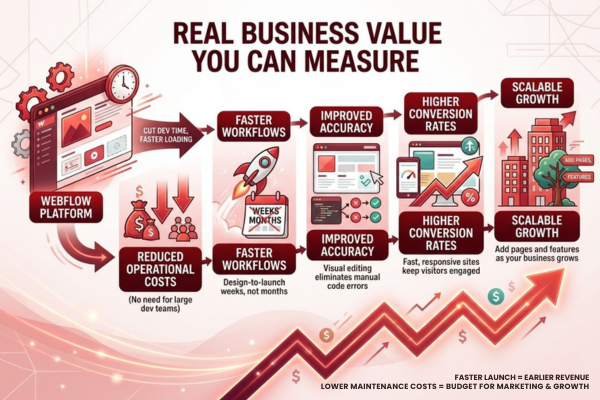
A beautiful site means nothing if no one can find it online. Webflow includes strong SEO features right out of the box. You do not need extra plugins or third-party tools.
You can edit meta titles, descriptions, and Open Graph tags for every page. The platform generates clean semantic HTML that search engines prefer. It also creates automatic XML sitemaps and supports 301 redirects.
These features help you build an SEO-friendly website from day one. Your site loads fast and follows best practices that Google rewards in search results.
The Benefits of Webflow for SEO are clear and measurable: faster indexing, cleaner code, and better page speed scores. For deeper insights, you can connect your site to Google Search Central and track your rankings over time.
Powerful CMS for Content Management
Content drives engagement and keeps visitors coming back. Webflow includes a flexible CMS that lets your team publish updates without any developer help.
The Webflow CMS works with dynamic content types. You can create collections for blog posts, team members, products, or case studies. Each collection has custom fields that match your exact needs.
Your marketing team can add new pages, update text, and upload images from a simple editor. No code changes are required at all. This keeps your site fresh and reduces your reliance on technical staff.
For instance, our work on the ProTrending project showed how a strong CMS setup can streamline content workflows. The client’s team now publishes new product listings daily without waiting for developer support.
Dynamic Pages and Filtering
Webflow lets you build dynamic pages from CMS collections. A single template can generate hundreds of unique pages automatically. You can also add filtering and sorting to help users find content fast.
Reliable Hosting and Website Performance
Slow websites lose customers every single day. Studies show that a one-second delay can drop conversions by seven percent. Webflow solves this problem with its built-in Webflow hosting solution.
Webflow runs on Amazon Web Services and Fastly’s global CDN. Your site loads from servers closest to each visitor. This means fast load times no matter where your audience lives.
You also get automatic SSL certificates, daily backups, and 99.99% uptime. There is no need to manage servers, update software, or worry about security patches.
Website performance is a core strength of the platform. Most Webflow sites score above 90 on Google PageSpeed Insights. Fast loading improves user experience and boosts your search rankings at the same time.
Real Business Value You Can Measure
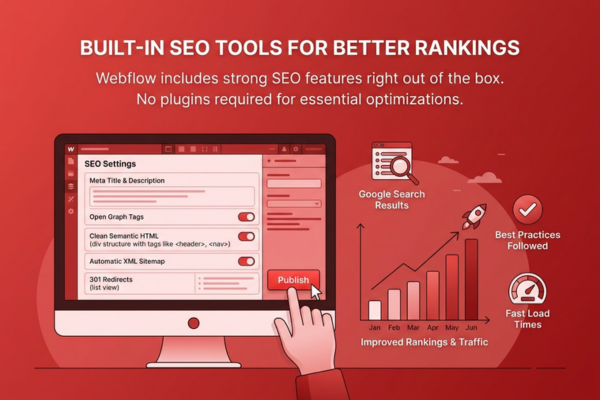
The Benefits of Webflow translate directly into real business results. When you cut development time, you save money. When your site loads faster, you convert more visitors into customers.
Here is a quick look at the measurable impact most companies see:
- Reduced operational costs: No need for large dev teams for simple updates
- Faster workflows: Design-to-launch in weeks, not months
- Improved accuracy: Visual editing eliminates manual code errors
- Higher conversion rates: Fast, responsive sites keep visitors engaged
- Scalable growth: Add pages and features as your business grows
These gains compound over time. A faster launch means earlier revenue. Lower maintenance costs free up budget for marketing and growth.
Our team at Canadian Software Agency has seen these results firsthand. When we delivered the MissionHQ platform, the client reduced their site update turnaround from two weeks to same-day delivery.
If your company is also exploring modern tech solutions, our AI-powered automation services can further streamline your digital workflows and boost overall efficiency.
How Webflow Compares to Traditional Development
Choosing the right tool matters for your bottom line. Here is a simple comparison to help you make a clear decision.
| Feature | Webflow | Traditional Coding | WordPress |
| Development Speed | Very Fast | Slow | Moderate |
| Design Control | Full Visual | Full Code | Theme-Based |
| Code Quality | Clean Auto-Generated | Manual | Plugin-Dependent |
| Hosting | Built-In | Self-Managed | Self-Managed |
| SEO Tools | Built-In | Manual Setup | Plugin Required |
| Learning Curve | Moderate | High | Low |
| Ongoing Maintenance | Minimal | High | Moderate |
| Cost Over Time | Lower | Higher | Moderate |
As the table shows, Webflow offers the best balance of speed, control, and cost for most business websites. Traditional coding still makes sense for complex web applications. But for marketing sites, landing pages, and content-driven platforms, Webflow is the smarter choice.
Getting Started With Your Webflow Project
Ready to build a better website? The process is simpler than you might think. The Benefits of Webflow become clear as soon as you start your first project.
Start by defining your goals. Do you need a new brand site, a product landing page, or a content hub? Clear goals help you choose the right approach from the start.
Next, gather your brand assets. Logos, color codes, fonts, and images should be ready before design begins. This speeds up the entire process significantly.
Then, work with an experienced team. A skilled Webflow development partner can take your vision and turn it into a live site fast. They will handle the structure, animations, CMS setup, and Webflow interactions that make your site stand out from the competition.
If you want to see how much your project might cost, you can get a detailed project estimate from our team in just a few minutes.
Conclusion
Building a great website should not take months or drain your entire budget. The Benefits of Webflow make it clear that a better, faster path exists for businesses of all sizes. From rapid development to stunning visual design, this platform delivers real value at every stage of your web project.
Webflow removes the biggest barriers that slow down traditional web development. You no longer need large teams of coders to launch a professional site. Your designers can build, test, and publish pages on their own. This cuts costs and speeds up your time to market in a meaningful way.
The built-in SEO tools, flexible CMS, and reliable hosting make Webflow a complete solution. You do not need to juggle multiple platforms or pay for expensive plugins. Everything works together in one clean interface. Your team spends less time on technical tasks and more time on growing your business.
As we have seen with our own client projects, the results speak for themselves. Faster launches, lower maintenance costs, and higher conversion rates are not just promises. They are measurable outcomes that real businesses achieve every day with Webflow.
If you are ready to build a better website faster, now is the time to act. The web moves quickly, and your competitors are not waiting. A modern, high-performing site gives you the edge you need to win more customers and grow your revenue.
Frequently Asked Questions
Q1: Is Webflow good for large business websites?
Yes. Webflow handles large sites with hundreds of pages with ease. Its CMS and dynamic content features scale well for growing businesses of all sizes.
Q2: Do I need coding skills to use Webflow?
No. Webflow is a no-code website builder at its core. You can build complete sites visually. However, basic knowledge of HTML and CSS helps you unlock advanced features.
Q3: Can I migrate my existing site to Webflow?
Yes. You can move content from WordPress, Wix, or custom sites to Webflow. The process takes some planning, but the result is a faster and cleaner website.
Q4: How does Webflow handle website security?
Webflow provides automatic SSL, DDoS protection, and regular backups. Your site stays secure without extra plugins or server management on your end.
Q5: Is Webflow better than WordPress for SEO?
In many cases, yes. Webflow generates cleaner code and faster page speeds by default. WordPress often needs multiple plugins to match the same level of SEO performance.