

In this blog, we break down the most common roadblocks, why they happen, and what to do about them. You will also find practical checklists, tables, and simple steps you can use in your next project. If you’re planning AI features for mobile apps, enterprise AI, or product automation, this guide will help you move faster with less risk and realize business value sooner.
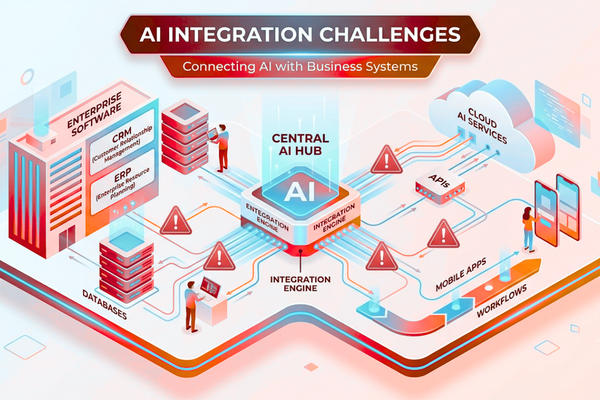
What are AI Integration Challenges?
AI Integration Challenges are obstacles businesses face when connecting AI models with existing systems, data, workflows, APIs, and business processes. Common challenges include poor data quality, legacy systems, security concerns, user adoption, and cost management.
The Business Value: Why AI Integration Matters
AI is not just a trend. It is a way to reduce manual work and improve decisions. But only if AI is connected to the systems your teams already use.
Benefits of AI automation include:
- reduced operational costs
- faster workflows
- improved accuracy
- better customer support
- more consistent decisions
- higher team productivity
When done right, Business AI Integration can turn slow processes into fast ones and unlock new digital products.
1) Why AI Integration Challenges Happen in Real Projects
Common AI Integration Challenges and Their Solutions
| AI Integration Challenge | Business Impact | Recommended Solution |
| Poor data quality | Inaccurate AI outputs and unreliable insights | Audit, clean, and standardize data before integration |
| Legacy systems | Delays and compatibility issues | Use APIs, middleware, and phased modernization |
| Security and privacy risks | Compliance violations and data breaches | Apply encryption, role-based access control, and regular audits |
| Low user adoption | Reduced ROI and productivity | Train users, explain AI decisions, and roll out features gradually |
| Cost and scope creep | Budget overruns and delayed delivery | Define KPIs, prioritize MVPs, and monitor usage costs |
Many teams focus on building a model. But most of the hard work is integration work.
Common root causes:
- AI is built without clear business goals
- Data is not ready, not clean, or not accessible
- Legacy systems cannot “talk” to modern AI tools
- Teams do not trust AI results
- Security and privacy are treated too late
This is why Challenges of AI Integration show up even in companies with strong development teams. The issue is not skill alone. It is planning, process, and alignment.
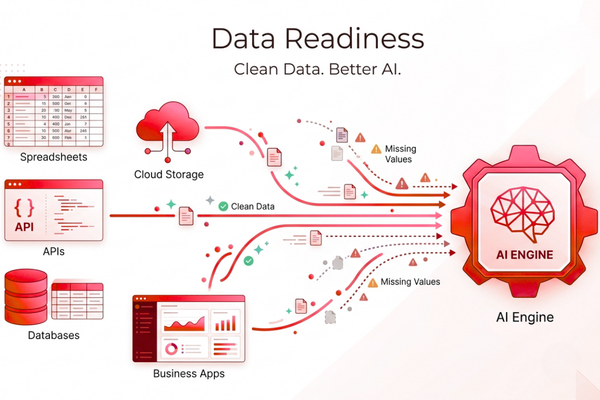
2) Data Readiness: The #1 Source of AI Integration Challenges
If AI is the engine, data is the fuel. Bad fuel means bad output. Most AI Implementation Challenges start here.
Common data problems
- Data is split across many tools
- Data has missing fields
- Data labels are wrong or inconsistent
- Data access is blocked by permissions
- Data is not updated in real time
AI Integration Solutions for data readiness
- Start with a data audit before building anything
- Create a “single source of truth” dataset
- Use clear naming rules and standard formats
- Add data quality checks in the pipeline
Practical checklist:
- Do we know what data AI needs?
- Do we own the data and the rights?
- Can we refresh it daily or hourly?
- Can we explain where each field comes from?
3) System Compatibility and Legacy Tech Conflicts
A major part of AI Software Integration is making new AI services work with older systems. This is where time and cost can rise fast.
What makes integration hard
- Old APIs with limited support
- Custom databases with no documentation
- Mobile apps with tight performance limits
- Different authentication standards across tools
AI Integration Best Practices for compatibility
- Use a middleware or integration layer (simple and stable)
- Prefer APIs over direct database reads
- Add versioning to endpoints early
- Plan for rollback if AI output is wrong
If you are building AI into customer-facing apps, performance matters. AI features must be fast and reliable, not just “smart.”
4) Security, Privacy, and Compliance Risks
Security issues are a top driver of AI Adoption Challenges, especially in healthcare, finance, and enterprise IT.
Common security risks
- Sensitive data sent to third-party services
- Weak access controls for AI tools
- Prompt injection or data leakage risks in LLM apps
- No audit trail for AI decisions
Ways to reduce risk
- Mask or remove sensitive fields before AI processing
- Use role-based access control
- Log AI inputs and outputs for audits
- Run privacy reviews early, not at the end
For trusted guidance, review the safety and policy work from OpenAI and enterprise AI practices from Google AI.
5) Cost and Scope Control: Avoid Surprise Budgets
Many AI Deployment Challenges come from unclear scope. AI costs are not only development. They also include usage, monitoring, and updates.
Estimated cost table (high-level)
| AI Development Type | Estimated Cost |
| AI Chatbot | $10k – $50k |
| AI SaaS | $50k – $200k |
| Enterprise AI | $100k+ |
Cost drivers to watch:
- Model usage fees (per request/token)
- Data storage and processing
- MLOps and monitoring tools
- Security and compliance work
- Human review loops (often needed)
Tip: define “success metrics” early. If you can’t measure value, you can’t control spend.
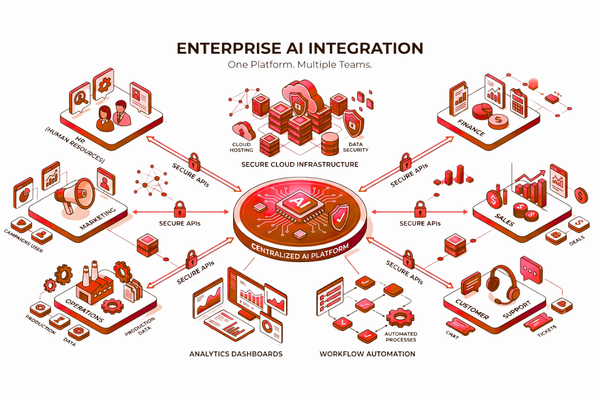
6) Enterprise AI Integration: Scaling Beyond One Team
Enterprise AI Integration sounds exciting, but it is where complexity grows. More teams, more systems, more rules.
Common Enterprise AI Integration blockers
- Different departments use different tools
- Data ownership is unclear
- Security teams slow down approvals
- AI work is not aligned with business priorities
What works in large organizations
- Create an AI steering group (business + tech)
- Use shared AI services and shared standards
- Set rules for data access and retention
- Build reusable components (auth, logging, feedback)
Enterprise AI succeeds when it becomes a repeatable process, not a one-off project.
7) User Trust and Change Management
Even strong AI can fail if people do not trust it. This is one of the most common AI Integration Challenges that leaders underestimate.
Why teams push back
- AI feels like a “black box”
- People fear job loss
- AI outputs are inconsistent
- There is no clear owner when AI is wrong
Practical steps to build trust
- Start with “AI assists humans,” not “AI replaces humans”
- Explain outputs in plain language
- Add a feedback button inside the app
- Track accuracy and show improvement over time
You can also reduce risk with phased rollouts:
- Pilot → limited group → full release
8) Integration Testing and Reliability Under Real Load
Many AI Deployment Challenges appear after launch. Things work in staging, then fail in production because the real world is messy.
Common production issues
- Slow response times during peak hours
- Model output changes after updates
- Unexpected user prompts break the flow
- Mobile app crashes due to memory use
AI Integration Best Practices for testing
- Test with real user-like inputs (not perfect samples)
- Add load testing for AI endpoints
- Set timeouts and fallbacks (human support, cached answers)
- Monitor drift and user satisfaction
A reliable AI feature is not just smart. It is stable, fast, and predictable.
9) Choosing the Right Use Cases and AI Transformation Strategies
Many AI Integration Challenges happen because the first use case is too big. Start smaller. Win trust. Then scale.
Good starter use cases
- Support automation (FAQ + ticket drafting)
- Data extraction from documents
- Personalization in-app (content suggestions)
- Internal search across knowledge bases
Clear AI Transformation Strategies (simple approach)
- Pick one workflow with measurable pain
- Build an MVP in 4–8 weeks
- Measure impact
- Expand to the next workflow
If you want examples of building digital products that scale, it helps to review real builds like the Player Dex product case study and how teams designed features that users actually adopt.
10) Feature-to-Benefit Mapping (So AI Has a Purpose)
AI features should tie to business outcomes. This reduces the challenges of AI Integration because everyone agrees on “why we’re doing this.”
Feature | Benefit table
| Feature | Benefit |
| AI chatbot for support | Faster replies and lower ticket volume |
| Smart search in-app | Users find answers without contacting support |
| AI data entry assistant | Less manual work and fewer errors |
| Fraud/anomaly detection | Fewer losses and faster investigations |
| AI personalization | Higher engagement and retention |
This kind of mapping also helps Business AI Integration stay focused, especially when teams request “nice to have” features.
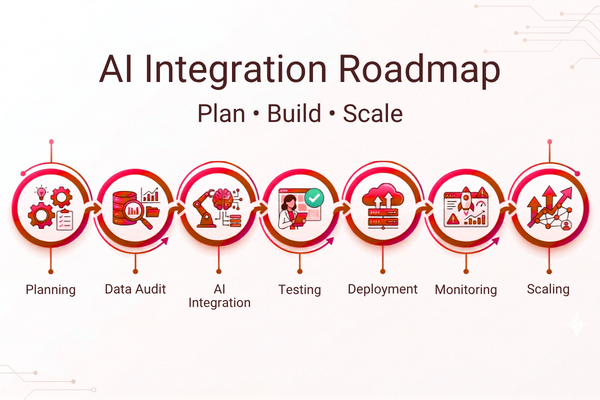
11) Proven AI Integration Solutions (A Practical Playbook)
Here is a simple playbook you can apply to most projects:
Step-by-step approach
- Define the goal: What KPI must improve?
- Audit the data: What is available, missing, or risky?
- Pick the model approach: buy vs build vs hybrid
- Design integration: APIs, middleware, auth, logging
- Launch an MVP: small group, clear success metrics
- Add monitoring: cost, latency, accuracy, feedback
- Scale carefully: reuse components, standardize
These steps reduce AI Implementation Challenges and improve delivery speed.
If your team needs help shaping scope early, an upfront estimate can remove a lot of uncertainty. Many companies start by using a structured planning step like a project scoping and cost estimate before moving into full development.
Start Your AI Development Project
Start Your AI Development Project by building AI that fits your real workflow, not a demo that never ships. If your company is exploring AI features in a mobile app, internal tool, or SaaS product, our team can help with planning, integration, testing, and long-term support. Learn how our delivery team approaches real-world builds through our AI services for strategy and implementation, with a focus on secure, scalable results.
Conclusion: Turning AI Integration Challenges Into Business Results
AI Integration Challenges are not a sign that AI “doesn’t work.” They are a sign that AI is being added to real business systems with old data, complex tools, security rules, and real users with real expectations. The best outcomes come when teams plan for integration early and treat it as a core part of the product, not an afterthought.
To overcome AI Integration Challenges, start with clarity. Pick one strong use case tied to a KPI, such as response time, ticket volume, conversion rate, or processing cost. Then build around the workflow, not the model. This mindset helps you avoid many AI Adoption Challenges, because teams can see the purpose and measure results.
Next, make data readiness a priority. Clean data, clear ownership, and consistent formats remove a huge portion of AI Implementation Challenges. After that, focus on stable architecture. Strong APIs, access control, logging, and fallbacks reduce risk and make AI reliable. These are not “extra steps.” They are what make AI usable at scale, especially in Enterprise AI Integration, where one weak link can block rollout across departments.
Finally, remember that AI success is not only technical. It is also human. Users need to trust results, understand what AI can and cannot do, and have a simple way to give feedback. When you combine these steps with AI Integration Best Practices testing under load, monitoring cost and drift, and scaling in phases, AI becomes a practical business tool.
If you want inspiration for building products that users adopt, it can help to look at how other digital experiences were shaped for real-world use, like the Luca project showcase. The key lesson is consistent: build for real users, measure impact, and improve over time.
Handled the right way, AI Integration Challenges become a roadmap. And that roadmap leads to faster workflows, lower costs, better service, and smarter products.
Successful AI integration depends on aligning technology with business processes, data governance, and measurable outcomes. Teams that begin with a clear integration strategy consistently achieve faster adoption and better ROI.
FAQs
1) What are the most common AI Integration Challenges?
Data quality issues, legacy system conflicts, security and privacy risks, unclear scope, and low user trust are the most common AI Integration Challenges.
2) How do we reduce AI Deployment Challenges after launch?
Use load testing, monitoring, timeouts, fallbacks, and logging. Also track model drift and user feedback so you can improve safely.
3) What is the best way to start Business AI Integration?
Start with one measurable use case. Build an MVP that integrates with your real tools. Prove value. Then scale with shared standards.
4) Why does Enterprise AI Integration take longer?
More systems, more teams, more approvals, and more data sources create complexity. Standards and reusable components help speed it up.
5) Are there proven AI Integration Solutions for small teams?
Yes. Use hosted models, keep the first scope small, focus on clean data and simple APIs, and add basic monitoring. AI Integration Challenges are one of the biggest reasons AI projects slow down, go over budget, or fail to deliver value. Many businesses start with strong goals: better support, faster work, lower costs, but hit real-world blockers like messy data, tool conflicts, weak security, and low team adoption. The good news is this: most AI Integration Challenges are predictable, and you can plan for them early.
one.