
AI is no longer a “nice to have” in mobile products. It is now a growth lever. When used well, it cuts costs, improves retention, and unlocks new revenue streams. That is why many teams are investing in mobile apps that learn from user behavior, automate routine work, and give each user a better experience over time. These apps continuously improve through data, making them more efficient, personalized, and valuable for both businesses and users.
In this guide, we break down practical AI features that make mobile apps more profitable and easier to scale. You will see what each feature does, how it adds business value, and where it fits best (eCommerce, fintech, health, education, media, and more). We will also cover real-world cost ranges, risk controls, and a simple roadmap to ship AI safely.
If you are planning a new product or upgrading an existing one, these ideas will help you build mobile apps that feel faster, more personal, and more helpful without turning your app into a complex science project.
What are Smarter Mobile Apps?
AI-powered mobile apps use artificial intelligence to make better decisions, personalize experiences, automate tasks, and improve outcomes for users and businesses. They learn from data, adapt in real time, and reduce manual work through features like recommendations, chatbots, predictive analytics, and intelligent search.
Why AI is a profit engine for mobile apps
AI features pay off when they improve one or more of these metrics: acquisition, conversion, retention, and cost-to-serve. The best teams treat AI as a business system, not just a tech add-on.
Benefits of AI automation include:
- reduced operational costs
- faster workflows
- improved accuracy
- better customer support coverage
- fewer user drop-offs during key journeys
- more upsell and cross-sell opportunities
Where the profit shows up most:
- Higher conversion through personalization
- Lower churn through proactive engagement
- Lower support costs through AI self-service
- Better ad and offer targeting
- Faster product iteration using insights
When built with the right guardrails, AI-powered mobile apps become easier to operate and more resilient as you scale.
AI feature map: What to add first
Not every app needs every AI feature. A smart approach is to start with what improves revenue or reduces cost within 90 days.
High-ROI starters for many apps:
- Personalized onboarding
- Recommendation engine
- AI support chatbot
- Smart search and discovery
- Fraud and anomaly detection (where relevant)
Then expand into deeper automation and predictive systems as your data grows. This staged approach helps teams introduce AI capabilities gradually without overbuilding.
Mobile apps start with a strong data foundation
AI needs clean signals. If your events, content, or user profiles are messy, the AI output will be messy too.
What data should you capture
- User actions (views, clicks, saves, purchases)
- Session context (device, time, location if relevant)
- Content attributes (tags, categories, price, difficulty level)
- Outcome metrics (conversion, refund, churn, support tickets)
Data rules that protect growth
- Collect only what you need
- Explain why you collect it
- Use consent and privacy controls
- Secure storage and access
This foundation lets you ship Smarter Mobile Apps that improve over time instead of drifting.
AI personalization: the fastest path to higher retention
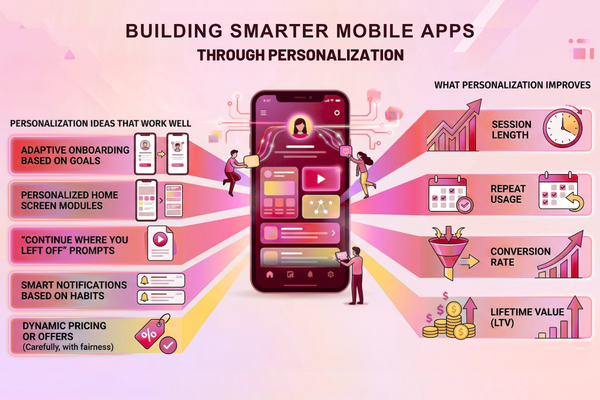
Personalization helps users feel the app “gets them.” That reduces decision fatigue and keeps people coming back.
Personalization ideas that work well
- Adaptive onboarding based on goals
- Personalized home screen modules
- “Continue where you left off” prompts
- Smart notifications based on habits
- Dynamic pricing or offers (carefully, with fairness)
What personalization improves
- Session length
- Repeat usage
- Conversion rate
- Lifetime value (LTV)
Personalization is one of the most direct ways to improve mobile apps because users see the value immediately.
Recommendation engines that increase revenue per user
Recommendation engines drive discovery. They also increase basket size in commerce and content consumption in media apps.
Where recommendations fit
- Products (“You may also like…”)
- Content (“Next best lesson…”)
- Communities (“People to follow…”)
- Features (“Try this tool…”)
Recommendation types
- Similar items (based on tags and attributes)
- Behavior-based (based on what similar users do)
- Context-based (time, location, intent)
When you tune recommendations around business goals, Mobile Apps that are smarter can lift revenue without adding more marketing spend.
AI chatbots and in-app assistants that cut support costs
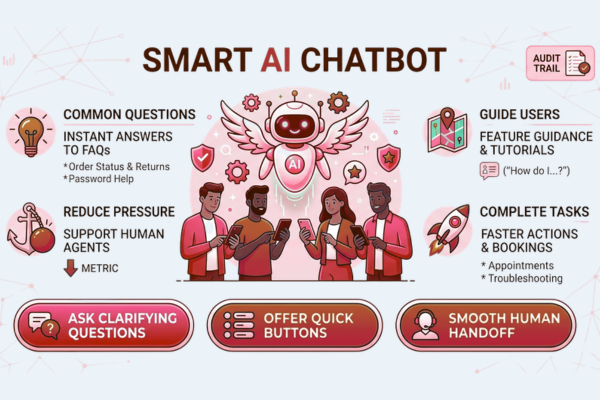
An AI chatbot can answer common questions, guide users, and reduce pressure on human agents. It can also help users complete tasks faster.
To power chat experiences, many teams rely on proven model providers like OpenAI, then add product rules and safety checks on top.
Best chatbot use cases in mobile apps
- Order status and returns
- Password and account help
- Feature guidance (“How do I…?”)
- Appointment changes
- Basic troubleshooting
What a good assistant should do
- Ask clarifying questions
- Offer quick buttons, not only text
- Hand off to a human smoothly
- Keep a clear audit trail for quality
If you want to explore implementation options, a structured plan through an experienced team matters. Many companies start by scoping chatbot and automation features within their broader AI development and delivery services so the assistant fits product goals and compliance needs.
Smart search and discovery: help users find value faster
Most users leave when they cannot find what they want. AI search reduces friction.
Smart search features users notice
- Autocomplete and query suggestions
- Typo tolerance
- Semantic search (meaning, not just keywords)
- Voice search for hands-free moments
- Filters that learn from behavior
Why does it boost profit
- Faster “aha” moment
- Higher conversion and fewer exits
- Less load on support teams
Search is a quiet hero behind many mobile apps, especially catalogs, marketplaces, and content platforms.
Predictive analytics: anticipate churn, demand, and next actions
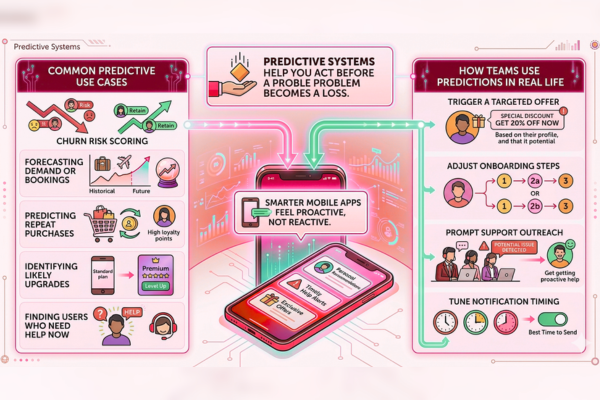
Predictive systems help you act before a problem becomes a loss.
Common predictive use cases
- Churn risk scoring
- Forecasting demand or bookings
- Predicting repeat purchases
- Identifying likely upgrades
- Finding users who need help now
How teams use predictions in real life
- Trigger a targeted offer
- Adjust onboarding steps
- Prompt support outreach
- Tune notification timing
This is where mobile apps start to feel proactive, not reactive.
Fraud detection and risk controls for safer mobile growth
If your app handles payments, credits, identity, or incentives, fraud is not optional to address.
AI-driven fraud signals
- Unusual login patterns
- Device fingerprint mismatches
- Abnormal transaction speed
- Repeated coupon abuse
- Suspicious location changes
Business wins
- Fewer chargebacks
- Less manual review
- Better user trust
- Reduced financial leakage
Risk systems are a core part of mobile apps in fintech, eCommerce, and subscription services.
Computer vision: turn cameras into conversion tools
Computer vision uses images and video to guide users. It can also remove steps from key workflows.
Strong mobile use cases for vision
- Document capture and auto-crop
- ID verification checks
- Barcode or product scanning
- Visual search (“find similar”)
- Damage detection for claims
Why it pays
- Shorter workflows
- Fewer data entry errors
- Higher completion rates
Vision features can make mobile apps feel “magical,” but the value is simple: less friction.
Voice and speech AI for faster, hands-free flows
Speech features help in driving, workouts, accessibility cases, and busy environments.
Practical speech features
- Voice commands for navigation
- Speech-to-text for notes and support
- Real-time transcription for meetings
- Voice search in catalogs
What to watch
- Background noise handling
- Language coverage
- Accessibility standards
Used well, voice helps mobile apps serve more users with less effort.
AI Features by Industry
Ecommerce Apps
- Product recommendations
- Dynamic pricing
- Visual search
- AI shopping assistants
Fintech Apps
- Fraud detection
- Risk scoring
- Spending insights
- Automated customer support
Healthcare Apps
- Symptom screening
- Appointment reminders
- Medical document processing
- Patient engagement
Education Apps
- Personalized learning
- AI tutoring
- Learning recommendations
- Progress prediction
This helps rank for:
- AI in ecommerce
- AI in fintech
- AI in healthcare
- AI in education
Feature vs Benefit table (what AI features do for your business)
| AI Feature | Business Benefit |
| Personalized onboarding | Faster activation and higher conversion |
| Recommendation engine | Higher revenue per user and more discovery |
| AI chatbot assistant | Lower support costs and faster resolution |
| Smart search | Fewer drop-offs and better engagement |
| Predictive churn scoring | Higher retention and targeted saves |
| Fraud/anomaly detection | Lower losses and stronger trust |
| Computer vision capture | Shorter flows and fewer errors |
| Voice/speech features | Better accessibility and hands-free use |
These are proven building blocks for mobile apps across many industries.
How AI Mobile App Development Works
Most successful AI projects follow a structured process:
- Discovery and business planning
- Data collection and preparation
- AI model selection
- Mobile app integration
- Testing and validation
- Deployment
- Continuous optimization
This section targets:
- AI app development process
- How to build an AI app
- AI mobile app development lifecycle
AI Development Type and Estimated Cost (table)
Cost depends on scope, integrations, data readiness, and compliance requirements. Here is a practical range many teams use for planning:
| AI Development Type | Estimated Cost |
| AI Chatbot | $10k – $50k |
| AI SaaS | $50k – $200k |
| Enterprise AI | $100k+ |
If you want a faster answer tied to your exact idea, many teams use a structured mobile app project estimate process so scope, risk, and timelines are clear early.
How to ship AI safely (without slowing your release cycle)
AI can move fast, but trust can break faster. Safety is part of profitability.
Simple guardrails that work
- Human review for sensitive actions
- Clear user feedback loops (“Was this helpful?”)
- Content filters for unsafe outputs
- Logging for audits and improvements
- Rate limits and fallback flows
Why does this protect ROI
- Fewer escalations
- Less brand risk
- Better compliance posture
- More predictable product quality
Teams that take safety seriously build Smarter Mobile Apps that scale with confidence.
Real-world inspiration: AI features in a shipping product
Seeing an AI-ready product in action helps teams make better decisions. For example, looking at how a live mobile product is designed and delivered, like this PlayerDex mobile app project case study, can spark ideas around user journeys, performance, and feature prioritization.
The takeaway: profitable AI is usually invisible. It sits inside the flows that users already want. That’s the core mindset behind mobile apps.
AI + ASO and SEO: make your app easier to find and keep
AI helps not only inside the app, but also in how people discover it.
For broader guidance, Google’s perspective on AI and marketing is worth following through Google AI resources, especially around responsible use and product innovation.
Practical optimization ideas
- Generate test variants for app store descriptions
- Cluster reviews into themes to fix churn drivers
- Predict which features improve ratings
- Create smarter onboarding that reduces early uninstall
Better discoverability plus better retention is how mobile apps win in competitive categories.
Start Your AI Development Project
Start Your AI Development Project
If your company is exploring AI solutions, our team can help you design and build scalable AI features that improve revenue, reduce support load, and protect your brand. The best path usually starts with a clear scope, measurable KPIs, and a roadmap that fits your release cycle, then moves into delivery with the right architecture and safeguards through our AI services for mobile product teams.
Conclusion
Profitability in mobile apps is rarely about one big feature. It is about small, consistent wins across the user journey. AI helps you get those wins faster and keep them longer. That is why so many teams are prioritizing Smarter Mobile Apps that adapt to users, reduce friction, and improve outcomes without adding complexity for the customer.
Start with the highest-impact areas: onboarding, discovery, support, and retention. Personalization can lift conversion by showing people what matters sooner. Recommendation engines increase basket size, content consumption, and repeat usage. Smart search prevents users from getting stuck and leaving. AI chatbots reduce cost-to-serve while improving response time. Predictive analytics can warn you before churn happens, so you can act early with the right offer or help. Fraud detection protects revenue and trust, especially in apps with payments, rewards, or subscriptions. Computer vision and voice features cut steps from workflows and open your product to more users.
The key is to treat AI like a business tool with clear metrics. Decide what you want to improve: LTV, churn, support tickets, conversion, or operational cost. Then ship one feature, measure it, and iterate. Add safety guardrails early, especially for assistants and automated decisions. Keep the UX simple. The AI should feel like the app is “just better,” not like the user is testing a lab experiment.
If you do this well, mobile apps become easier to run and easier to grow. Your team spends less time on repetitive tasks and more time on product improvement. Users get faster answers, better recommendations, and smoother flows. Over time, this compounding effect is what turns a “good app” into a market leader.
FAQs
1) What is the fastest AI feature to add to create mobile apps?
A support chatbot or smart search is often faster, because it can be added without changing your core product logic. It also shows quick value in reduced support load and fewer user drop-offs.
2) Do I need a lot of data to build mobile apps?
Not always. Many features can start with rules plus lightweight machine learning. As usage grows, models improve. The key is tracking the right events from day one.
3) How do I measure ROI from AI features?
Pick 1–2 KPIs per feature, such as conversion rate, churn, average order value, ticket volume, or time-to-resolution. Run an A/B test where possible.
4) Are AI features risky for brand trust?
They can be if you skip guardrails. Add safe fallbacks, human handoff, and monitoring. Keep outputs explainable in simple terms.
5) What industries benefit most from mobile apps?
eCommerce, fintech, health, education, travel, logistics, and media see strong results because AI improves discovery, reduces manual work, and supports personalization.