Modern mobile apps need content that updates fast. They also need pages, product info, help articles, and promotions that stay consistent across iOS, Android, web, and even kiosks. That is where a Headless WordPress CMS fits well.
This approach keeps WordPress as your content hub while delivering content to any screen through APIs. Your app gets clean content on demand. Your marketing team still uses the WordPress editor they already know. And your development team can build modern front ends without being locked into WordPress themes.
In this guide, you will learn what headless means, how the setup works, and how it supports mobile app growth. We will also cover common use cases, SEO basics, cost ranges, and key trade-offs. If you’re planning an app that needs fresh content, fast delivery, and long-term flexibility, this architecture is worth serious consideration.
What is Headless WordPress?
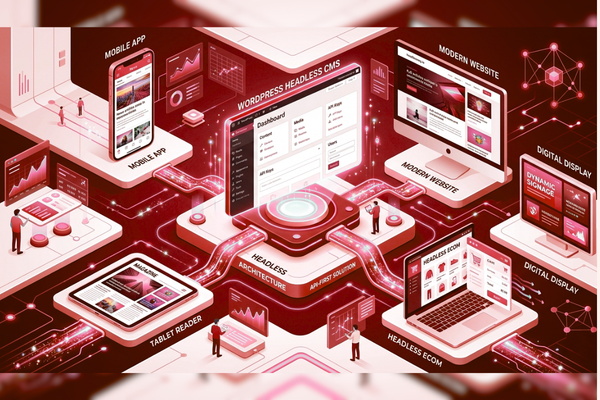
It is an architecture where WordPress stores and manages content, while the website or app front end is built separately. Content is delivered through APIs, such as REST or GraphQL, instead of traditional WordPress themes.
A Headless CMS is separated into two parts:
- Back end (content): where editors write and manage content
- Front end (display): where users read content in an app or website
When people ask what it is, the simplest answer is:
- WordPress becomes your content engine
- Your app becomes the main “face” users interact with
- APIs connect them
In this setup, you usually keep:
- WordPress admin
- Posts, pages, media library
- Users and workflows
But you replace:
- Theme-based rendering
- Many page builder dependencies (in most cases)
Why it Matters for Mobile Apps
Mobile apps often need content that changes weekly, daily, or hourly. Shipping a new app release for every content update is slow and expensive. It solves that by letting your team publish content once and deliver it everywhere.
Common mobile app content powered it:
- In-app blogs and news feeds
- Help center and FAQs
- Product catalogs
- Location pages (stores, clinics, offices)
- Events and promotions
- Multi-language content
Business wins you can expect:
- Faster content updates without app store approvals
- Better user experience with faster screens
- Easier A/B testing and personalization
- One content source for app + website
If your company builds apps for clients, offering WordPress Headless CMS options can also increase project value, because clients get control over content without touching code.
Its Architecture
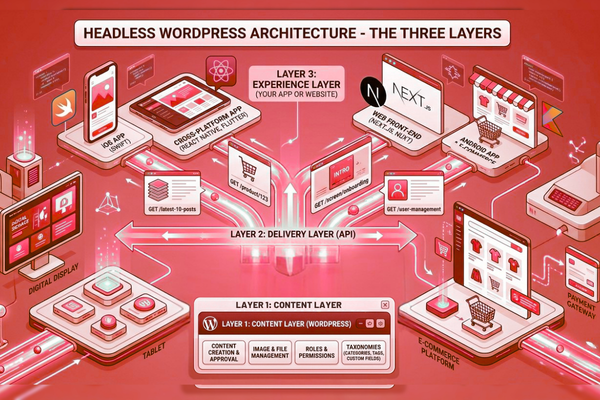
This architecture is typically made up of three layers:
1) Content Layer (WordPress)
WordPress is used for:
- Creating and approving content
- Managing images and files
- Setting roles and permissions
- Organizing categories, tags, and custom fields
2) Delivery Layer (API)
This is where the WordPress API comes in. Your app requests data like:
- “Give me the latest 10 posts.”
- “Give me product details for item 123.”
- “Give me the content for the onboarding screen.”
3) Experience Layer (Your App or Website)
Your developers build:
- iOS apps (Swift)
- Android apps (Kotlin)
- Cross-platform apps (React Native, Flutter)
- Web front ends (Next.js, Nuxt, etc.)
With this architecture, each layer can evolve independently without disrupting the others. That flexibility is one of the main reasons businesses adopt it.
Key Benefits for Business Teams
This architecture is more than a developer choice; it is a business strategy. It helps content teams publish faster while giving product teams the flexibility to scale and evolve.
Core Benefits
- Faster releases: publish content without rebuilding the app
- Better performance: modern front ends load quickly
- Stronger security posture: You can reduce public WordPress exposure
- Multi-channel delivery: app, web, email, kiosks, and more
- Cleaner design freedom: no theme limits
Business Value Section (with automation)
Benefits of AI automation include:
- reduced operational costs
- faster workflows
- improved accuracy
- better content tagging and search
- quicker translation support
This architecture pairs well with automation because content is already structured and delivered through APIs. That makes it easier to integrate AI tools for summaries, search, and personalized recommendations.
Headless WordPress vs Traditional WordPress
This is the decision point for many teams.
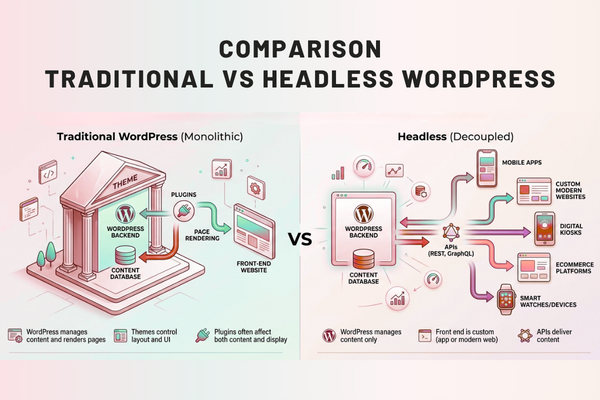
Traditional WordPress (Monolithic)
- WordPress manages content and renders pages
- Themes control layout and UI
- Plugins often affect both content and display
Headless (Decoupled)
- WordPress manages content only
- Front end is custom (app or modern web)
- APIs deliver content
When traditional WordPress is still a good fit
- Small marketing sites
- Simple blogs with limited growth needs
- Teams that rely heavily on theme features
When Headless WordPress CMS is a better fit
- Mobile apps that need dynamic content
- High-traffic sites that need speed
- Multi-brand or multi-site setups
- Products that need custom UI and logic
WordPress API Options (REST vs GraphQL)
This architecture relies on APIs to deliver content. The most common options are:
REST API (built-in)
WordPress includes REST by default. It is widely supported and easy to start with.
Good for:
- Standard content apps
- Simple integrations
- Quick MVPs
GraphQL (via plugin)
GraphQL is popular for complex apps. It lets the app request exactly what it needs.
Good for:
- Large content models
- Complex screens
- Performance tuning for data-heavy views
If you want the official background on REST endpoints and structure, the WordPress team documents it in the REST API handbook.
In practice, the choice depends on:
- data complexity
- caching strategy
- app needs
- developer skills
Building with it (Step-by-Step)
A reliable build process reduces risk. Here is a simple, business-friendly roadmap.
Step 1: Define content types
List what you need:
- Articles
- FAQs
- Products
- Locations
- App screens (onboarding, banners)
Step 2: Structure content in WordPress
Most teams use custom fields and custom post types so content stays consistent.
Step 3: Set up API delivery
- Configure endpoints
- Add authentication where needed
- Apply caching rules
Step 4: Build the front end
Your app pulls content and renders it with your design system.
Step 5: QA with real content
Test:
- empty states
- long titles
- large images
- multiple languages
If you are planning effort and budget, it helps to start with a clear scoping step, like a structured project estimate. Many teams use a guided workflow similar to this kind of app and CMS project estimation process.
Headless CMS for Websites (SEO, Speed, and Content Control)
A common fear is: “Will SEO suffer?” The answer: not if you build it correctly. A Headless CMS for Websites can rank very well because performance and technical SEO can improve.
SEO basics to plan for
- Server-side rendering (SSR) or static generation for key pages
- Clean URLs and redirects
- Metadata support (title tags, descriptions, Open Graph)
- XML sitemaps (generated on the front end or via tools)
- Schema markup for rich results
Speed basics to plan for
- Image optimization (WebP/AVIF)
- CDN caching
- API response caching
- Lazy loading where appropriate
Security basics to plan for
- Lock down WordPress admin
- Use least-privilege roles
- Keep plugins minimal and updated
For SEO guidance straight from Google, use the Google Search Central documentation. A well-built implementation can improve Core Web Vitals, helping support better search rankings and higher conversion rates.
Feature vs Benefit
Here is a simple view you can share with non-technical stakeholders.
| Feature | Business Benefit |
| API-based content delivery | Content appears in apps and sites without rework |
| Separate front end | Faster experiences and more design freedom |
| Structured content models | More consistent screens and fewer content errors |
| Role-based access in WordPress | Safer publishing and clearer approvals |
| Easier integration with tools | Connect search, analytics, and automation faster |
When presenting an implementation roadmap, this type of table helps align product, marketing, and engineering teams.
Real-World Patterns (What Works Best)
This architecture can be implemented in different ways. These are some of the most common patterns used in mobile-first projects:
Pattern A: App-first + marketing site
- The mobile app is the main product
- Website supports acquisition and SEO
- WordPress manages content for both
Pattern B: Multi-brand content hub
- One WordPress backend
- Multiple front ends per brand or region
- Shared content standards
Pattern C: Commerce + content blend
- The commerce system handles checkout
- WordPress handles content, guides, and landing pages
- App pulls both for a smooth user journey
If you want examples of how strong builds and clean UX support business outcomes, review projects like this modern digital build for Ecotech Windows and Doors and this product-focused experience for Bundlbox. These types of projects often benefit from decoupled thinking, even when WordPress is only part of the stack.
Costs, Timelines, and Resourcing (Plus an AI Cost Table)
This approach usually involves more initial development than a traditional WordPress website. Over time, however, it can be more cost-effective thanks to better scalability and fewer redevelopment efforts.
Typical timeline ranges
- MVP (basic content + 1 channel): 4–8 weeks
- Full build (content types + app + SEO): 8–16 weeks
- Enterprise (multi-site + workflows + integrations): 3–6+ months
Cost drivers (simple list)
- Number of content types
- Number of channels (app + web + more)
- Authentication needs
- Search and personalization
- Migration from an old site
- SEO requirements (SSR/static generation)
Required table (AI development cost examples)
Even if your main project is content, many teams add AI features later (search, summaries, support). Here is a simple reference table:
| AI Development Type | Estimated Cost |
| AI Chatbot | $10k – $50k |
| AI SaaS | $50k – $200k |
| Enterprise AI | $100k+ |
If you are exploring AI features around content workflows, it helps to review credible sources like OpenAI and plan how AI will fit into your product roadmap.
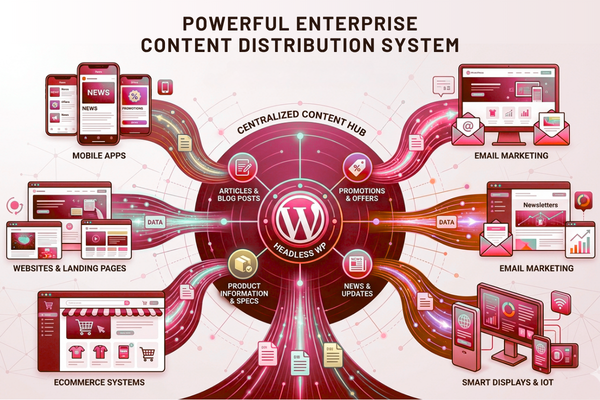
This approach simplifies these upgrades by keeping content centralized, structured, and ready for delivery across multiple platforms.
Common Pitfalls
To get the most out of this setup, teams should avoid a few common pitfalls.
Pitfall 1: Treating it like a theme project
Fix:
- Plan content models first
- Design screens around real content
Pitfall 2: Not planning preview workflows
Fix:
- Set up preview URLs
- Add staging environments for editors
Pitfall 3: Weak caching strategy
Fix:
- Cache at the API layer
- Use a CDN for media
- Define cache invalidation rules
Pitfall 4: Plugin overload
Fix:
- Keep WordPress lean
- Prefer custom code for critical workflows
A well-planned implementation transforms this architecture into a reliable, predictable solution that is easier to maintain and scale.
Start Your AI Development Project
If your company is exploring AI solutions, our team at Canadian Software Agency can help you design and build scalable AI platforms that integrate seamlessly with this architecture. This includes AI search, chat support, content automation, and analytics-ready data flows. To see the full scope of what we offer, explore our AI services for product and platform teams. And if you want a clear budget and timeline, use our project estimation process for apps and digital platforms. A strong app needs a strong content engine. This setup is often the foundation that makes it possible.
Conclusion
Choosing this architecture is a practical move when your business needs content to be delivered consistently across multiple digital channels. Mobile apps, web apps, landing pages, and even in-store displays can all pull from one trusted source. That means fewer content silos, fewer duplicated efforts, and faster updates without waiting for app store approvals.
The biggest reason teams adopt this architecture is the level of control it provides. Marketing teams retain a familiar editing experience and publishing workflows, while product teams gain the flexibility to build a front end that delivers the app experience they envision. Engineering teams get the freedom to use modern frameworks and performance tactics without fighting theme limits. When done well, this setup reduces long-term friction and makes growth easier.
Still, this architecture is not a “flip-the-switch” upgrade. It requires careful planning. You need to define your content model, decide how content previews will work, and build a front end that delivers both strong SEO performance and fast page speeds. You also need a solid approach to caching, security, and ongoing maintenance. These are not blockers, but they do require ownership and a clear roadmap.
If you’re building a content-rich mobile app or your brand requires frequent content updates, this architecture provides a strong foundation. It also supports future enhancements such as improved search, personalized experiences, and AI-powered features because structured content is easier to reuse, integrate, and automate.
The best next step is simple: map your channels (app, web, email), list your content types, and determine how quickly you need to publish updates. If speed, scalability, and flexibility are priorities, this architecture is likely the right fit. With the right implementation, it can become a long-term growth asset rather than just another technology choice.
FAQs
1) What is Headless WordPress in simple terms?
It means WordPress manages and stores your content, while a separate website or application displays it. Instead of relying on a traditional WordPress theme, content is delivered through APIs such as the WordPress REST API or GraphQL.
2) Is it good for SEO?
Yes, if you use SSR or static generation for key pages, manage metadata, and build clean URLs. Many Headless CMS for Websites setups rank very well when performance is strong.
3) What is the main difference between it and Traditional WordPress?
Traditional WordPress uses themes to display content. In contrast, this architecture separates content management from the front end, providing greater flexibility and better support for delivering content across multiple channels.
4) Does a WordPress Headless CMS cost more?
Often, yes, at the start, because you build a custom front end. But it can cost less over time due to reuse across channels and fewer rebuilds.
5) Which API should I use for its Development?
REST is a common starting point. GraphQL can be better for complex apps. The best choice depends on content structure, performance needs, and team skills.