Businesses are moving fast to add AI to customer and team workflows. AI-Powered Web Applications help you do that without rebuilding everything from scratch. They can answer questions, predict outcomes, automate routine tasks, and turn messy data into clear actions. That means better service, lower costs, and faster decisions.
In this guide, you will learn what they are, where they create real value, and how to plan, build, and scale them. We will keep it practical and business-focused. You will also see common use cases, feature ideas, cost ranges, and the key steps for safe launch. If you are a mobile app development company (or work with one), this is also a great way to extend your app’s value by sharing the same AI backend across web and mobile.
What Are AI-Powered Web Applications?
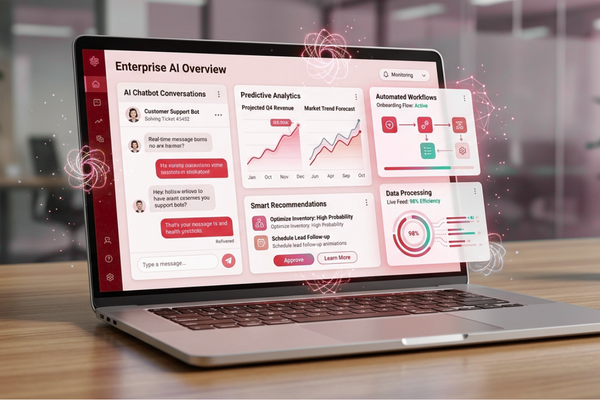
They are web-based products that use AI models (like machine learning or generative AI) to understand data, make predictions, generate content, or automate decisions so users can complete tasks faster and with less manual work.
These apps can be simple or advanced. Some only add a smart search box. Others run complex workflows across many systems.
What makes them “AI-powered”?
They usually include one or more of these abilities:
- Understand text, images, or speech
- Learn patterns from data and predict outcomes
- Recommend next steps
- Generate drafts, summaries, or answers
- Automate repeated work with rules + AI
In AI web development, the goal is not “AI for AI’s sake.” The goal is a better product outcome: speed, accuracy, and scale.
Why Businesses Invest in AI-Powered Web Apps
Most leaders adopt it for one simple reason: they pay back quickly when focused on the right workflow.
Benefits of AI automation include:
- reduced operational costs
- faster workflows
- improved accuracy
- quicker customer response times
- better use of team capacity
- more consistent service quality
Where the ROI often shows up first
- Support teams: fewer tickets per agent
- Sales teams: better lead scoring and follow-ups
- Operations: fewer manual handoffs
- Finance: quicker document handling and review
Many companies start with a small, high-impact pilot, then expand into AI-powered software solutions across departments.
High-Value Use Cases (That Customers Actually Want)
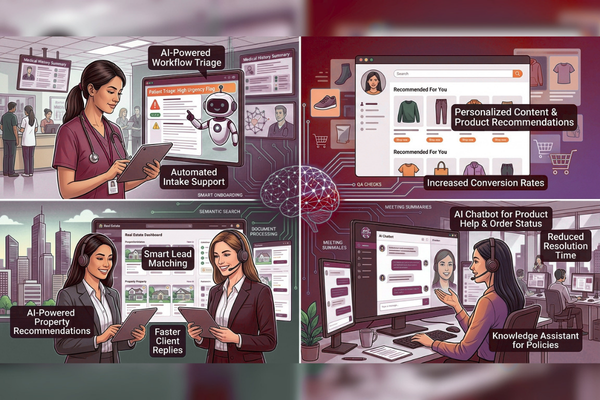
The best AI-Powered Web Applications solve one painful problem very well, then grow.
Customer-facing use cases
- Smart onboarding that adapts to user answers
- AI chat for product help and order status
- Personalized content and product recommendations
- Faster search across large catalogs (semantic search)
Internal team use cases
- Document processing (invoices, claims, forms)
- Knowledge assistants for policies and SOPs
- Meeting notes, summaries, and action items
- QA checks for support and sales conversations
Industry examples
- Real estate: listing summaries, lead matching, faster replies
- Marketplaces: fraud signals, trust scoring, smarter search
- Healthcare (with care): intake support and workflow triage
If you want inspiration, see how product outcomes are shaped in real builds like this Luca marketplace case study, where strong UX and clear flows make advanced features easier to use.
Core Building Blocks of AI-Powered Web Apps
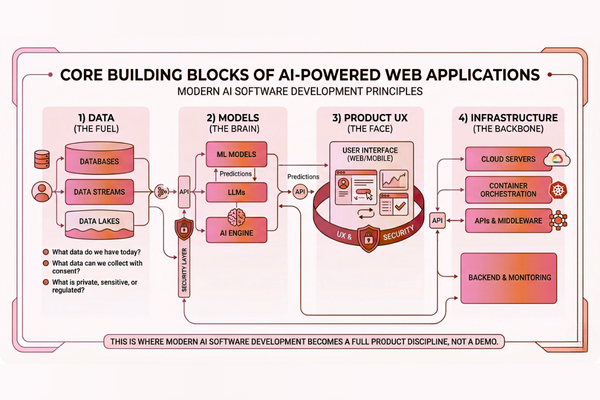
Strong AI application development needs more than a model. These are the essentials.
1) Data (the fuel)
You need clear answers to:
- What data do we have today?
- What data can we collect with consent?
- What is private, sensitive, or regulated?
For many Machine learning web applications, data quality matters more than model choice.
2) Models (the brain)
Common options include:
- Pre-trained APIs (fast to start)
- Fine-tuned models (more tailored)
- Classic ML models (great for prediction tasks)
3) Product UX (the face)
AI features must be easy to trust:
- Show sources when possible
- Provide “review and approve” steps
- Keep actions reversible
4) Infrastructure (the backbone)
You may need:
- A secure backend for prompts, policies, and logs
- A vector database for knowledge search
- Monitoring for quality, cost, and latency
This is where modern AI software development becomes a full product discipline, not a demo.
Choosing the Right AI Approach (ML vs. Generative AI)
Not every problem needs a chatbot. Picking the right approach saves budget and reduces risk.
When classic ML is a better fit
Use ML when you need:
- Prediction (churn, demand, risk)
- Classification (spam, routing, tagging)
- Forecasting and anomaly detection
These are common in Intelligent web applications for operations and analytics.
When Generative AI is a better fit
Use Generative AI development when you need:
- Summaries of long content
- Drafting emails, messages, reports
- Q&A over internal knowledge
- Natural language search and discovery
For many teams, the best plan is a hybrid: ML for scoring + generative AI for communication.
Cost table (planning ranges)
| AI Development Type | Estimated Cost |
| AI Chatbot | $10k – $50k |
| AI SaaS | $50k – $200k |
| Enterprise AI | $100k+ |
Costs change based on data readiness, compliance needs, and how much AI integration is required across systems.
To get a realistic budget range for your scope, a structured project cost estimate for AI-enabled builds helps you define features, timelines, and tradeoffs early.
Step-by-Step: How to Build AI-Powered Web Apps
This process works well for both startups and Enterprise AI applications.
1) Discovery (1–2 weeks)
Define:
- The user problem
- The workflow steps
- Success metrics (time saved, cost saved, accuracy)
- Data sources and privacy limits
Output:
- Scope, risks, and roadmap
- A simple KPI dashboard definition
2) Prototype (1–3 weeks)
Build a small prototype to prove:
- The AI can answer the right questions
- The UI flow makes sense
- Latency and cost are acceptable
This is where Custom AI web applications start to take shape: tailored to your real users, not generic demos.
3) MVP build (4–10 weeks)
Deliver:
- Core features
- Admin controls (prompts, policies, content sources)
- Logging and basic monitoring
4) Quality and safety testing
Test for:
- Incorrect answers and edge cases
- Prompt injection attempts
- Bias and unsafe outputs
- Performance under load
5) Launch and improve (ongoing)
After launch:
- Monitor user feedback
- Track success metrics weekly
- Improve prompts, data, and UX continuously
This is the practical reality of AI-Powered Web Apps: they get better over time.
AI Integration Patterns That Work in Real Product
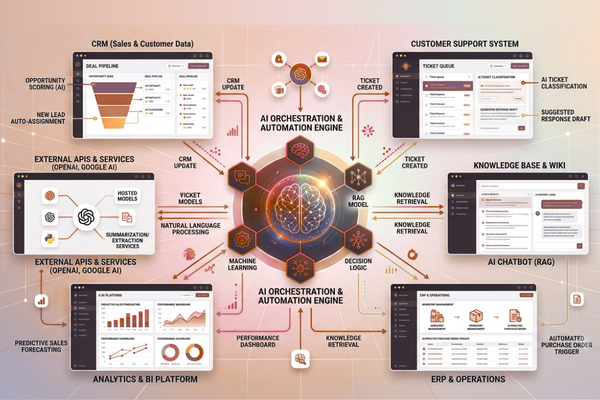
Most value comes from connecting AI to your existing tools. Strong AI integration turns AI from a feature into a workflow engine.
Pattern 1: API-first AI (fast start)
Use hosted AI APIs for:
- Chat and Q&A
- Summaries
- Extraction (entities, key fields)
Reference providers and docs when planning:
Pattern 2: “Chat with your knowledge” (RAG)
RAG (retrieval + generation) helps your app answer using your content:
- Policies
- Help docs
- Product guides
- Internal wiki pages
This is common in AI-Powered Web Apps because it reduces hallucinations and keeps answers grounded.
Pattern 3: AI as an automation layer
Examples:
- Classify incoming requests
- Route tickets to the right team
- Draft replies for review
- Trigger tasks in CRM/ERP tools
This is where AI-powered software solutions can change team output without adding headcount.
UX and Product Design for Trustworthy AI
Great AI with weak UX still fails. Users need control, clarity, and confidence.
UX rules that keep adoption high
- Keep AI optional at first (assist, don’t force)
- Show what data the AI used when possible
- Let users correct, regenerate, or edit
- Save “before and after” states for safety
- Add clear feedback buttons (“helpful / not helpful”)
Feature → Benefit table (for planning)
| Feature | Benefit |
| Suggested replies with edit mode | Faster support without losing human tone |
| Source links in answers | Higher trust and easier validation |
| Confidence tags (low/medium/high) | Better decisions and fewer mistakes |
| Admin prompt controls | Consistent outputs across teams |
| Audit logs | Compliance support and faster issue review |
When you design Intelligent web applications, aim for “human-in-the-loop” where it matters. That balance often drives the best business results.
If you want to see how user-first design supports advanced features, this ReadilyHome product story is a good example of building clarity into complex user journeys.
Security, Privacy, and Compliance (Plain English)
Security is not a “later” step for AI-Powered Web Apps. It is part of the build.
Key security practices
- Do not send sensitive data to third-party models unless approved
- Mask or redact PII where possible
- Use role-based access control (RBAC)
- Store prompts and outputs securely
- Log access and actions for audits
Reduce risk from day one
- Add content filters for unsafe output
- Set strict system instructions and policies
- Test against prompt injection
- Use allow-lists for tools and actions
For Enterprise AI applications, compliance needs may include SOC 2, HIPAA, GDPR, or internal vendor reviews. Plan these early so the launch is not delayed.
Scaling and Maintenance: Keeping Quality High Over Time
Once users rely on your app, you must keep it stable, fast, and cost-efficient.
What to monitor weekly
- Answer quality (user ratings + review sampling)
- Latency (slow responses kill adoption)
- Token usage and model costs
- Top failure modes and edge cases
Common scaling moves
- Cache frequent answers
- Use smaller models for simple tasks
- Add routing: “easy questions” vs “hard questions.”
- Improve data retrieval to reduce long prompts
This is also where ongoing AI software development pays off: you treat AI like a living product feature, not a one-time install.
Many companies start with one workflow, then expand into broader AI-Powered Web Apps across teams.
Start Your AI Development Project
If your company is exploring AI-Powered Web Applications, our team at Canadian Software Agency can help you design and build scalable AI features that fit your product and your users. Explore our AI services for strategy, build, and launch to see how we support discovery, delivery, and long-term improvement.
Conclusion
Building AI-Powered Web Applications is no longer only for big tech. With the right plan, you can launch a useful AI feature quickly, prove value, and then expand safely. The best results come from choosing one workflow that matters, setting clear success metrics, and building a product experience that users can trust.
A strong approach starts with discovery. You map the user journey, define what “better” looks like, and check what data you can use responsibly. Then you prototype to confirm that the AI can perform the task at an acceptable cost and speed. This early validation helps you avoid spending months on features that look impressive but do not move key business numbers.
Next, you build the MVP with quality and safety in mind. That includes admin controls, logging, and clear UX patterns like “review and approve.” These steps help users feel in control, which drives adoption. As you grow, it should also improve. You monitor quality, track the real cost per task, and keep refining prompts, retrieval, and user flows based on live feedback.
It also helps to pick the right AI style for the job. Classic ML can be best for scoring and prediction. Generative AI can be best for summaries, search, and drafting. Many winning products combine both. That is how modern teams deliver AI-powered software solutions that feel seamless, not bolted on.
Finally, remember that AI value often comes from connections. When AI-Powered Web Apps are integrated with your CRM, support desk, knowledge base, and internal tools, they become workflow engines. That is where time savings and service improvements compound. If you treat AI as a product capability measured, improved, and governed—you can build experiences that scale across teams, channels, and even your mobile apps, while staying secure and business-ready.
FAQs
1) How long does it take to build AI-Powered Web Apps?
A focused MVP often takes 6–12 weeks. Complex builds with deep integrations or compliance reviews can take longer.
2) Do we need our own data to start?
Not always. Many teams start with public content, help docs, or structured internal files. But for advanced personalization and prediction, your own data helps a lot.
3) What is the biggest reason AI projects fail?
Unclear success metrics. If you cannot measure time saved, accuracy, or cost reduction, it’s hard to improve the product after launch.
4) Can one AI backend support both web and mobile apps?
Yes. A shared AI layer is common. It keeps behavior consistent across platforms and reduces maintenance.
5) Are chatbots the best starting point?
Often, yes, if they are connected to real knowledge and real workflows. If not, a simple automation or prediction feature may deliver better ROI.