

Why Website Speed Is a Big Deal
Your website speed matters more than you think.
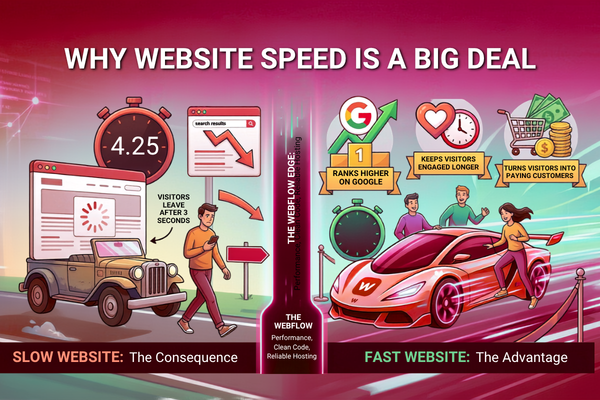
If your site takes more than three seconds to load, most visitors will leave. They will not wait. They will go to a competitor instead.
That is why Webflow performance is getting so much attention from businesses right now.
Webflow is a website building platform. It helps you create fast, beautiful websites without writing complex code. It comes with built-in speed tools, clean code output, and reliable hosting all in one place.
Webflow performance gives businesses a real edge. Faster websites rank higher on Google. They keep visitors engaged longer. And they turn more visitors into paying customers.
In this blog, we will cover everything you need to know. You will learn what makes Webflow fast, how it compares to other platforms, and why it is a smart business investment.
Let us get started.
What Is Webflow? A Simple Explanation
Webflow is a website builder. But it is much more powerful than basic tools like Wix or Squarespace.
It lets you design websites visually. At the same time, it writes clean code in the background. You get full design control without needing to code everything by hand.
Quick Definition: Webflow is a visual web development platform. It builds responsive, fast-loading websites using clean HTML, CSS, and JavaScript all generated automatically as you design.
Here is what Webflow gives you out of the box:
- Clean code — No messy, bloated output
- Built-in hosting — Powered by Amazon Web Services
- CMS tools — Manage content without a developer
- Responsive design — Looks great on all screen sizes
- No plugins needed — Everything is built in
It sits in the sweet spot between simple drag-and-drop builders and full custom development. That makes it ideal for businesses that want quality without the high cost.
Webflow Performance: The Core Speed Advantages
Webflow performance stands out for several clear reasons. Let us break them down one by one.
Fast Page Load Times
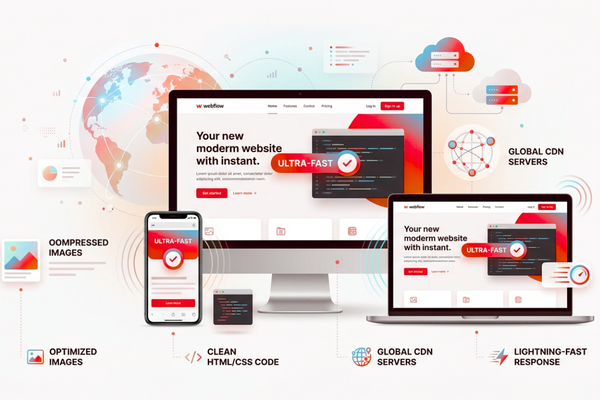
Speed starts with where your website lives. Webflow hosts all websites on Amazon Web Services (AWS). It also uses a global Content Delivery Network (CDN).
What does that mean for you?
- Your site loads from a server close to each visitor
- International users get fast load times too
- Server response times are very low
Google has confirmed that page speed affects your search rankings. A faster site means more visibility. According to Google’s Core Web Vitals documentation, performance directly impacts how your site ranks in search results.
Clean, Lightweight Code
WordPress websites often use many plugins. Each plugin adds extra code. That extra code slows your site down.
Webflow is different. It generates:
- Lean, structured HTML
- Optimized CSS files
- Minimal JavaScript
Less code means faster loading. It is that simple.
Automatic Image Optimization
Big images slow websites down. Webflow handles this for you automatically.
When you upload an image, Webflow:
- Compresses it to reduce file size
- Converts it to the faster WebP format
- Serves the right size for each device
You do not have to do anything manually. Webflow takes care of it all.
Webflow vs. WordPress: Which One Performs Better?
Many businesses use WordPress. It is a popular platform. But when it comes to speed and performance, there are some key differences worth knowing.
| Feature | Webflow | WordPress |
| Hosting | Built-in AWS CDN | Requires separate setup |
| Code Quality | Clean and lightweight | Often bloated from plugins |
| Image Optimization | Automatic | Manual or plugin-required |
| Security | Fully managed | User must manage |
| Page Speed Score | 85–95 (Google Lighthouse) | 50–75 (Google Lighthouse) |
| Plugin Dependency | None | Very high |
| Updates | Automatic | Manual |
The numbers speak clearly. Webflow sites score significantly higher on performance tests.
For businesses building customer-facing products or digital platforms, these differences have a direct impact. If you are planning a larger digital build, it is worth understanding how Webflow performance fits alongside other tools, especially solutions like custom AI-powered digital services that add smart features to your site.
How Webflow Performance Helps Your SEO
Search engines love fast websites. Webflow performance supports better SEO in several direct ways.
Clean Code Helps Google Crawl Your Site
Google sends bots to read and index your website. Clean, lightweight code makes that process easier.
Benefits include:
- Faster crawl times
- Better content indexing
- Higher relevance in search results
Built-In SEO Controls
Webflow includes everything you need for on-page SEO:
- Custom meta titles and descriptions
- Open Graph tags for social sharing
- Automatic sitemap generation
- 301 redirect management
- Alt text fields for every image
No extra plugins required. No extra cost.
Core Web Vitals Alignment
Google measures user experience through something called Core Web Vitals. These are three key speed metrics:
- LCP (Largest Contentful Paint) — How fast the main content loads
- FID (First Input Delay) — How fast the page reacts to user input
- CLS (Cumulative Layout Shift) — How stable the layout is while loading
Webflow websites are built to score well on all three. That means better rankings and more organic traffic for your business.
Webflow Hosting: Why It Is Built for Speed
The hosting setup behind Webflow is one of its biggest Webflow performance advantages.
Here is what you get with every Webflow plan:
- Amazon Web Services (AWS) — One of the most reliable hosting providers in the world
- Fastly CDN — Delivers your content from servers around the globe
- Free SSL certificate — Keeps your site secure and trusted by browsers
- Automatic backups — Your data is always safe
You do not need to manage any of this yourself. There are no server settings to configure. No caching plugins to install. No uptime monitoring tools to set up.
Everything runs automatically in the background.
This is a huge benefit for small businesses and startups. You get enterprise-level hosting without needing an IT team.
Webflow CMS: Fast Performance for Content-Heavy Websites
Does your website have a blog, news section, or product catalogue? Then the Webflow CMS is worth knowing about.
The Webflow CMS is designed with speed in mind. Here is how it works differently from traditional platforms:
- Static-like page rendering — Pages load like simple files, even when using dynamic content
- Pre-rendered pages — Pages are built in advance, so they load instantly
- No live database calls — This removes a major cause of slow load times
The result? Your content-heavy website stays fast, even as it grows.
Easy for Non-Technical Teams
The Webflow CMS editor is simple to use. Your marketing team can:
- Write and publish blog posts
- Update product pages
- Edit text and images
No developer needed for everyday updates. This saves time and reduces costs.
Real Business Value of Webflow Performance
Let us connect Webflow performance to real business results. This is what matters most.
Key Business Benefits:
- Lower bounce rates — Fast pages keep visitors on your site longer
- Higher conversions — Speed directly increases form fills, sign-ups, and purchases
- Better search rankings — Fast, clean code helps you rank higher on Google
- Reduced costs — Less developer time needed for updates and fixes
- Faster launches — Get your website live in days, not months

Here is a simple overview of how Webflow fits different project types:
| Project Type | Webflow Advantage | Time to Launch |
| Marketing Website | Fast design and built-in SEO tools | 1–3 weeks |
| Portfolio Site | Clean visuals and lightweight code | 3–7 days |
| Blog or Content Hub | CMS tools and fast page rendering | 1–2 weeks |
| SaaS Landing Page | Conversion-ready and performance-first | 1–2 weeks |
| E-Commerce Store | Webflow Commerce plus fast loading | 2–4 weeks |
For a real example of how clean design and smart development come together, take a look at how the StreamStyle digital product was built. It shows how performance-first thinking drives better user results.
Animations in Webflow: Beautiful and Still Fast
Many people assume animations slow websites down. With Webflow, that is not the case — when done right.
Webflow handles animations smartly:
- GPU-accelerated animations — Processing is offloaded to the graphics card, not the browser
- Trigger-based interactions — Animations only run when a user scrolls or clicks
- No third-party libraries needed — Less external code means faster load times
You can have a visually impressive website without hurting your speed scores.
The key is keeping animations simple and purposeful. Avoid heavy parallax effects on mobile. Skip autoplay videos. Use motion to guide users, not just to look fancy.
Webflow Mobile Performance: Fast on Every Device
More than 60% of all web traffic comes from mobile devices. Your mobile performance matters a lot.
Webflow performance on mobile is strong because:
- Responsive layouts are built directly into the design process
- Images automatically resize for smaller screens
- Lightweight code loads faster on slower mobile connections
- No separate mobile version of your site is needed
Google now uses mobile-first indexing. That means it ranks your site based on how the mobile version performs. Webflow is built with this in mind from the very start.
For a great example of fast, mobile-ready design in action, the Revo Video project shows how speed and visual quality can work together without compromise.
Common Mistakes That Hurt Webflow Performance
Even a great platform needs to be used correctly. Here are the most common mistakes that slow Webflow sites down:
Avoid These Performance Killers:
- Too many custom fonts — Each font file adds extra load time. Stick to one or two fonts
- Large video files uploaded directly — Use YouTube or Vimeo embeds instead
- Too many third-party scripts — Chat tools, analytics, and ad scripts all add weight
- Not using lazy loading — Turn on lazy loading for images that appear lower on the page
- Skipping mobile testing — Always check how your site performs on real mobile devices
Fixing these issues is simple. And the performance gains are immediate.
Start Your Webflow Project Today
Is your current website slow, outdated, or hard to manage?
It might be time for a change.
Webflow performance gives your business a real competitive advantage. Faster load times. Better search rankings. Higher conversions. And a website your team can actually manage.
At Canadian Software Agency, we help businesses design and launch high-performance Webflow websites. We build sites that are fast, functional, and ready to grow with your business.
Here is what we offer:
- Custom Webflow design and development
- Performance-first build approach
- SEO setup and optimization
- Ongoing support and updates
Get a free project estimate today and let us show you what a fast, well-built Webflow site can do for your business.
Conclusion: Webflow Performance Is One of the Smartest Investments You Can Make
Let us bring everything together.
Webflow performance is not just a technical topic. It is a business topic.
A fast website makes money. A slow website loses it.
Every second of delay costs you visitors. Every extra plugin adds risk. Every manual update wastes time. Webflow solves all of these problems in one platform.
Here is a quick recap of what we covered:
- Webflow generates clean, lightweight code that loads fast
- AWS and Fastly CDN hosting deliver your site quickly around the world
- Automatic image optimization saves time and improves speed
- Core Web Vitals alignment helps your site rank higher on Google
- Mobile-first design is built into every Webflow project
- CMS architecture keeps content sites fast even at scale
- No plugin dependency means fewer risks and less bloat
The message is clear. Webflow performance gives you speed, control, and results all without the complexity of traditional development.
Your competitors are already thinking about website speed. The question is whether you are ahead of them or catching up.
If you want a website that loads fast, ranks well, and converts visitors into customers, Webflow is the right choice. And with the right team behind you, getting there is easier than you think.
Now is the right time to act. Build something fast. Build something smart. Build something that works as hard as you do.
Frequently Asked Questions
Q1: Is Webflow faster than WordPress?
Yes, in most cases. Webflow uses built-in CDN hosting, generates clean code, and optimizes images automatically. WordPress can be fast too, but it requires more setup, plugins, and ongoing maintenance to reach the same level.
Q2: Can Webflow handle large websites?
Yes. Webflow’s CMS and hosting setup work well for content-heavy websites. For very large e-commerce stores with thousands of products, you may need to explore additional solutions.
Q3: Will my Webflow site score well on Google Lighthouse?
Most well-built Webflow sites score between 85 and 98 on Google Lighthouse. Keep images optimized and limit third-party scripts to maintain high scores.
Q4: Is Webflow good for SEO?
Absolutely. Webflow includes built-in SEO tools, generates clean code, and aligns with Google’s Core Web Vitals. All of these factors help improve your search rankings.
Q5: Do I need a developer to update a Webflow website?
Not for everyday content updates. Webflow’s CMS editor is easy enough for non-technical team members to use. For design changes or new features, a developer can help you get the best results.