Getting a Webflow site live is a big win. But ranking on Google is what turns that site into steady leads. This Webflow SEO Checklist is built for business teams that want clear actions, not theory. When SEO is set up the right way, you get more qualified traffic, lower ad spend over time, and stronger trust in your brand.
In this guide, you will learn how to fix the basics, improve site structure, speed up pages, and make every page easier for Google to understand. You will also see how to track results and avoid common mistakes that block rankings. The goal is simple: help your Webflow site show up for the searches that matter most to your business.
If your company also builds digital products, this checklist pairs well with a growth plan that includes smarter automation and analytics. We will keep every step simple, practical, and focused on business value.
SEO also helps you compete against bigger brands. Even if they have larger budgets, you can win by being clearer, faster, and more helpful. A well-optimized Webflow site can rank for high-intent searches like “app development company,” “MVP development,” or “product design partner” if each page is built around a clear topic and user need. That means your service pages must explain what you do, who you help, and what makes you different without making users hunt for answers.
This Webflow SEO Guide will also help you build a stronger foundation for content marketing. Instead of writing random blog posts, you will learn how to create pages that support each other through internal links, smart headings, and a simple site structure. Over time, this creates steady growth: more pages indexed, more keywords ranked, and more entry points into your funnel. With the right tracking in place, you can see exactly which pages bring leads, which need updates, and where your next SEO wins will come from.
What is a Webflow SEO Checklist?
A strategic search optimization plan is a structured framework for improving a Webflow website’s visibility in Google through technical SEO, on-page optimization, content strategy, site speed improvements, and internal linking.
A structured SEO plan for a Webflow website is a step-by-step process designed to improve its visibility on Google and other search engines. It includes technical setup such as proper indexing, optimized site speed, clean URLs, and XML sitemaps; on-page improvements like optimized titles, meta descriptions, headings, and high-quality content; and off-page efforts such as building backlinks and increasing domain authority. When implemented correctly, it helps a site rank higher in search results, attract targeted traffic, and generate more qualified business leads.
Set Goals and Track the Right KPIs First
Before changes, set targets. SEO is not just “more traffic.” It is more useful traffic.
Track these KPIs:
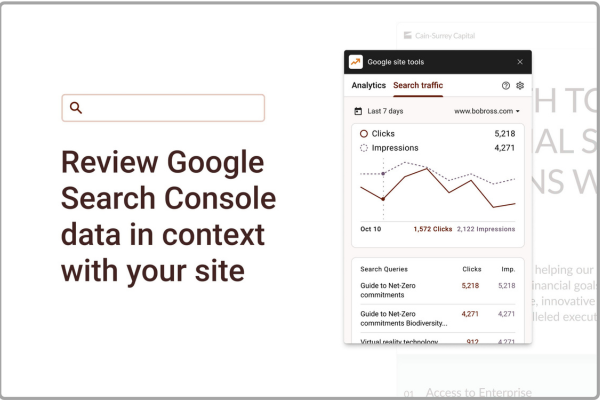
- Organic clicks and impressions (Google Search Console)
- Keyword rankings for service pages
- Leads, form fills, and calls from organic traffic
- Top landing pages and bounce rate (GA4)
- Conversions by page type (blog, service, case study)
Simple rule: measure outcomes, not only visits.
Indexing Setup (The Fastest Wins in This Webflow Technical SEO )
If Google cannot crawl your site, nothing else matters.
Check these essentials
- Make sure “Disable indexing” is OFF in Webflow project settings
- Submit your sitemap to Google Search Console
- Confirm the sitemap URL works (usually /sitemap.xml)
- Check robots.txt is not blocking key pages
- Remove “noindex” from pages that should rank
Common Webflow indexing errors
- Staging domains indexed by mistake
- Duplicate pages (old slugs) still live
- Template pages published but not needed
Tip: In Search Console, inspect your most important service page first. If it is not indexed, fix that before doing content updates.
URL Structure and Site Architecture (Keep It Clean)
Google prefers simple structures. Users do too.
Best practices for Webflow URLs
- Use short slugs: /mobile-app-development/ not /services/mobile-app-development-best-team-2026/
- Use hyphens, not underscores
- Keep naming consistent across sections
Build a clear page structure
A simple model that works:
- Home
- Services (one page per service)
- Industries (optional)
- Case studies
- Blog
- Contact
If you want a real-world example of how a focused project story can support trust and SEO, a detailed case study like this HouseParent project breakdown shows how outcome-based content improves relevance and conversions.
On-Page SEO Basics (Titles, H1, and Content)
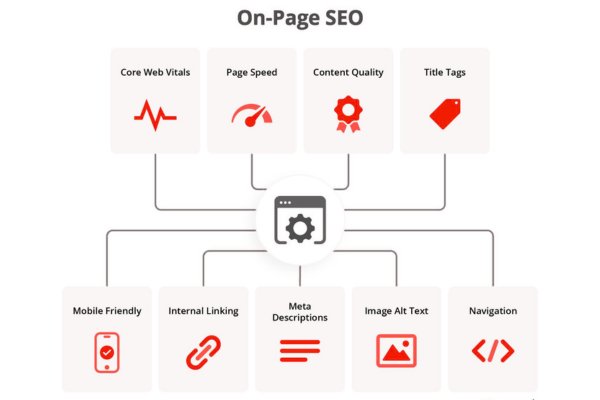
On-page SEO is where ranking gains often come from. This part of the Webflow SEO Checklist is also the easiest to control.
Title tag rules
- Put the main topic first
- Keep it clear, not clever
- Aim for 50–60 characters
- Add your brand name at the end (often)
Example pattern:
Webflow Website SEO for Higher Rankings | Brand
H1 rules
- Use one H1 per page
- Match the page intent (what the user searched)
- Keep it readable (not a keyword dump)
Content rules that improve ranking
- Answer the main question early
- Use short paragraphs (3–4 lines)
- Add bullet lists often
- Use real examples and steps
- Write for humans first, search engines second
Meta Descriptions and Click-Through Rate (CTR)
Google rankings improve when users click your result and stay on your page. Your snippet matters.
Meta description best practices
- 150–160 characters is usually safe
- Explain what the page offers
- Add a clear benefit
- Include your main keyword naturally
You do not “rank because of meta descriptions,” but you often win more clicks, and that helps performance over time.
Image SEO and Accessibility (Often Ignored, Always Important)
Webflow sites often look great. But SEO needs details.
Image checklist
- Use descriptive file names: webflow-seo-checklist.png
- Add alt text that describes the image
- Compress images (WebP when possible)
- Avoid huge hero images without compression
Alt text helps:
- Accessibility for users
- Image search visibility
- Content clarity for crawlers
Core Web Vitals and Speed (Rankings + Conversions)
Fast pages convert better. They also rank better.
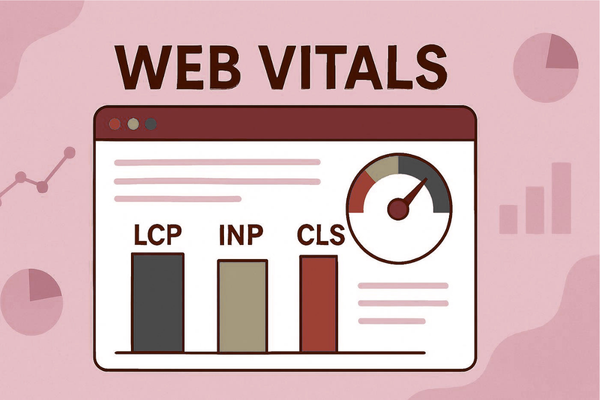
Quick speed wins in Webflow
- Compress images and videos
- Limit heavy animations
- Reduce custom scripts
- Avoid loading multiple font families
- Use fewer third-party widgets
What to monitor
- Largest Contentful Paint (LCP)
- Interaction to Next Paint (INP)
- Cumulative Layout Shift (CLS)
If your site is slow, rankings suffer. If it is slow on mobile, leads suffer more.
Content Strategy That Supports Services
Many companies publish blogs that get views but no leads. The fix is alignment.
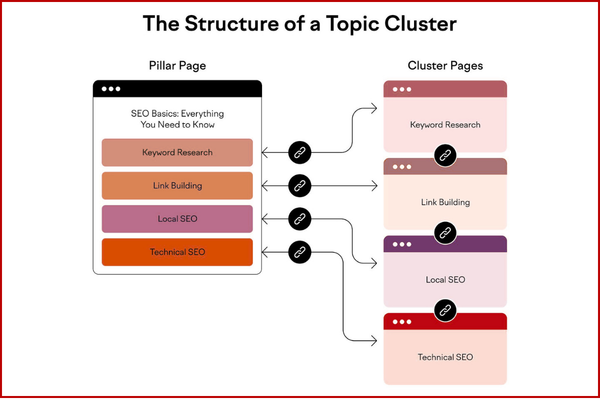
Build content around your service pages
Use a simple cluster model:
- Core service page (money page)
- Supporting blog posts (problem and solution pages)
- Case studies (proof pages)
Example supporting topics:
- “Webflow Search Ranking Steps for SaaS Platforms”
- “How to fix Webflow indexation issues.”
- “Webflow vs WordPress SEO: what changes?”
If you need inspiration for performance-driven content that connects product work to business outcomes, a results-focused story like this ProTrending project case study is a good model for building authority pages that earn trust.
Internal Linking That Builds Authority (Do This Weekly)
Internal links guide Google and users to your most important pages.
Internal linking rules
- Link from high-traffic pages to high-value pages
- Use descriptive anchor text
- Link naturally inside sentences
- Avoid repeating the same anchor every time
Good anchor text examples:
- “technical SEO setup in Webflow”
- “Webflow site speed improvements”
- “service page SEO structure”
If you offer modern digital services, linking from SEO content to related capability pages can also improve conversions. For example, mentioning automation support inside a workflow section can naturally connect to AI services for faster marketing and ops execution without forcing the link.
Backlinks and Authority Signals (Build Trust the Safe Way)
Google still uses links as a trust signal. But quality matters more than volume.
Safe link-building tactics
- Publish case studies that show real results
- Write guest posts on relevant industry sites
- Partner with vendors and list integrations
- Earn mentions through data, research, or tools
- Use digital PR for launches and milestones
Avoid:
- Buying spam links
- Low-quality link farms
- “10,000 backlinks in 7 days” offers
Authority grows when you prove value and other sites reference you.
11) Schema, Rich Results, and Better SERP Visibility
Schema helps Google understand your page type. It can also improve how your listing looks.
Easy schema types to consider
- Organization schema (brand signals)
- Article schema (blog posts)
- FAQ schema (when applicable)
- LocalBusiness schema (if you serve a region)
Keep it accurate. Never add FAQ schema for content that is not shown on the page.
Authority references:
Google shares guidance through its Search and structured data documentation. You can also follow ongoing research and tooling discussions through trusted AI leaders like OpenAI and search innovation work connected to Google.
Business Value: Why This Checklist Matters (Revenue, Not Vanity)
SEO is a growth asset. It compounds.
Business outcomes this checklist supports
- More inbound leads from high-intent searches
- Lower cost per lead compared to paid ads over time
- Stronger brand trust from first-page visibility
- Better conversion rates through faster pages and clearer content
- More predictable pipeline when rankings stabilize
Benefits of AI automation include:
- reduced operational costs
- faster workflows
- improved accuracy
When SEO content, analytics, and automation work together, your marketing team spends less time guessing and more time scaling what works.
Cost Planning Table (Example Budgets for AI-Driven Growth)
Many companies pair SEO with automation, chat, and analytics to convert more visitors.
| AI Development Type | Estimated Cost |
| AI Chatbot | $10k – $50k |
| AI SaaS | $50k – $200k |
| Enterprise AI | $100k+ |
If you are planning a growth initiative and want a realistic budget range, you can map scope and timeline using a structured project estimation process that aligns deliverables with business goals.
Feature vs Benefit Table (SEO Actions That Pay Off)
| Feature (What you do) | Benefit (What you get) |
| Clean URL structure | Better crawlability and user trust |
| Strong titles + H1 | Higher rankings and clearer relevance |
| Faster load time | More conversions and better UX signals |
| Internal linking plan | Stronger authority to service pages |
| Content clusters | More qualified leads, not just traffic |
| Image compression + alt text | Faster pages and better accessibility |
Real Results From Webflow SEO Improvements
Example:
In one client project, improving internal linking, fixing indexing issues, and optimizing Core Web Vitals increased organic traffic by 62% within six months.
Start Your AI Development Project
Start Your AI Development Project
If your company is exploring AI solutions that support growth like automation, chat, analytics, or smarter lead handling, our team at Canadian Software Agency can help you design and build scalable AI platforms that improve marketing performance and operations. Explore how AI services can support SEO-driven growth while keeping delivery practical and business-focused.
Conclusion
A strong SEO system is not about tricks. It is about clarity, structure, and consistency. This Webflow SEO Checklist works because it focuses on what Google and users both want: pages that load fast, answer real questions, and make it easy to find the next step. When your Webflow site is set up correctly, every page becomes a business asset. Your service pages can rank for high-intent searches. Your blog posts can support those pages with helpful details. Your case studies can prove results and earn trust.
The highest-impact move is often the simplest: make sure your key pages are indexed, use clear titles and headings, and link your supporting content back to your revenue pages. Then improve speed and user experience so visitors stay, scroll, and convert. Over time, these actions compound. A small improvement in click-through rate, plus stronger internal links, plus better content structure, can turn into meaningful ranking lifts. And those ranking lifts can reduce your dependency on paid ads and bring in a more stable flow of leads.
As a mobile app development company, your buyers often search with strong intent. They look for partners they can trust. SEO helps you show up at the exact moment they are ready to compare options. This is why a practical Webflow SEO Best Practices matters: it connects technical setup to real sales outcomes.
If you want to go beyond “basic SEO” and build a growth engine, consider combining search strategy with automation and AI support. That can improve how you capture leads, qualify them, and respond faster without adding more manual work for your team. Use this checklist as your foundation, track the right KPIs, and keep improving your top pages each month. The brands that win on Google are not the ones that do more tricks. They are the ones who build better pages, again and again, with a clear plan.
FAQs
1) How long does it take to see results from a Webflow search optimization plan?
Most sites see early technical improvements in 2–4 weeks, but strong ranking gains often take 3–6 months, depending on competition and content depth.
2) Is Webflow good for SEO compared to WordPress?
Webflow can perform very well for SEO if indexing, speed, structure, and on-page basics are done correctly. The platform is not the limit of execution.
3) What is the most common Webflow SEO mistake?
Indexing issues and weak page structure. Many sites also miss internal linking, which slows down authority flow to service pages.
4) Do I need a schema for better rankings?
Not always. But schema can improve visibility and click-through rate by helping Google understand page meaning and show rich results.
5) How often should I update my checklist?
Review monthly. Re-check speed, indexing, internal links, and top pages each quarter.