
In today’s digital world, your website is your storefront. It builds trust, drives leads, and supports growth. Understanding the WordPress Development Lifecycle helps businesses create websites that are secure, scalable, and results-driven.
The WordPress Development Lifecycle covers every stage of building a WordPress site. From planning and design to testing, launch, and ongoing support, each phase plays a key role. When done right, it reduces risk, controls cost, and ensures better performance.
For businesses, this lifecycle is not just technical work. It is a structured process that aligns your website with your goals. Whether you need an eCommerce store, a corporate website, or a custom solution, following a proven lifecycle ensures long-term success.
In this guide, we explain each step in simple words. You will learn the business value, best practices, and key stages involved.
What is the WordPress Development Lifecycle?
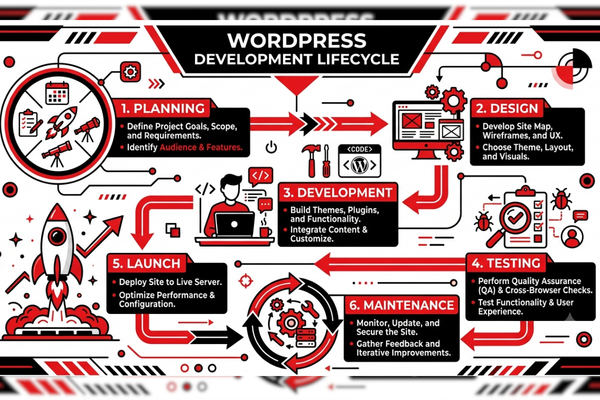
The WordPress Development Lifecycle is a structured process that guides the planning, design, development, testing, launch, and maintenance of a WordPress website.
It ensures:
- Clear project goals
- Smooth execution
- High performance
- Long-term scalability
A structured approach avoids confusion. It also keeps your budget and timeline under control.
Why the WordPress Development Lifecycle Matters for Businesses
A website is an investment. Without a clear process, projects often face delays and hidden costs.
Business Benefits
Following a proper lifecycle helps you:
- Reduce operational risks
- Improve website speed
- Increase security
- Boost SEO performance
- Deliver better user experience
For example, companies that invest in professional WordPress web development services often see better lead conversion because the project follows a defined lifecycle from day one.
Stage 1: Planning and Discovery
This is the foundation of the WordPress Development Lifecycle.
Define Business Goals
Ask questions like:
- What is the purpose of the website?
- Who is the target audience?
- What actions should users take?
Clear goals help shape the project direction.
Competitor and Market Research
Research competitors. Study their:
- Design
- Features
- SEO strategy
- User experience
This ensures your site stands out.
Project Scope and Timeline
Create a roadmap. Include:
- Key milestones
- Budget estimation
- Resource planning
If you need accurate planning, using a structured project estimation process helps define cost and timeline early.
Stage 2: Strategy and Information Architecture
After planning comes structure.
Sitemap Creation
A sitemap shows:
- Main pages
- Subpages
- Navigation flow
This improves user experience and search engine crawling.
Content Strategy
Good content supports SEO and conversions. Plan:
- Keywords
- Blog topics
- Landing pages
- Calls to action
For businesses exploring AI-driven personalization, solutions supported by platforms like OpenAI can improve content automation and engagement.
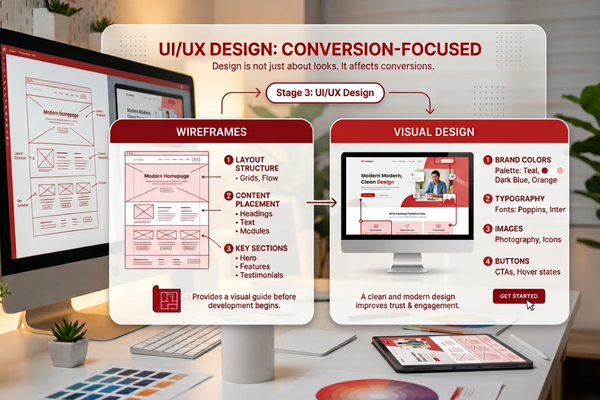
Stage 3: UI/UX Design
Design is not just about looks. It affects conversions.
Wireframes
Wireframes outline:
- Layout structure
- Content placement
- Key sections
They provide a visual guide before development begins.
Visual Design
This includes:
- Brand colors
- Typography
- Images
- Buttons
A clean and modern design improves trust.
Feature vs Benefit Table
| Feature | Business Benefit |
| Responsive Design | Works on all devices |
| Fast Loading Speed | Better SEO and lower bounce rate |
| Secure Login System | Protects customer data |
| SEO Optimization | Higher Google ranking |
| Easy CMS | Simple content updates |
Stage 4: Development and Customization
This is where coding begins in the WordPress Development Lifecycle.
Theme Development
Developers:
- Customize themes
- Build layouts
- Ensure responsiveness
Plugin Integration
Plugins add features such as:
- Contact forms
- eCommerce
- Security
- SEO tools
Custom development ensures plugins work smoothly.
Businesses looking for advanced automation can combine WordPress with intelligent systems like Google AI tools for analytics and optimization.
Stage 5: Content Integration
Content brings the website to life.
Adding Pages
Developers upload:
- Text
- Images
- Videos
- Blog posts
SEO Optimization
On-page SEO includes:
- Meta titles
- Meta descriptions
- Keyword placement
- Internal linking
This ensures your website ranks better in search engines.
For example, successful WordPress case studies like the Ecotech Windows and Doors project show how structured content and technical SEO improve digital presence.
Stage 6: Testing and Quality Assurance
Testing prevents costly errors.
Functional Testing
Check:
- Forms
- Checkout process
- Links
- Buttons
Performance Testing
Measure:
- Page speed
- Mobile responsiveness
- Server performance
Security Testing
Ensure:
- SSL certificates
- Firewall setup
- Malware protection
This stage strengthens the WordPress Development Lifecycle by reducing launch risks.
Stage 7: Website Launch
Launch is not just pressing a button.
Pre-Launch Checklist
Before going live:
- Backup files
- Test all pages
- Check SEO settings
- Connect analytics
Go Live
Once live:
- Submit sitemap to Google
- Monitor traffic
- Fix small issues quickly
A structured launch ensures a smooth transition.
Stage 8: Post-Launch Maintenance
The WordPress Development Lifecycle does not end after launch.
Regular Updates
Update:
- WordPress core
- Plugins
- Themes
This improves security.
Performance Monitoring
Track:
- Speed
- User behavior
- Conversion rates
Ongoing Optimization
Continuous improvements increase ROI.
For example, scalable WordPress projects like BundlBox demonstrate how ongoing optimization supports growth.
Cost Considerations in Web and AI Development
Businesses often ask about costs.
Here is a simple comparison:
| AI Development Type | Estimated Cost |
| AI Chatbot | $10k – $50k |
| AI SaaS | $50k – $200k |
| Enterprise AI | $100k+ |
WordPress development costs vary based on:
- Custom features
- Design complexity
- Integrations
- Maintenance needs
A clear WordPress Development Lifecycle reduces unexpected expenses.
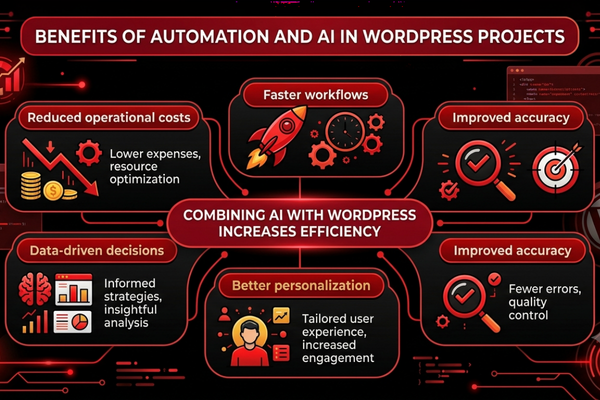
Benefits of Automation and AI in WordPress Projects
Modern websites use AI tools to improve results.
Benefits of AI automation include:
- Reduced operational costs
- Faster workflows
- Improved accuracy
- Better personalization
- Data-driven decisions
Combining AI with WordPress increases efficiency.
For businesses exploring smart integrations, advanced AI services can enhance website functionality and analytics.
Common Mistakes to Avoid
Even with a defined WordPress Development Lifecycle, mistakes can happen.
Avoid:
- Skipping planning
- Ignoring mobile users
- Using too many plugins
- Not updating regularly
- Weak security setup
A professional team helps prevent these issues.
Start Your WordPress Development Project
If your company is planning a new website or redesign, following a structured WordPress Development Lifecycle is the smartest approach.
At Canadian Software Agency, we build scalable, secure, and high-performing WordPress platforms. From planning to post-launch support, our experts guide you at every stage.
Whether you need business automation, eCommerce functionality, or custom integrations, our team can help you design and develop a solution that supports long-term growth.
Start your project today and build a website that drives real business results.
Conclusion: Building Success with the WordPress Development Lifecycle
The WordPress Development Lifecycle is more than a technical framework. It is a business strategy. It ensures your website is built with purpose, precision, and performance in mind.
From planning and design to development, testing, launch, and maintenance, each phase plays a vital role. Skipping steps often leads to delays, security risks, and higher costs. A structured lifecycle reduces uncertainty and improves return on investment.
Businesses that follow a defined WordPress Development Lifecycle gain clear advantages. They launch faster. They rank better in search engines. They deliver stronger user experiences. Most importantly, they achieve measurable growth.
In today’s competitive market, your website must do more than exist. It must convert visitors into customers. It must reflect your brand. It must scale as your business grows.
By investing in a professional and structured development approach, you protect your digital investment. You also create a strong foundation for innovation, automation, and long-term success.
If you already have project details in mind, you can request a detailed WordPress development estimate through our structured project estimation process to receive clear timelines and cost insights. If you want a secure, high-performing, and future-ready website, adopting the right lifecycle is the first step.
FAQs
1. What is the WordPress Development Lifecycle?
It is a step-by-step process that includes planning, design, development, testing, launch, and maintenance of a WordPress website.
2. How long does the WordPress development process take?
It depends on project complexity. A simple website may take 4–6 weeks, while complex platforms may take 3–6 months.
3. Why is testing important in WordPress development?
Testing ensures the website works correctly, loads fast, and remains secure before launch.
4. How much does WordPress development cost?
Costs vary based on features, customization, and integrations. Clear planning helps control expenses.
5. Can WordPress integrate with AI tools?
Yes. WordPress can integrate with AI tools for chatbots, automation, analytics, and personalization.