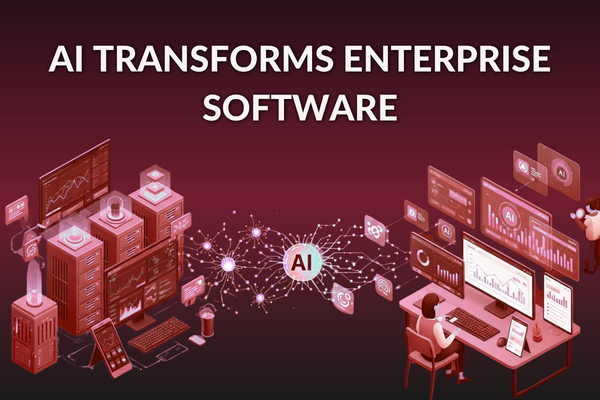
Enterprise software is no longer just about managing operations. With AI, it becomes a system that predicts, automates, and guides decisions in real time. AI can turn slow workflows into quick ones, reduce manual work, and help leaders make better calls with real data. It also helps unify systems that feel “stuck” in the past, like legacy ERPs, CRMs, and support tools.
In this blog, you will learn how AI fits into enterprise apps, what business results to expect, and how to roll it out with less risk. We will cover practical use cases, simple model choices, costs, and a clear plan you can use. If you build mobile apps for field teams, sales reps, or managers, you will also see how AI improves daily work on the go without adding complex steps.
Why AI is now a growth lever for enterprises
Markets change fast. Customers expect instant service. Teams are asked to do more with the same headcount. In this environment, AI transforms enterprise software by improving speed, accuracy, and visibility across the business.
Key forces driving adoption:
- More data than humans can process
- Higher service expectations (24/7, self-serve, instant)
- Rising labor costs for repetitive work
- Stronger competition using smarter tools
- New options like copilots, chatbots, and forecasting
AI is also a core part of AI for digital transformation. It upgrades how work happens, not only what tools you own.
What is AI in enterprise software?
AI in enterprise software means using artificial intelligence to automate tasks, predict outcomes, and improve decision-making across business systems like ERP, CRM, and support platforms.
What does it mean when AI transforms enterprise software?
When people hear “AI,” they often think of chatbots. In reality, AI in enterprise software offers many ways: automation, predictions, smart search, and better decisions inside your existing systems.
AI-powered enterprise systems are created when artificial intelligence is added to business systems to automate tasks, predict outcomes, and improve user actions at scale.
Where AI shows up in real systems
You will see AI in enterprise applications through features like:
- Auto-routing tickets to the right team
- Flagging unusual payments or fraud risk
- Predicting inventory demand before stockouts
- Summarizing long notes into short updates
- Giving managers “next best action” prompts
This is the practical side of artificial intelligence in business software, helping people do their work with fewer steps.
Business Value of AI in Enterprise Software Automation
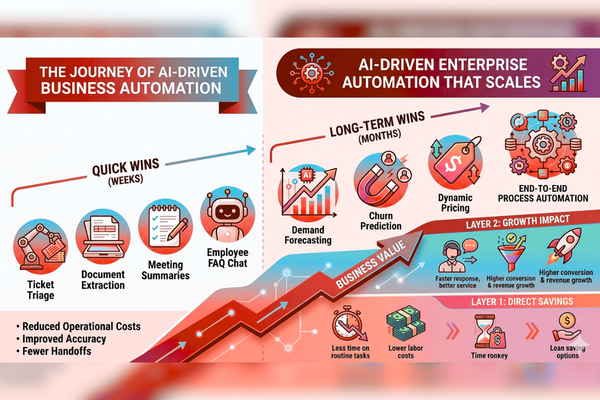
Many enterprises start with one goal: to remove manual work. That is the heart of AI-driven business automation and enterprise software automation with AI.
Benefits of AI automation include:
- reduced operational costs
- faster workflows
- improved accuracy
- fewer handoffs between teams
- better compliance with consistent steps
- Higher employee satisfaction (less repetitive work)
When an enterprise AI transformation is implemented, it creates value in two layers:
- Direct savings: less time spent on routine tasks
- Growth impact: faster response, better service, higher conversion
Enterprise software automation with AI means using AI to complete, assist, or verify business tasks (like approvals, data entry, triage, and reporting) with minimal human effort.
Quick wins vs. long-term wins
Quick wins (weeks):
- Ticket triage
- Document extraction
- Call and meeting summaries
- FAQ chat for employees
Long-term wins (months):
- Demand forecasting
- Churn prediction
- Dynamic pricing guidance
- End-to-end process automation
AI Use Cases in Enterprise Software
Executives often ask for “proof fast.” The best approach is to pick 2–3 AI use cases in enterprise applications that are measurable and repeatable. Once you win trust, you scale.
Customer support and service
- Auto-suggest replies for agents
- Summarize customer history in seconds
- Detect urgency and sentiment
- Reduce average handling time
This is where AI-powered business tools often pay back quickly.
Sales and account management
- Lead scoring and prioritization
- Call summaries and follow-up drafts
- Forecast accuracy improvements
- Next-step guidance based on CRM signals
Operations and supply chain
- Demand forecasting
- Smart reorder alerts
- Route and schedule optimization
- Quality checks from images or sensor data
Finance and risk
- Invoice extraction and matching
- Fraud pattern detection
- Cashflow forecasting
- Policy checks before approvals
Analytics and leadership dashboards
AI can also improve how leaders read the business. In our work on the Opta Dash analytics platform case study, the focus was on clear insights and faster decisions, exactly the kind of outcome enterprises want when they modernize reporting.
As AI becomes part of enterprise software, analytics shifts from “what happened?” to “what will happen next?
AI models explained: from rules to machine learning
Enterprises do not need “the most advanced” AI. They need the right tool for the job, with clear limits and controls. Here are AI models explained in simple terms.
1) Rules and workflows (non-AI, still useful)
- Best for fixed steps (if/then)
- Easy to audit
- Not flexible when patterns change
2) Machine learning models
This is machine learning in enterprise systems: models learn patterns from past data.
- Best for predictions (risk, churn, demand)
- Needs clean, labeled data
- Improves over time with feedback
3) Generative AI (LLMs)
- Best for language tasks (summaries, Q&A, drafting)
- Useful for knowledge access across documents
- Needs guardrails to avoid wrong answers
Many companies build on trusted platforms such as OpenAI or Google AI to speed up development and reduce setup time.
As AI becomes integrated into enterprise software, the right model should match your risk level, data quality, and business goals.
Budget and effort: choosing enterprise AI solutions
A common blocker is cost uncertainty. The best way to plan is to tie spend to a clear use case and ROI path. Strong enterprise AI solutions start small, then scale.
Typical AI build cost ranges
| AI Development Type | Estimated Cost |
| AI Chatbot | $10k – $50k |
| AI SaaS | $50k – $200k |
| Enterprise AI | $100k+ |
Costs change based on:
- Data readiness (clean vs. messy)
- Integration needs (ERP/CRM/HRIS)
- Security and permissions
- Mobile + web scope
- Ongoing monitoring and updates
When adopting AI in enterprise software, the real cost goes beyond development. It also includes user adoption, training, and ongoing measurement.
Build vs. buy (simple guide)
Buy when:
- The use case is common (basic support bot, simple OCR)
- Speed matters more than customization
Build when:
- Your workflow is unique
- You need strong controls and custom logic
- AI becomes part of your competitive edge
Data, security, and governance for enterprise AI
AI depends on data. Enterprises also need strong controls. This is where many projects succeed or fail.
When AI is used in enterprise software, leaders should focus on a few basics.
Data foundations (keep it practical)
- Identify the “source of truth” for key fields
- Remove duplicates and outdated records
- Set clear data owners (who fix what)
- Track data changes over time
Security and access control
- Role-based access (people only see what they should)
- Audit logs for key actions
- Clear policies for sensitive data
- Vendor reviews when using external AI APIs
Governance that does not slow teams down
Good governance is simple:
- Define what AI can and cannot do
- Add a “human check” for high-risk steps
- Test AI outputs before wide release
- Monitor accuracy monthly, not yearly
This is especially important for artificial intelligence in business software used in finance, health, or regulated fields.
Building AI-powered business tools for mobile teams
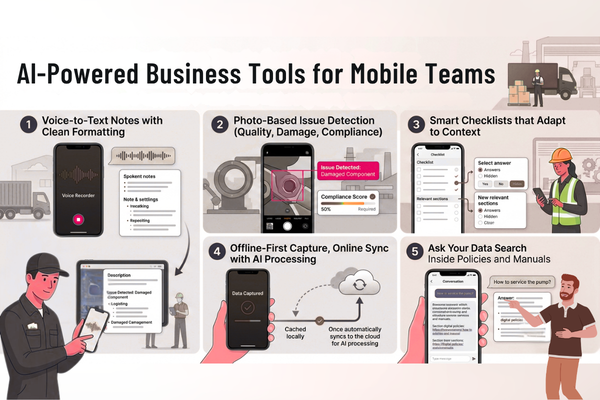
Mobile is where work happens in real time: field service, sales visits, on-site audits, and shift handoffs. If your enterprise app is mobile-first, AI can reduce taps, typing, and searching, making everyday tasks faster and easier.
High-value mobile AI features
- Voice-to-text notes with clean formatting
- Photo-based issue detection (quality, damage, compliance)
- Smart checklists that adapt to context
- Offline-first capture, online sync with AI processing
- “Ask your data” search inside policies and manuals
Work like this needs strong product thinking, not just AI. In the Neuro Ascent product case study, a key theme is building around real user actions, so insights turn into daily habits.
Feature vs. benefit (enterprise-ready view)
| Feature | Benefit |
| Ticket auto-triage | Faster response and lower backlog |
| Smart summaries (calls, notes, tickets) | Less time reading, faster handoffs |
| Predictive alerts (risk, churn, stockouts) | Prevent issues before they become losses |
| Document extraction (invoices, forms) | Less data entry and fewer errors |
| Role-based AI assistant | Better answers with safer access |
These are the kinds of AI-powered business tools that improve both speed and quality.
The benefits of AI in enterprise software: how to measure ROI
Teams often feel the value of AI before they can prove it. To secure a budget, you need clear measures. The benefits of AI in enterprise software should show up in time, cost, quality, and growth.
When implementing AI in enterprise software, track ROI with a focused set of KPIs.
Practical KPI checklist
Efficiency
- Time per ticket/claim/order
- % tasks automated
- Cycle time from request to completion
Quality
- Error rate
- Rework rate
- Compliance misses
Customer impact
- First response time
- Resolution time
- CSAT / NPS changes
Revenue impact
- Lead-to-close rate
- Upsell acceptance
- Churn rate
Keep measurement simple
- Baseline “before” metrics for 2–4 weeks
- Pilot with one team
- Compare results weekly
- Scale only after stable wins
Rollout plan: how AI for digital transformation scales safely
AI projects fail when they try to do everything at once. A simple rollout keeps risk low and momentum high. This is how AI for digital transformation should look in practice.
A practical 30–60–90-day plan
Days 1–30: Pick and design
- Choose 1–2 use cases with clear ROI
- Define success metrics
- Map the workflow (as-is vs. to-be)
- Confirm data sources and access
Days 31–60: Build and pilot
- Build a working MVP
- Integrate into the real system (not a demo)
- Train a small user group
- Collect feedback weekly
Days 61–90: Improve and expand
- Fix gaps and edge cases
- Add monitoring (accuracy, drift, errors)
- Expand to more teams
- Build your AI backlog for next quarter
When AI transforms enterprise platforms, change management matters. Share “what’s in it for me” for each team. Show the time saved in their daily work.
Start Your AI Development Project (CTA)
Start your AI project in the next 30 days. Get a clear scope, timeline, and cost estimate from our enterprise AI experts. You can review our AI services for strategy, development, and delivery, and get fast clarity on scope and budget using our project estimate process for enterprise builds.
Conclusion
In today’s fast-moving business landscape, companies that fail to modernize risk falling behind. AI transforms enterprise software by turning slow, manual processes into intelligent, data-driven workflows. The real power of AI lies in its ability to automate repetitive tasks, enhance decision-making, and unlock hidden efficiencies without requiring a complete system overhaul.
The key to success is starting with practical AI use cases in enterprise applications that deliver quick wins. Whether it’s automating customer support with AI chatbots, improving sales forecasting with predictive analytics, or streamlining operations with smart document processing, the best approach is to pick one high-impact area, measure results, and scale from there. This ensures that AI adoption is both cost-effective and aligned with business goals.
Enterprise AI solutions are not just about technology; they’re about people. Employees benefit from reduced administrative burdens, managers gain real-time insights, and leaders make better strategic decisions. When AI is implemented in enterprise software, it doesn’t just optimize processes; it creates a more agile, competitive, and future-ready business.
For companies ready to take the next step, the path is clear:
- Identify the biggest bottlenecks in your workflows.
- Pilot AI-driven automation in one department.
- Measure improvements in speed, accuracy, and cost savings.
- Expand based on proven ROI.
We help businesses design and deploy AI-powered business tools that integrate seamlessly with existing systems. Whether you need a custom AI model, a mobile-first automation solution, or a full digital transformation strategy, our team ensures your investment delivers real, measurable value.
The future of enterprise software is intelligent, adaptive, and built for growth. By embracing AI today, your business can work smarter, move faster, and stay ahead without the complexity. Start small, think big, and scale with confidence. The right AI strategy isn’t just an upgrade; it’s a competitive advantage.
FAQs
1) What is the best first step if we want AI in enterprise applications?
Start with one workflow that is high-volume and measurable, like ticket triage, document extraction, or call summaries. Set a baseline and define success metrics.
2) Are enterprise AI solutions only for large companies?
No. Mid-sized firms also win with AI, especially in support, finance ops, and sales ops. The key is choosing a focused use case and scaling after proof.
3) How long does it take to see results from AI-driven business automation?
Many teams see early gains in 4–8 weeks with a pilot. Larger rollouts can take 3–6 months, depending on integrations and governance needs.
4) What data do we need for machine learning in enterprise systems?
You need historical examples of the outcome you want to predict (like churn, late delivery, fraud flags). The data must be consistent and linked to real results.
5) How do we reduce risk when using artificial intelligence in business software?
Use role-based access, keep humans in the loop for high-impact steps, test outputs before launch, and monitor performance over time.