 F
F
Choosing between Native vs. Cross-Platform Apps is one of the biggest decisions in mobile product planning. It affects your budget, speed to market, user experience, and long-term maintenance. For business leaders, this is not a “developer preference” question. It is a business value question.
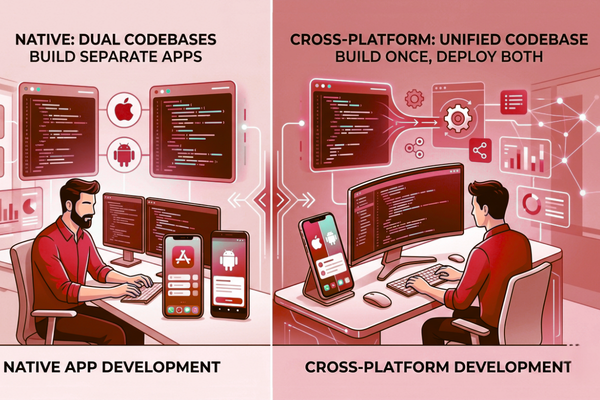
In simple terms, native apps are built for one platform (iOS or Android). Cross-platform apps use one codebase to run on both. Both can succeed. Both can fail. The better choice depends on your goals, feature set, timeline, and growth plan.
This guide explains Native and Cross-Platform Apps in clear terms. You will learn what each approach means, where each one wins, and how to pick the right option for your company. We will also share practical decision rules, real-world tradeoffs, and a clear checklist you can use with your team.
Native apps are built separately for iOS and Android using platform-specific technologies. Cross-platform apps use one shared codebase across both platforms. Native apps provide better performance and deeper device integration, while cross-platform apps reduce development time and cost.
Why This Decision Matters for Business (Real ROI)
Research consistently shows that mobile users are highly sensitive to performance and usability, making architecture decisions important for retention and app ratings. The build type shapes your product outcomes. It impacts release speed, retention, and cost control.
Business value of picking the right approach:
- Faster time to market (ship sooner, learn sooner)
- Better user experience (higher ratings, lower churn)
- Lower long-term maintenance risk
- Easier scaling as features grow
- More predictable budgeting for future releases
Many teams also link mobile apps with automation and AI features. If your roadmap includes AI, align your build choice with your AI needs early. For example, if you plan to add AI workflows, you may also explore product planning support through AI solution design and delivery services so the app architecture supports future growth.
Native vs. Cross-Platform Apps: Core Differences at a Glance
| Feature | Native Apps | Cross-Platform Apps |
| Performance | Excellent | Good |
| Development Speed | Slower | Faster |
| Initial Cost | Higher | Lower |
| User Experience | Best platform-specific UX | Consistent across platforms |
| Codebase | Separate for iOS & Android | Shared codebase |
| Maintenance | More complex | Easier initially |
| Device Access | Full native access | May require plugins |
| Scalability | Strong for complex apps | Strong for standard apps |
What is a Native App?
A native app is built specifically for one platform:
- iOS app using Apple’s ecosystem
- Android app using Google’s ecosystem
Common strengths:
- Best performance
- Best access to device features
- Best platform “look and feel.”
What is a cross-platform app?
Cross-platform development is often grouped under hybrid app development because it allows teams to support multiple platforms with one shared codebase.
A cross-platform app uses one shared codebase for both iOS and Android.
Common strengths:
- Faster development
- Lower upfront cost
- Easier feature parity across platforms
Cost, Timeline, and Team Impact
Development speed
Discussions around React Native vs native development usually focus on balancing faster releases with platform-specific optimization.
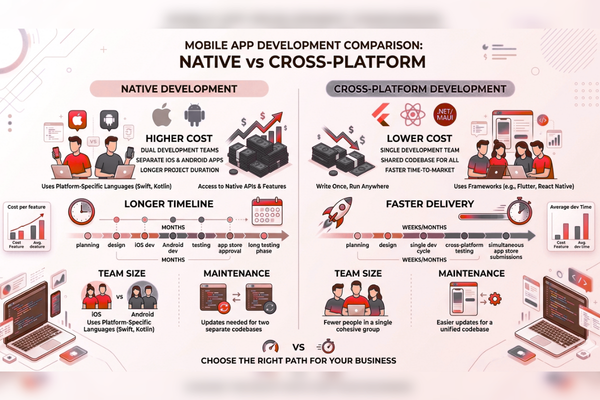
- Cross-platform often ships faster because you build once.
- Native may take longer because you build two apps (or two major codebases).
Typical cost pattern
- Cross-platform: lower initial build cost
- Native: higher initial build cost, but can reduce risk for complex apps
To avoid guessing, many companies start with a project scope and estimate before picking a build type. A structured process like a mobile app project estimate helps prevent budget surprises later.
Performance and User Experience: When It Really Matters
Many businesses evaluating Flutter vs native apps compare speed-to-market benefits against long-term performance optimization.
Native wins when:
- Your app needs heavy graphics, smooth animations, or complex interactions
- You rely on advanced cameras, Bluetooth, sensors, or background tasks
- Your users expect top-tier responsiveness (finance, logistics, real-time service)
Cross-platform is “good enough” when:
- Your app is mostly forms, content, dashboards, and standard flows
- Your biggest risk is time to market, not performance
- You want to validate demand fast with an MVP
Quick decision tip:
Need help deciding the right architecture for your mobile app? Start with a structured mobile app project estimate to align scope, budget, and technical requirements before development begins. If performance is a key selling point, lean native. If speed is the key selling point, cross-platform is often best.
Device Features and Integrations (Camera, GPS, Payments)
Native access is deeper and simpler
Native development usually gets faster access to:
- New OS features
- Hardware features
- Platform updates
Cross-platform can still integrate well
Cross-platform frameworks support most device features. But sometimes:
- You need custom modules
- You depend on third-party plugins (which can vary in quality)
Examples where native often reduces risk:
- Secure payments and identity flows
- Real-time location tracking for field teams
- High-reliability offline mode
Security, Compliance, and Data Control
Security is not only about code. It is about design choices, access control, and testing.
Native security advantages
- Mature platform tooling
- More direct control over secure storage and permissions
- Easier platform-aligned compliance patterns
Cross-platform security reality
Cross-platform can be secure, but you must:
- Vet libraries and plugins
- Keep dependencies updated
- Use strong mobile security practices on both platforms
Practical rule:
If you are in healthcare, finance, or enterprise workflows, do not treat build type as the security plan. Treat security as a separate track with clear requirements.
Maintenance, Updates, and Long-Term Scalability
One common issue teams underestimate in cross-platform development is plugin maintenance as the app scales. Third-party libraries can become outdated, forcing teams to build custom native modules later. Planning for this early reduces technical debt and avoids release delays.
Cross-platform maintenance is often simpler early
- One codebase
- One main release process
- Faster updates across both platforms
Native can be easier at scale in complex products
As apps grow, native teams can:
- Optimize platform-specific flows
- Reduce framework limitations
- Avoid “one-size-fits-all” UI compromises
If you want proof that strong delivery and maintenance processes matter, review how real products evolve after launch. Long-term scalability also depends on how well the architecture evolves after launch, especially for products that require continuous optimization and operational support.
AI Features in Mobile Apps: How It Changes the Choice
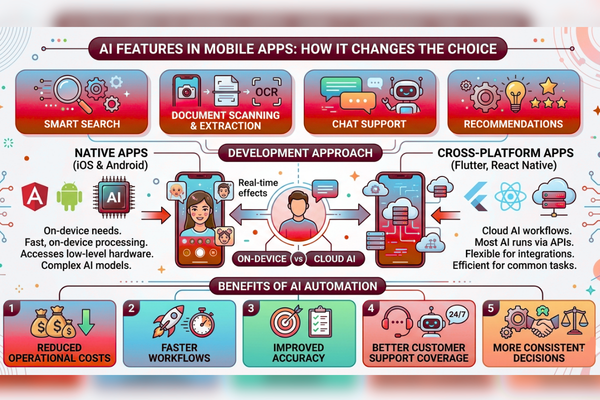
Many mobile apps now include AI features like:
- Smart search
- Document scanning and extraction
- Chat support
- Recommendations
AI can affect Native vs. Cross-Platform Apps in two ways:
- On-device needs: If you need fast, on-device processing, native may help.
- Cloud AI workflows: If most AI runs via APIs, cross-platform is often fine.
Benefits of AI automation include:
- reduced operational costs
- faster workflows
- improved accuracy
- better customer support coverage
- more consistent decisions
When teams evaluate AI add-ons, they often reference leaders like OpenAI and platform updates from Google AI to understand what is possible now and what is coming next.
AI integration costs vary based on infrastructure complexity, data processing needs, and whether AI runs on-device or through cloud APIs.
AI cost expectations
| AI Development Type | Estimated Cost |
| AI Chatbot | $10k – $50k |
| AI SaaS | $50k – $200k |
| Enterprise AI | $100k+ |
Feature vs Benefit: What Stakeholders Actually Care About
The best way to explain Native vs Cross Platform Apps to non-technical stakeholders is “feature vs benefit.”
| Feature | Benefit |
| One shared codebase (cross-platform) | Lower initial cost and faster launch |
| Platform-specific UI (native) | More natural user experience |
| Faster prototyping (cross-platform) | Quicker validation of demand |
| Deep OS integration (native) | Better reliability for advanced device features |
| Shared release cycle (cross-platform) | Easier feature parity across iOS and Android |
| Platform-tuned performance (native) | Higher responsiveness and better ratings |
Use Cases: Which Approach Fits Which Business Model?
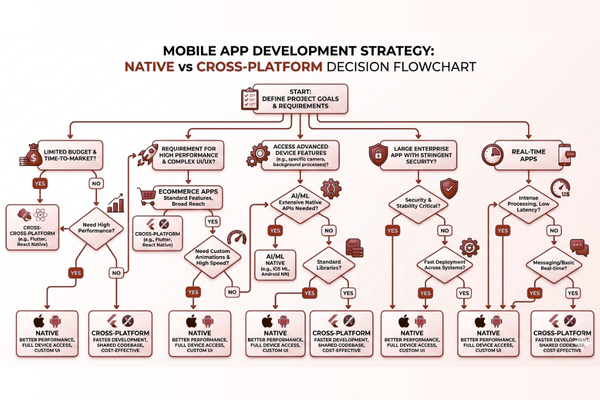
Cross-platform is often best for:
- Startups validating an MVP
- Internal tools (dashboards, field reporting)
- Service booking apps
- Content-first apps
- Simple eCommerce apps
Native is often best for:
- High-performance consumer apps
- Apps with heavy camera use or real-time tracking
- High-security apps
- Products where UI polish drives retention
A real example of operational complexity is service-based workflows like hauling, scheduling, and location coordination. Reviewing a build like Phantom Disposal’s app and product workflow helps teams see why performance, reliability, and UX details can become core business requirements.
Native vs. Cross-Platform Apps Decision Checklist
Use this simple checklist in planning meetings.
Choose cross-platform if:
- You need to launch in 8–16 weeks
- Budget is tight, and scope is controlled
- Most features are common across iOS and Android
- Your app is mostly standard UI flows
- You can accept minor platform differences
Choose native if:
- Performance is a competitive advantage
- You need deep device features
- You expect complex scaling and long-term roadmap growth
- Your users demand best-in-class UI
- You have strict compliance needs
If you are unsure:
Start with a cross-platform for MVP, then go native later for the parts that need it. Many successful products take this hybrid path.
Start Your AI Development Project
If your mobile app roadmap includes AI features, automation, or smarter workflows, do not bolt it on later. Plan it early so your app architecture supports it.
Start Your AI Development Project
If your company is exploring AI solutions, our team at Canadian Software Agency can help you design and build scalable AI platforms and mobile experiences that match your goals. You can begin by defining scope and timeline with a structured project estimate process for mobile and AI builds, then move into delivery with a clear plan.
Conclusion: The Best Choice Depends on Your Growth Plan
The “best” answer to Native vs Cross Platform Apps is not universal. The right choice depends on what your business must achieve in the next 90 days and what it must support in the next two years. If you choose based only on cost, you may ship fast but hit limits when the product grows. If you choose based only on perfection, you may spend too much before you have real user proof.
Cross-platform apps are often the strongest option when speed, budget, and shared features matter most. They help teams launch sooner, test demand, and iterate. For many service apps, internal tools, and early-stage products, cross-platform gives excellent ROI because it reduces time and effort while still delivering a solid user experience.
Native apps are often the strongest option when performance, reliability, and premium UX drive revenue. They shine when your product depends on smooth interactions, advanced device features, or strict security needs. Native can also reduce long-term risk for complex apps where platform-specific tuning becomes important over time.
A practical way to decide is to map your must-have features against your risks. If the biggest risk is “we need users and feedback now,” cross-platform is usually the safer bet. If the biggest risk is “the app must work perfectly in complex real-world conditions,” native is often the safer bet. In many cases, a phased plan works best: build an MVP cross-platform, then move key modules to native as the product matures.
Most importantly, treat Native vs Cross Platform Apps as a business strategy decision, not a trend decision. Align it with your market, your users, and your roadmap. If AI, automation, or data-driven features are part of your plan, choose an approach that supports clean integrations and reliable scaling. When your build choice matches your business goals, you reduce waste, ship with confidence, and create a product that is easier to improve every month.
FAQs
1) Is cross-platform always cheaper than native?
Often, yes, for the first version. But long-term cost depends on complexity, performance needs, and how many custom platform features you add.
2) Which is better for an MVP: native or cross-platform?
Cross-platform is usually better for MVPs because it helps you launch faster and test the market with one shared codebase.
3) Can cross-platform apps feel like native apps?
Yes, in many cases. For standard UI flows, users may not notice a difference. The gap shows more in high-performance or highly polished experiences.
4) Do Native vs. Cross-Platform Apps affect App Store approval?
Both can be approved. Approval depends more on privacy rules, permissions, stability, and user safety than on build type.
5) What if we need both speed and performance?
Use a hybrid strategy: start cross-platform, then build performance-critical parts natively once you validate the product.