Autonomous AI Agents are quickly becoming a practical way for companies to scale service, speed up work, and build smarter digital products. In a mobile-first world, users expect fast answers, smooth flows, and personalized experiences. Agents help you deliver that without adding headcount for every new task.
This guide explains what these agents are, how they work, and where they fit in modern mobile app development. You will also learn the real business value, common use cases, costs, risks, and a simple roadmap to launch.
If you are exploring AI automation for support, operations, or product growth, this blog will give you a clear picture of what is possible today and what to plan for next.
What are Autonomous AI Agents?
These agents are AI systems that can plan, decide, and take actions to complete tasks with minimal human input. They can use tools such as APIs, apps, and databases, follow rules, and adapt based on results.
Unlike a basic chatbot that only replies to messages, agents can “do the work.” They can:
- Create a plan
- Call tools and services
- Check outcomes
- Retry when something fails
- Escalate to a human when needed
How they differ from chatbots and scripts
- Chatbots: Answer questions. Limited actions.
- Scripts/automation: Follow fixed rules. Break when the flow changes.
- Autonomous systems: Use reasoning + tools to handle changing steps and messy real-world inputs.
Agents are often powered by generative AI, but the real value comes from safe action-taking, not just text output.
Why Autonomous systems matter for businesses (and apps)
Most teams are overloaded with repeat work: support tickets, data updates, content tasks, internal requests, QA checks, and reporting. It turns many of these into faster, trackable workflows.
For consumer and B2B apps, agents can also improve the user experience by making your app feel more responsive and personal.
Where companies see results first
- Customer support and self-service
- Sales and lead routing
- App onboarding and retention flows
- Internal ops and reporting
- Product analytics and experimentation
If you already invest in AI integration, agents are often the next step because they connect AI output to real actions.
How Independent AI Agents work (simple model)
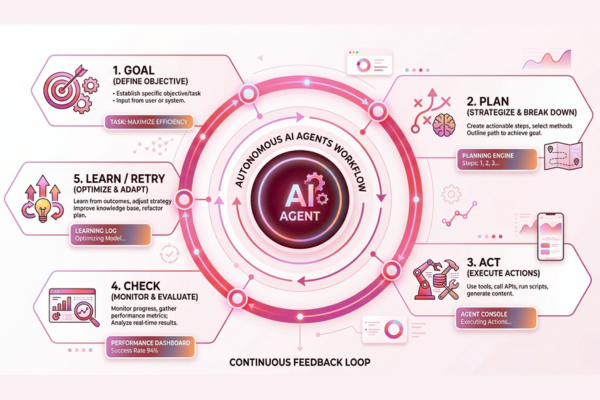
Most Independent AI agents follow a loop:
- Goal (what success looks like)
- Plan (steps to reach the goal)
- Act (use tools and APIs)
- Check (did it work?)
- Learn/retry/escalate
Core components (in plain words)
1) Brain (the model)
This is usually a large language model that can reason and generate text. Many teams build with platforms like OpenAI or Google’s tools.
2) Tools (what the agent can use)
Tools make an agent useful. Examples:
- CRM updates
- Ticket creation
- Payment checks
- Search and retrieval
- App feature flags
- Email/SMS sending
3) Memory (what it should remember)
Memory can include:
- Past user requests
- Company policies
- Product data
- A “state” of the current task
4) Guardrails (how you keep it safe)
Guardrails reduce risk through:
- Permission checks
- Allowed tool lists
- Rate limits
- Human approvals for sensitive actions
- Logging and monitoring
This is where AI security and AI governance matter most.
Common Types of Independent AI Agents
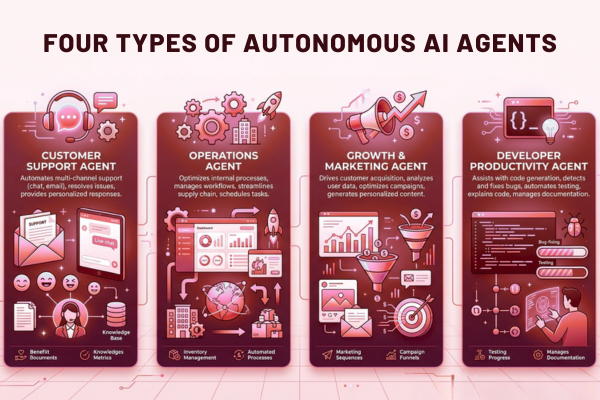
Not every agent needs full freedom. Most businesses start with narrow, high-confidence flows.
Customer support agents
Typical tasks:
- Understand issue → fetch account info → suggest fix
- Open/close tickets
- Route to the right team
Operations agents (internal)
Typical tasks:
- Create weekly reports
- Pull data from multiple sources
- Update dashboards
- Notify owners when numbers change
Growth and marketing agents
Typical tasks:
- Draft app store updates
- Generate experiment ideas
- Segment users for campaigns
- Track results and summarize outcomes
Developer productivity agents (AI copilots)
These agents help engineering teams:
- Write test cases
- Review pull requests
- Draft release notes
- Summarize errors and logs
When these flows connect end-to-end, you start building true agentic workflows.
Autonomous AI Agents in mobile app development: practical use cases
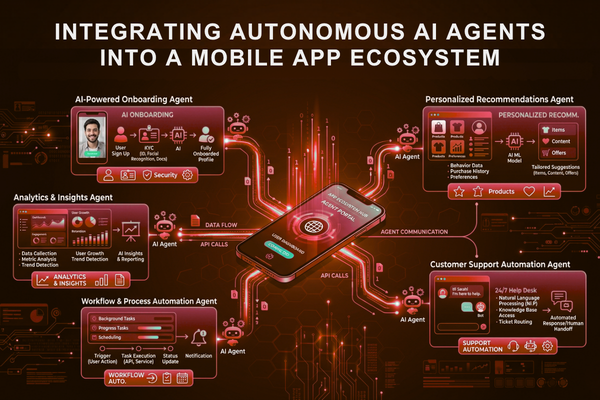
For a mobile app development company, agents can improve both what you build and how you build it.
Product use cases (inside the app)
Smarter onboarding
- Ask users a few questions
- Set preferences automatically
- Recommend the next best action
Personalized experiences
- Suggest content, products, or routines
- Adapt based on behavior in real time
- Reduce churn with better timing
In-app support that actually resolves issues
Instead of “Here’s an article,” an agent can:
- Check subscription status
- Reset account settings
- Create a refund request (with approval)
Delivery use cases (how teams build apps)
QA and release readiness
Agents can support task automation, such as:
- Generating test scenarios
- Checking analytics events
- Verifying app store metadata
- Summarizing crash logs
Faster project planning and updates
Agents can:
- Turn meeting notes into tasks
- Track blockers
- Draft status updates for stakeholders
If you want examples of real product delivery outcomes, see how complex builds are handled in projects like this Player Dex product case study, where structured systems and clear workflows are critical for speed and quality.
Business Value
The business case is strongest when agents remove repeat work and speed up cycle time.
Benefits of AI automation include:
- reduced operational costs
- faster workflows
- improved accuracy
- better customer response times
- more consistent processes across teams
Other measurable gains:
- Higher support resolution rates
- Lower time-to-release
- Better retention through personalization
- Cleaner data (fewer manual errors)
Quick checklist: good first agent projects
Pick a workflow that is:
- High volume
- Low risk
- Clear success criteria
- Easy to log and review
- Built on data you already trust
Agents deliver ROI faster when the scope is tight and the rules are clear.
Challenges of Independent AI Agents
While Independent AI agents offer significant benefits, organizations should be aware of common challenges before deployment.
Hallucinations and Incorrect Decisions
AI models can occasionally generate inaccurate outputs or misunderstand requests. Validation rules and human review processes help reduce these risks.
Data Quality Issues
Agents are only as effective as the data they access. Incomplete, outdated, or inconsistent data can lead to poor decisions.
Security and Access Control
Agents that interact with business systems require strict permission controls to prevent unauthorized actions.
Monitoring and Accountability
Organizations should maintain logs, audit trails, and performance tracking to ensure agents operate reliably and transparently.
Key features to look for (Feature → Benefit)
Below is a practical way to evaluate intelligent agents for business use.
| Feature | Benefit |
| Tool/API access (CRM, ticketing, payments) | Turns answers into actions |
| Role-based permissions | Prevents unsafe changes |
| Human approval step | Controls risk on high-impact tasks |
| Structured logs and audit trail | Easier compliance and debugging |
| Retrieval from your knowledge base | More accurate, company-specific replies |
| Monitoring + alerts | Catches failures early |
| Multi-step planning | Handles complex workflows |
| Fallback to human support | Protects customer experience |
These features matter as much as the model you choose, especially for enterprise AI use cases.
Tech choices and platforms for Autonomous AI Agents
Most teams combine an AI model with orchestration, tools, and monitoring.
Model providers (common options)
- OpenAI provides advanced language models with strong reasoning and tool-calling capabilities widely used in modern AI agent development.
- Google AI for a broad ecosystem and enterprise options
- Gemini via the Gemini API for multimodal and app-friendly workflows
What “good” looks like in implementation
A strong agent setup usually includes:
- Clean tool definitions (inputs/outputs)
- Rate limits and timeouts
- Test suites for key flows
- A safe, prompt, and policy layer
- Observability (logs, metrics, replay)
This is where thoughtful AI integration makes or breaks the project.
If you’re mapping these components into a delivery plan, it helps to work with a team that already builds production systems like the AI delivery approach outlined in these AI services for product teams.
Cost guide
Costs vary based on scope, data, tool access, safety, and whether the agent is internal-only or customer-facing.
Here is a simple baseline:
| AI Development Type | Estimated Cost |
| AI Chatbot | $10k – $50k |
| AI SaaS | $50k – $200k |
| Enterprise AI | $100k+ |
What drives the price up or down
Common cost drivers:
- Number of tools and systems to connect
- Data cleaning and knowledge base setup
- Security reviews and approvals
- Multi-agent coordination
- Load, latency, and uptime targets
If you want a fast, realistic range for your app idea, you can scope it using a structured planning flow like this AI project estimate questionnaire, which helps clarify features, risk, and integration needs.
Security, privacy, and compliance for Intelligent agents
Because intelligent agents can take actions, security must be designed from day one.
Key AI security controls
Use a layered approach:
- Least-privilege permissions (agents only access what they must)
- Allowlist tools and actions
- Mask sensitive data (PII, payment info)
- Encrypt data at rest and in transit
- Audit logs for every action
AI governance (how you stay in control)
Good governance is simple and practical:
- Define “what the agent is allowed to do.”
- Document escalation rules
- Review outputs regularly
- Track KPIs and failure cases
- Keep humans in the loop for high-impact decisions
If you operate in regulated spaces, start with internal agents first, then expand to customer-facing flows once controls are proven.
Implementation roadmap
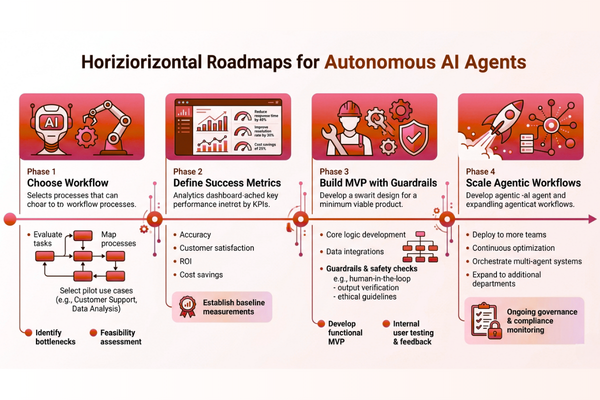
A clear rollout plan reduces risk and speeds up time-to-value.
Step 1: Pick one workflow
Choose one narrow process. Example:
- “Resolve shipping status requests.”
- “Summarize app crash clusters daily.”
- “Route leads and book demos”
Step 2: Define success in numbers
Examples:
- Reduce average handle time by 30%
- Resolve 20% more tickets without humans
- Cut release QA time by 25%
Step 3: Build an MVP with guardrails
Include:
- Human approval for sensitive actions
- Logging and replay
- Clear fallback path
Step 4: Expand into end-to-end agentic workflows
After the MVP works:
- Add more tools
- Add more use cases
- Introduce multi-step task automation
Companies building sustainability or compliance-heavy platforms often benefit from a step-by-step rollout. For instance, in solutions similar to this GreenTag delivery example, controlled data handling and clear rules matter as much as the AI itself.
Start Your AI Development Project
If your company is exploring intelligent agents, our team at Canadian Software Agency can help you design and build safe, scalable AI systems for real-world apps. From discovery to production, we focus on measurable outcomes, clear controls, and a smooth user experience. Learn how we approach delivery through our AI services for modern product teams.
Future Trends
Emerging trends include:
- Multi-agent workflows that coordinate across departments
- AI-powered digital coworkers
- Real-time decision-making agents
- Autonomous business process automation
- Advanced multimodal agents capable of working with text, images, audio, and video
As AI technology evolves, businesses that adopt agentic AI strategically will be better positioned to improve efficiency and customer experiences.
Conclusion
Autonomous AI Agents are not a trend you “try.” They are a practical new layer in modern software that helps businesses act faster, serve customers better, and reduce repeat work. The key shift is simple: instead of AI only answering questions, Independent AI agents can plan and complete tasks using tools while your team stays in control through rules, reviews, and approvals.
For mobile products, this creates real advantages. You can build apps that feel more personal, more helpful, and easier to use. You can also streamline delivery work behind the scenes, from QA support to reporting and release notes. Done well, intelligent agents become a force multiplier for product, support, and operations. Done poorly, they become a risk. That is why guardrails, logs, and safe permissions are not “extra features.” They are core requirements.
If you want the best ROI, start small. Pick one workflow with clear inputs and outputs. Add tool access only where needed. Measure impact with simple KPIs like time saved, tickets resolved, or errors reduced. Then expand. Over time, multiple agents can work together in connected agentic workflows, creating reliable automation across teams.
Also, remember that model choice matters less than system design. Strong AI integration, clear AI governance, and solid AI security practices will decide whether your agent is trusted and scalable. Most companies win by building a simple first version, proving value quickly, and then improving reliability step by step.
FAQs
1) Are Independent AI agents the same as AI chatbots?
No. Chatbots mainly respond with text. Autonomous systems can also take actions, like creating tickets, updating records, or triggering workflows.
2) What is the best first use case for an independent AI agent?
Start with a high-volume, low-risk workflow such as support triage, report generation, or internal knowledge search with summarization.
3) Do Independent AI agents replace staff?
In most companies, they reduce repetitive work and speed up service. People still handle exceptions, relationships, and high-impact decisions.
4) What are the biggest risks?
Common risks include wrong actions, data exposure, and unclear accountability. Strong AI security controls and AI governance processes reduce these risks.
5) How long does it take to build an agent MVP?
A focused MVP can take a few weeks, depending on tool access, data readiness, and review requirements.